Apple MDM Lost Mode
What
Apple Managed Lost Mode is an MDM command for supervised iPhone and iPad devices. When FileWave places a supported device in the Missing Client State, FileWave sends Apple’s Lost Mode MDM command. The device is locked from use until Lost Mode is disabled by MDM.
Managed Lost Mode applies to supervised iOS and iPadOS devices. Apple does not provide the same Managed Lost Mode workflow for macOS.
Why
Use Lost Mode when a supervised iPhone or iPad is misplaced, lost, or suspected stolen. It helps protect the device by locking the current user out while still allowing an administrator to display a recovery message, request location, and play a sound after the device receives the command.
Information
Lost Mode is enabled by setting a supported device into the Missing Client State from the right-click contextual menu:
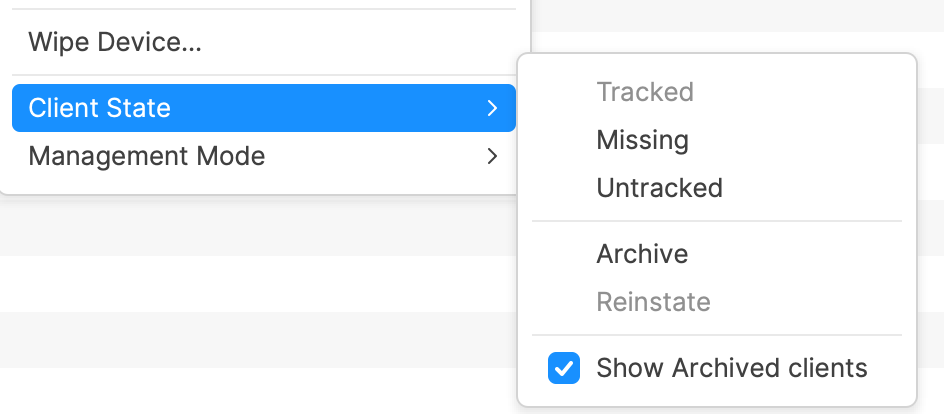
To disable Lost Mode, select another Client State, such as Tracked or Untracked. A Model Update is required after changing the Client State before the MDM command is sent to the device.
Devices require a network connection to receive the command to enable or disable Lost Mode.
If a device is locked and cannot connect because nearby Wi-Fi networks are not configured, consider connecting the device to Ethernet. An adapter may be required.
Locating Devices
While a supported device is in Lost Mode, FileWave can help locate it in addition to keeping the device locked.
Location
After a supported device is set as Missing, location data is sent back to the FileWave Server when the device has a network connection. Location may be viewed on a map from the Client Info view, and related location data is available from Inventory Queries.
Apple’s Managed Lost Mode can request location from a supervised iPhone or iPad even if Location Services are off, and it does not require Find My to be enabled on the device.
Sound
Location is useful, but sometimes the device is in a bag, cupboard, or similar place. To further assist retrieval, when a supported device is in the Lost Mode Missing state, an additional right-click menu option is available: Play Lost Mode Sound. The previous volume setting is not considered; the device plays an audible set of tones.
macOS and other Apple devices
macOS does not support Apple MDM Managed Lost Mode. For Mac, Apple provides different MDM security commands instead:
- Lock Device: Locks a Mac with a six-digit PIN and message. After receiving the command, the Mac restarts and cannot boot back into macOS until the PIN is entered and validated. Locking a Mac with Apple silicon requires macOS 11.5 or later.
- Erase Device: Remotely erases a Mac when data protection is more important than recovery.
- Activation Lock management: Available for supported supervised Macs with Apple silicon or the Apple T2 Security Chip.
These Mac commands are separate from Managed Lost Mode and do not provide the same iOS/iPadOS Lost Mode location and sound workflow.
Apple reference: Lock and locate Apple devices.