Managed Lost Mode applies to supervised iOS and iPadOS devices. Apple does not provide the same Managed Lost Mode workflow for macOS.
## Why Use Lost Mode when a supervised iPhone or iPad is misplaced, lost, or suspected stolen. It helps protect the device by locking the current user out while still allowing an administrator to display a recovery message, request location, and play a sound after the device receives the command. ## Information Lost Mode is enabled by setting a supported device into the **Missing** Client State from the right-click contextual menu: [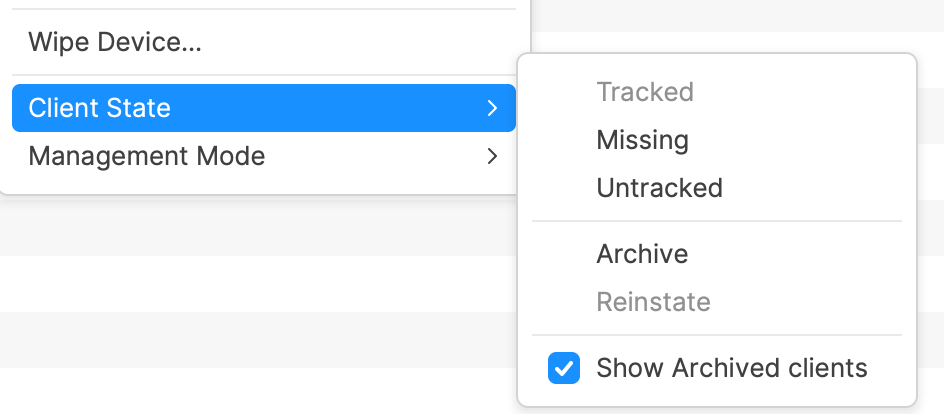](https://kb.filewave.com/uploads/images/gallery/2024-10/6lwnzE3UJcqhoQm6-image.png) To disable Lost Mode, select another Client State, such as **Tracked** or **Untracked**. A Model Update is required after changing the Client State before the MDM command is sent to the device.Devices require a network connection to receive the command to enable or disable Lost Mode.
If a device is locked and cannot connect because nearby Wi-Fi networks are not configured, consider connecting the device to Ethernet. An adapter may be required.
### Locating Devices While a supported device is in Lost Mode, FileWave can help locate it in addition to keeping the device locked. #### Location After a supported device is set as **Missing**, location data is sent back to the FileWave Server when the device has a network connection. Location may be viewed on a map from the Client Info view, and related location data is available from Inventory Queries. Apple’s Managed Lost Mode can request location from a supervised iPhone or iPad even if Location Services are off, and it does not require Find My to be enabled on the device. #### Sound Location is useful, but sometimes the device is in a bag, cupboard, or similar place. To further assist retrieval, when a supported device is in the Lost Mode **Missing** state, an additional right-click menu option is available: **Play Lost Mode Sound**. The previous volume setting is not considered; the device plays an audible set of tones. ### macOS and other Apple devices macOS does not support Apple MDM Managed Lost Mode. For Mac, Apple provides different MDM security commands instead: - **Lock Device:** Locks a Mac with a six-digit PIN and message. After receiving the command, the Mac restarts and cannot boot back into macOS until the PIN is entered and validated. Locking a Mac with Apple silicon requires macOS 11.5 or later. - **Erase Device:** Remotely erases a Mac when data protection is more important than recovery. - **Activation Lock management:** Available for supported supervised Macs with Apple silicon or the Apple T2 Security Chip. These Mac commands are separate from Managed Lost Mode and do not provide the same iOS/iPadOS Lost Mode location and sound workflow. Apple reference: [Lock and locate Apple devices](https://support.apple.com/guide/deployment/lock-and-locate-devices-depb980a0be4/web).