Managing Client States via the FileWave API
What
Use the FileWave API to move a device between the Tracked, Archived, Missing, and Untracked states.
0= Tracked1= Archived2= Missing3= Untracked
When/Why
This is useful when you need to archive a retired device, reinstate a device that should be managed again, or script state changes as part of cleanup or offboarding work.
Archiving Apple MDM-enrolled devices can remove or break their MDM enrollment. Reinstating the record later does not automatically restore that enrollment.
How
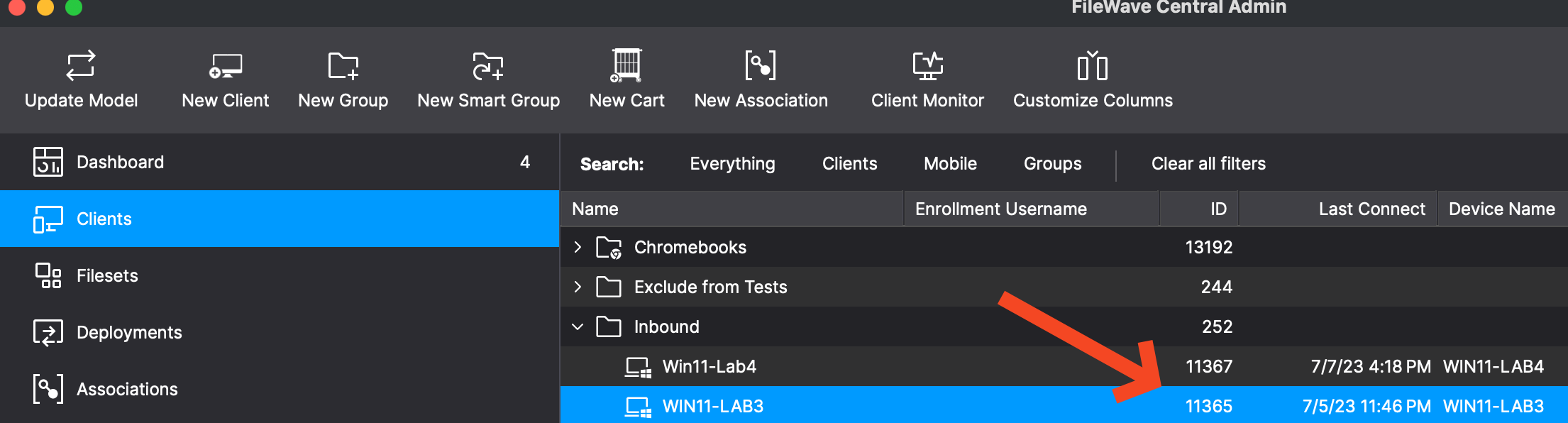
Find the DeviceID in FileWave Central, as shown below, or copy it from the URL in FileWave Anywhere when viewing the device. Then send a PATCH request to update the state and run update_model so the change is reflected in the FileWave management interface.
Shell script:
#!/bin/zsh

# Variables
ServerURL="https://fwjoshlab.filewave.net"   # Replace with your server address.
Token="your_token_here"  # Replace with your actual token.
DeviceID="11365"         # Specify the device ID.
NewState="0"             # Set the desired state (0: Tracked, 1: Archived, 2: Missing, 3: Untracked).

# Update device state
curl -X PATCH "$ServerURL/filewave/api/devices/v1/devices/$DeviceID" \
     -H "Authorization: Bearer $Token" \
     -H 'Content-Type: application/json' \
     -d '{"state":'$NewState'}'

# Update the model to reflect changes
curl -X POST "$ServerURL/filewave/api/fwserver/update_model" \
     -H "Authorization: Bearer $Token" \
     -H 'Content-Type: application/json'
PowerShell:
# PowerShell Script to Manage FileWave Client States

# Variables
$ServerURL = "https://fwjoshlab.filewave.net" # Replace with your server address.
$Token = "your_token_here"  # Replace with your actual token.
$DeviceID = "11365"         # Specify the device ID.
$NewState = "0"             # Set the desired state (0: Tracked, 1: Archived, 2: Missing, 3: Untracked).

# Headers for authorization and content type
$headers = @{
    "Authorization" = "Bearer $Token"
    "Content-Type" = "application/json"
}

# Body data for changing the state
$body = @{
    "state" = $NewState
} | ConvertTo-Json

# Update device state
Invoke-RestMethod -Uri "$ServerURL/filewave/api/devices/v1/devices/$DeviceID" -Method Patch -Headers $headers -Body $body

# Update the model to reflect changes
Invoke-RestMethod -Uri "$ServerURL/filewave/api/fwserver/update_model" -Method Post -Headers $headers

# Output for user confirmation
Write-Host "Device state updated and model refreshed successfully."
Tips
- Ensure that the
Tokenvariable contains a valid authorization token. - Replace
DeviceIDandNewStatewith the values you need. - If you are changing many devices, refresh the model after the updates so the new state is visible in the admin tools.
Related Links
- FileWave API Documentation - Official API documentation.
- curl command line tool - curl manual.
Digging Deeper
The update_model API call tells the FileWave server to rebuild its internal model so the state change is reflected in the management interface. That is especially helpful after bulk state changes.