Note the reference to the device(s) is now by 'ids'. This refers to the Client ID, as opposed to the Device ID, and is always an Integer.
Example data could look like: ``` { "ids": [ 737581 ], "command": "DeviceInformation" } ```'ids' is a list of devices, so multiple devices could be targeted in one RESTful API command.
Commands sent by the API will show in the device's Client Info: [](https://kb.filewave.com/uploads/images/gallery/2023-07/748qJZ5yPtjKonrf-image.png) ## HOW This is an example of a RESTful API request that is only available through the FileWave Anywhere API. Running the command from the Swagger Documentation will show the URL path required to send a command. For example, to lock devices: macOS and Linux: ``` mdm_command='{"ids": [737581, 562620],"command": "DeviceLock"}' ``` ``` curl -H "Authorization: $auth" \ -X POST https://${server_dns}/api/devices/v1/devices/mdm-command \ -d "$mdm_command" \ -H "Content-Type: application/json" ``` Windows PowerShell: ``` $mdm_command = '{"ids": [737581, 562620],"command": "DeviceLock"}' ``` ```powershell $header = @{Authorization="$auth"} Invoke-RestMethod -Method POST \ -Headers $header \ -ContentType application/json \ -Uri https://${server_dns}/api/devices/v1/devices/mdm-command \ -Body $mdm_command ``` #### What commands are available From the Swagger, there is the following text: *Command options can be specified in 'options' field of the request for the following commands: DeviceLock,* *EraseDevice, SetFirmwarePassword, VerifyFirmwarePassword, UnlockUserAccount, RestartDevice.* *Acceptable options for each command are listed in Apple documentation: [https://developer.apple.com/documentation/devicemanagement/commands\_and\_queries](https://developer.apple.com/documentation/devicemanagement/commands_and_queries)* Some commands have been listed, but the link to Apple's documentation shows all possible commands:If a new command is released by Apple before it appears in FileWave, the API should be able to trigger that command
To use Apple's documentation, navigate through the pages for the chosen command to locate the 'RequestType'. For example, the following shows the command to shut a device down is: ShutDownDevice [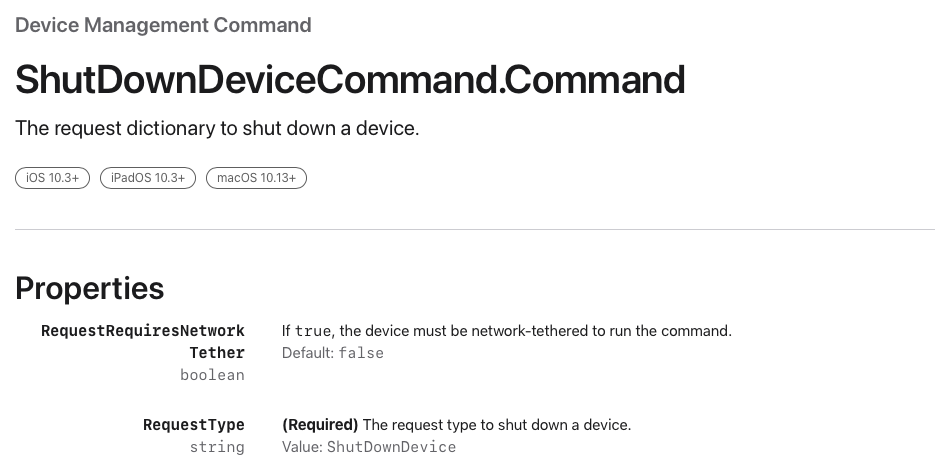](https://kb.filewave.com/uploads/images/gallery/2023-07/BzWEzMkbnvwEd0LA-image.png) ## Related articles - [How to write to a custom field using the FileWave API](https://kb.filewave.com/books/application-programming-interface-api/page/how-to-write-to-a-custom-field-using-the-filewave-api "How to write to a custom field using the FileWave API") - [Command Line API (v1)](https://kb.filewave.com/books/application-programming-interface-api/page/command-line-api-v1 "Command Line API (v1)") - [Anywhere API (v2)](https://kb.filewave.com/books/application-programming-interface-api/page/filewave-anywhere-api-v2 "Anywhere API (v2)")