# FileWave Power/Battery Reporting
## Description
Content packs give you ready-made FileWave examples that combine the pieces needed for a complete workflow. You can use them as-is, adjust them for your environment, or review them to see how the content is built.
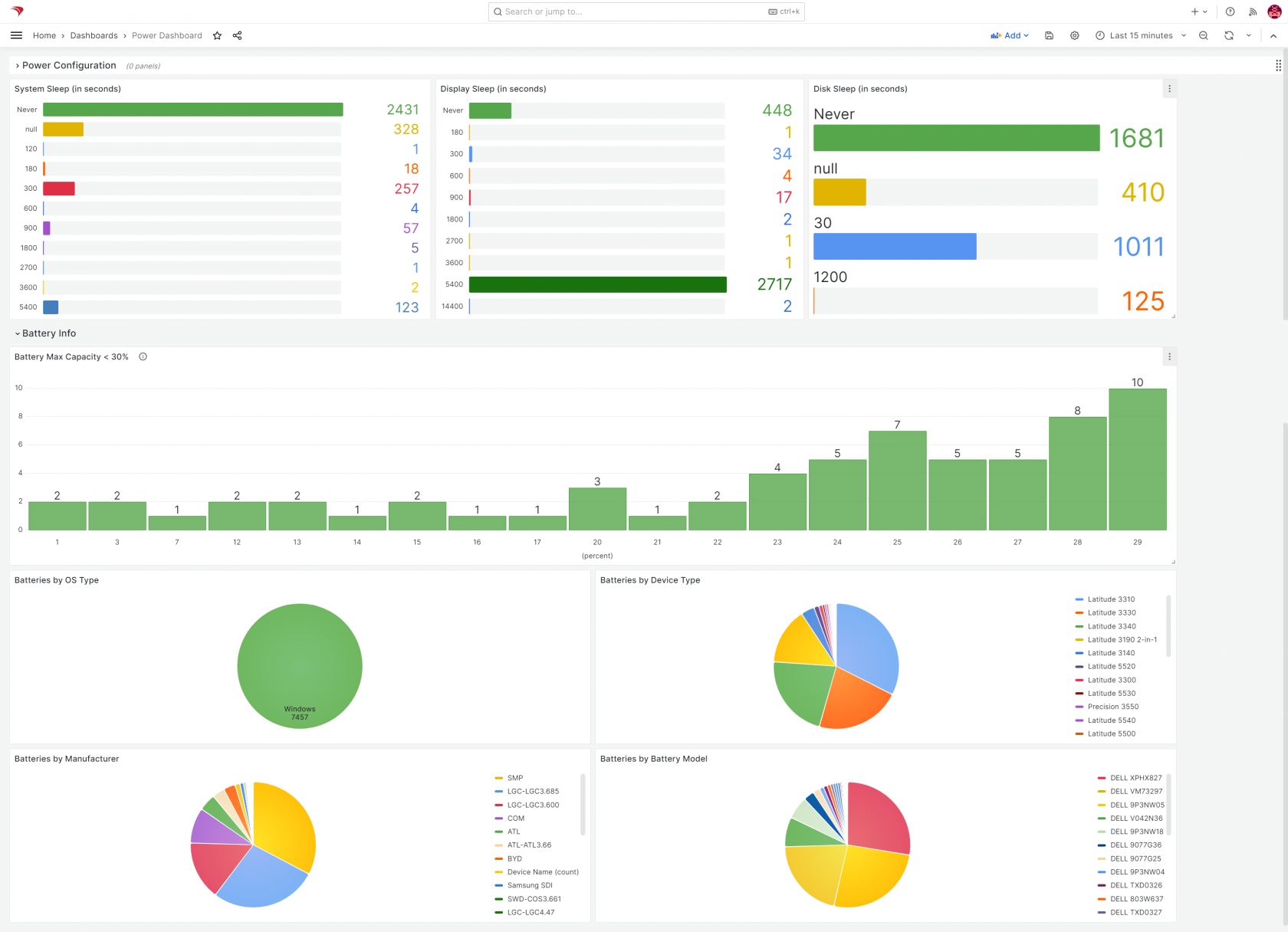
This FileWave content pack reports on battery health and power-use settings for macOS and Windows clients. It includes the content listed below.
## What You Get in this Content Pack
This content pack provides:
#### Custom Fields:
Custom Fields extend the inventory attributes collected from your devices. This content pack includes:
- - - **Battery Name:** Typically the "model name" of the battery
- **Battery Manufacturer:** The maker of the battery
- **Battery Serial Number:** The serial number of this specific battery
- **Battery Cycle Count:** The number of times a battery has been fully charged/discharged (only some batteries support)
- **Battery Capacity:** Battery Capacity is represented as a percent of charge the battery can take compared to its original capacity. A lower percentage means degradation of storage ability.
- **Display Sleep Setting:** The amount of time (in seconds) before the display is configured to go to sleep after idle
- **Disk Sleep Setting:** The amount of time (in seconds) before the hard drive is configured to go to sleep after idle
- **System Sleep Setting:** The amount of time (in seconds) before the entire system is configured to go to sleep after idle
Note that the battery information collected above does not try to account for multiple batteries, so you may want to adjust if you have that scenario in your environment.
#### Reports (aka Inventory Queries):
Reports are a great way of measuring the effectiveness of distributing content, and can be used for all sorts of compliance purposes as well. Trust, but verify is what reports are all about. In this pack we have included the following reports:
- - - **Battery Report:** Includes information on devices and their batteries
- **Low Battery Capacity Report:** Includes batteries below 30% capacity. You can change that threshold by editing the report criteria.
- **Power Scheme Report:** Includes information on devices and their power saving settings for display, disk and system
#### Dashboards:
Dashboards build upon reports and are an incredibly powerful tool for showing aggregated data in charts and graphs. This pack provides the following dashboard(s):
- - - **Power/Battery Dashboard:** This dashboard breaks down most of the important power savings and battery utilization information for your environment
## Ingredients
In FileWave 16.1.0 and later, open FileWave Central and go to Assistants > Content Packs to add this content pack directly. The manual download/import steps below are for older FileWave versions.
- FileWave Central Admin & Credentials
- Base64 API Token for 'fwadmin' account
| **Windows Content Pack** | [Windows Content Pack Download](https://kb.filewave.com/attachments/398 "Download Pack") |
| **macOS Content Pack (ARM based)**
| On macOS, we need to use curl to download so that Gatekeeper doesn't quarantine the import application. You can copy and paste the following into Terminal.app...the example provided downloads import\_pack.zip to the desktop
```bash
curl -o ~/Desktop/import_pack.zip https://kb.filewave.com/attachments/397
```
|
| **macOS Content Pack (Intel based)**
| On macOS, we need to use curl to download so that Gatekeeper doesn't quarantine the import application. You can copy and paste the following into Terminal.app...the example provided downloads import\_pack.zip to the desktop
```bash
curl -o ~/Desktop/import_pack.zip https://kb.filewave.com/attachments/399
```
|
**On macOS, Apple's Gatekeeper will quarantine the download if you don't use curl to download the zip. Quarantine may be removed, after unzipping the download, with the following command which will allow the tool to run:**
```shell
xattr -rd com.apple.quarantine
```
|
## Directions
1. Download the above content pack and unzip it
2. Run the <app name> tool, using appropriate credentials for your environment
3. Once completed, verify the new content in your system (and [import dashboards](https://kb.filewave.com/books/dashboard-grafana/page/importing-a-grafana-dashboard "Importing a Grafana Dashboard"), if applicable)
## Sample Screenshots
[](https://kb.filewave.com/uploads/images/gallery/2024-10/AtLd5JdlFGjLuGXy-image.png)
## Notes
You can edit any content that this pack imports. Review the Custom Fields, Reports, and dashboard first so you understand how the pieces work together before changing criteria or thresholds.
## Related Content
- [How to Import a Content Pack](https://kb.filewave.com/books/content-packs/page/how-to-import-a-content-pack "How to Import a Content Pack")
- [Getting an API Token](https://kb.filewave.com/books/application-programming-interface-api/page/working-with-apis)
- [Importing a Grafana Dashboard](https://kb.filewave.com/books/dashboard-grafana/page/importing-a-grafana-dashboard "Importing a Grafana Dashboard")
- [Content Packs](https://kb.filewave.com/books/content-packs "Content Packs")
- More Info on how to use:
- [Custom Fields](https://kb.filewave.com/books/evaluation-guide/page/custom-fields "Custom Fields")
- [Client Group Structure](https://kb.filewave.com/books/evaluation-guide/page/organize-devices-with-client-groups "Client Group Structure")
- [Inventory Reports](https://kb.filewave.com/books/evaluation-guide/page/inventory-reports "Inventory Reports")
- [Custom Dashboards](https://kb.filewave.com/books/dashboard-grafana/chapter/20-custom-dashboards-for-beginners "Custom Dashboards")