# Battery Health Inventory Field

## What

FileWave v16.2.0+ now reports <span class="s2">**Battery Health**</span> as an inventory field for supported iPads and Macs. This value comes directly from Apple’s device management framework and can help administrators quickly identify whether a device battery is functioning properly, requires service, or is using a non-genuine replacement.

The possible values are:

- <span class="s1">**Normal**</span> – Battery is functioning within expected parameters.
- <span class="s1">**Non-Genuine**</span> – Battery replacement detected that is not Apple-certified.
- <span class="s1">**Service-Recommended**</span> – Battery requires servicing due to degradation or fault.
- <span class="s1">**Unknown**</span> – Device could not determine battery status.
- <span class="s1">**Unsupported**</span> – Device does not support reporting battery health.

<p class="callout info"><span class="platform" data-v-46b6209d="" data-v-d4791104=""><span aria-label="iOS 17.0+, Available on iOS 17.0 and later" data-v-46b6209d="" data-v-d4791104="" role="text" title="Available on iOS 17.0 and later">To get a value of anything other than Unsupported you would need iOS 17.0+, i</span></span><span class="platform" data-v-46b6209d="" data-v-d4791104=""><span aria-label="iPadOS 17.0+, Available on iPadOS 17.0 and later" data-v-46b6209d="" data-v-d4791104="" role="text" title="Available on iPadOS 17.0 and later">PadOS 17.0+, or </span></span><span class="platform" data-v-46b6209d="" data-v-d4791104=""><span aria-label="macOS 14.4+, Available on macOS 14.4 and later" data-v-46b6209d="" data-v-d4791104="" role="text" title="Available on macOS 14.4 and later">macOS 14.4+ and for iPads it was added to higher end iPads at the end of 2024 and all iPads in 2025. </span></span></p>

## When/Why

Battery health information is crucial for organizations managing fleets of iPads or Macs where device longevity, service costs, and user experience depend on reliable battery performance.

- <span class="s1">**When**</span>: Use this field during device audits, lifecycle management, or when troubleshooting performance and uptime issues.
- <span class="s1">**Why**</span>: It helps IT teams proactively schedule repairs or replacements, avoid downtime, and distinguish between genuine vs. non-genuine repairs.

## How

1. Open the <span class="s1">**FileWave Central Console**</span> and locate the target device.
2. Navigate to the <span class="s1">**Client Info**</span> window.
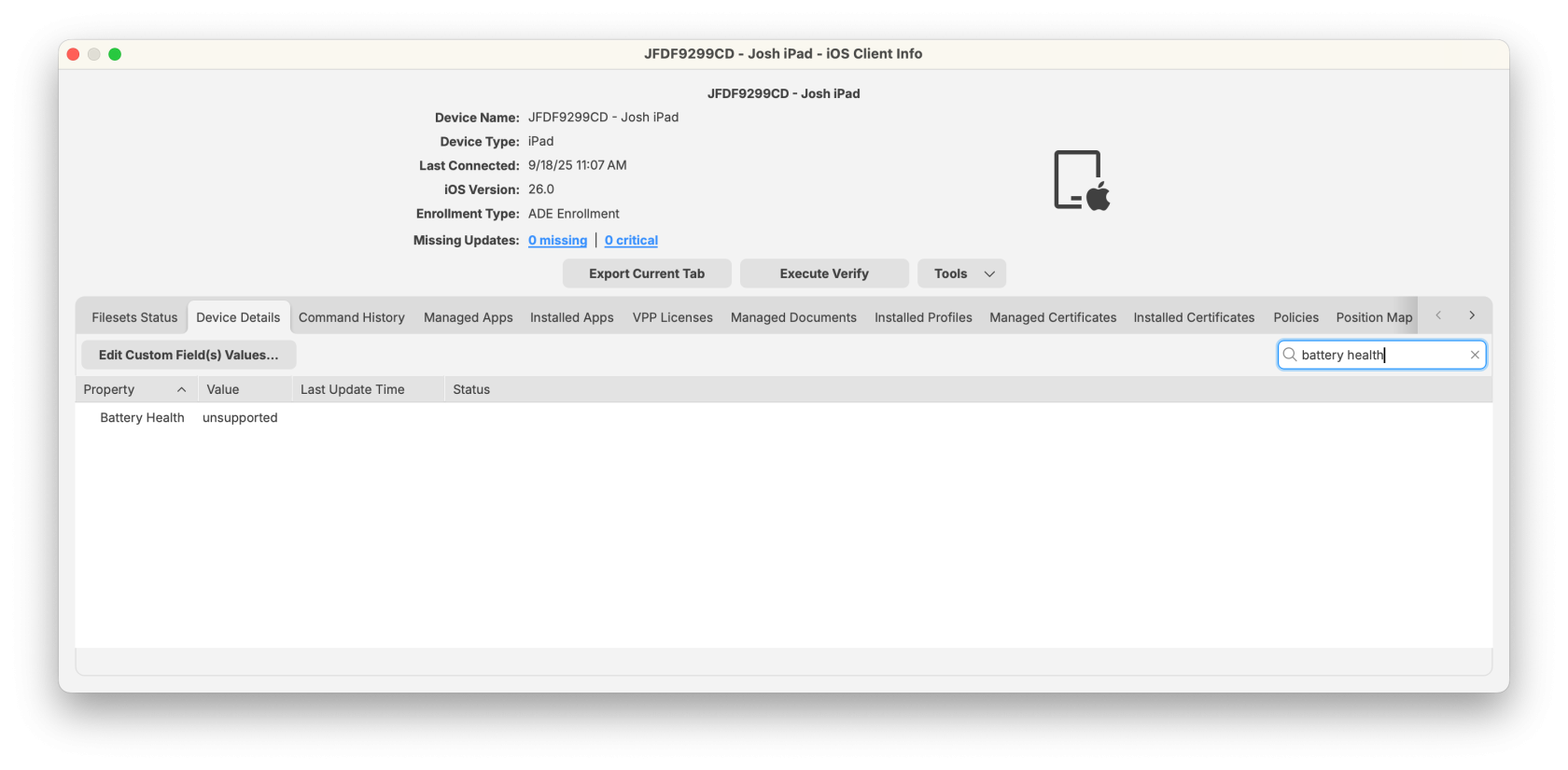
3. Select the <span class="s1">**Device Details**</span> tab (or search for “Battery Health” in the search bar).
4. Review the reported <span class="s1">**Battery Health**</span> value.
    
    
    - For unsupported devices, the value will display as <span class="s1">**Unsupported**</span>.
    - Supported iPads and Macs will show one of the Apple-defined statuses.

<p class="callout info">💡 <span class="s2">**Support Note**</span>: According to [Apple’s documentation](https://support.apple.com/en-us/117759), battery health reporting is currently available on higher-end <span class="s2">**2024 models**</span> and <span class="s2">**all 2025 iPad/Mac models**</span>.</p>

[![FileWave Admin 2025-09-18 11.07.22.png](https://kb.filewave.com/uploads/images/gallery/2025-09/scaled-1680-/LyAtTLXJRtmJwS5X-filewave-admin-2025-09-18-11-07-22.png)](https://kb.filewave.com/uploads/images/gallery/2025-09/LyAtTLXJRtmJwS5X-filewave-admin-2025-09-18-11-07-22.png)

#### **Smart Group Example: Devices Needing Battery Service**

To automatically identify devices that require attention:

1. <span class="s1">In the </span>**FileWave Central Console**<span class="s1">, create a new </span>**Smart Group**<span class="s1">.</span>
2. Add a filter with:
    
    
    - <span class="s1">**Property**</span><span class="s2">: </span>Battery Health
    - **Operator**<span class="s1">: </span><span class="s2">equals</span>
    - <span class="s1">**Value**</span><span class="s2">: </span>Service-Recommended
3. Save the Smart Group.

This group will dynamically collect all devices with failing batteries so administrators can schedule replacements or repairs.

## Related Content

- [Apple: Check iPad battery health](https://support.apple.com/en-us/117759)
- [Apple Developer Documentation – Battery Health Status](https://developer.apple.com/documentation/devicemanagement/statusdevicebatteryhealth)

## Digging Deeper

- FileWave does not calculate battery health; it simply displays the status as reported by the device.
- In environments with mixed device generations, you may see a mix of <span class="s1">**Normal**</span> and <span class="s1">**Unsupported**</span> values, depending on hardware.
- For long-term fleet management, admins may consider building a <span class="s1">**Smart Group**</span> that collects devices with <span class="s2">Battery Health = Service-Recommended</span> to streamline service workflows.