# View macOS Background Tasks with DDM
## What
FileWave can inventory the launch agents, launch daemons, login items, applications, and other background tasks that a managed Mac reports through Apple Declarative Device Management (DDM).
DDM status reporting is declarative. When the device management service subscribes to a status object, the device reports its current state and later changes. FileWave therefore receives device-reported background-task status instead of repeatedly polling each Mac to discover the same information.
## Requirements
Apple supports the DDM Background tasks status report on **macOS 14 and later**. The Mac must be enrolled so FileWave can receive the status data. Available fields can vary by task, and a field may be blank when the device does not return a value for it.
## What FileWave reports
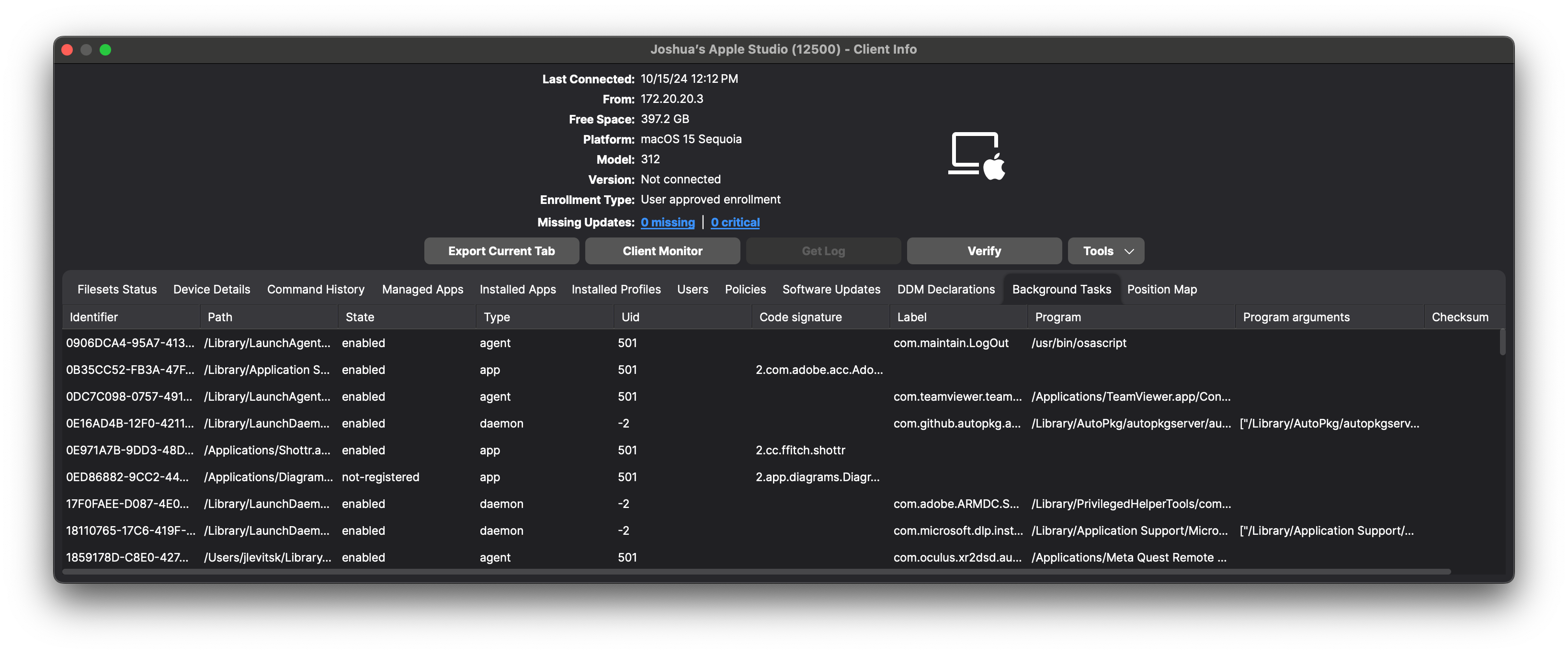
Apple's Background tasks status can include the task type, state, bundle ID, user ID (UID), label, and team identifier. In FileWave Central, the **Background Tasks** view can provide the following operational detail:
| Field | What it helps identify |
|---|
| Identifier | The identifier associated with the reported task record |
| Path | The application, LaunchAgent, LaunchDaemon, or other path associated with the task |
| State | The reported state, such as `enabled` or `not-registered` |
| Type | The task category, such as `agent`, `daemon`, or `app` |
| UID | The user or system context under which the task is reported |
| Code signature | Code-signing information returned for the task, when available |
| Label | The launchd or service label that can identify the component |
| Program | The executable or program launched by the task |
| Program arguments | Arguments supplied to the program, when reported |
| Checksum | The reported checksum value, when available |
## How to view and report the data
1. In FileWave Central, open the managed Mac and its **Client Info** window.
2. Select the **Background Tasks** tab. Scroll horizontally to inspect fields that are outside the initial view.
3. Use Inventory Reports when you need to compare returned background-task values across multiple Macs rather than inspect one device at a time.
## When to use it
Background-task inventory can help you:
- Confirm that an expected security, management, or support component is present and reporting the expected state.
- Find Macs that report an unfamiliar task label, executable path, code signature, or team identifier.
- Use the reported task data as one input when investigating login-item, launch-agent, launch-daemon, application-launch, performance, or battery-life concerns.
- Compare task types and states across a device group for troubleshooting or policy review.
- Document the device-reported state as part of a security or compliance investigation.
A background-task record is evidence of what the Mac reported; it is not proof by itself that a component is safe, malicious, required, compliant, currently executing, or consuming resources. A state such as `enabled` is reported status, not a live process measurement. Validate unfamiliar values against your approved software inventory, vendor documentation, and device investigation before taking action.
[](https://kb.filewave.com/uploads/images/gallery/2024-10/YTkOPO1Cwh7wKrod-image.png)
## Related Content
- [Apple Device Management - DDM Configurations](https://kb.filewave.com/books/ddm-apple/page/apple-device-management-ddm-configurations)
- [Apple: Declarative status reports for Apple devices](https://support.apple.com/guide/deployment/declarative-status-reports-depd90ee8a5f/web)