# FileWave Version 15.0.1 (Unsupported)
These downloads are provided for the purposes of migrations and should not continue to be used in production. You should upgrade to either the most recent release or the one prior. They can always be found here: [Supported FileWave Versions](https://kb.filewave.com/books/downloads "Supported FileWave Versions")
## FileWave Management Suite
The FileWave endpoint management suite allows you to manage your devices wherever they are, wherever you are, whatever they are, and all in one platform!
For anyone upgrading, there are 2 essential elements to be aware of before upgrading:
\* If you are upgrading from less than version 14.8, expect longer than normal upgrade times (one time process)
\* TCP/UDP 20003, 20004, 20005, and 20006 ports are no longer used since ZMQ is removed for notifications, and you may want to check your firewall rules to eliminate them. ([read more](https://kb.filewave.com/books/filewave-general-info/page/default-tcp-and-udp-port-usage "Default TCP and UDP Port Usage"))
Additionally, there are several deprecation and decommission notices currently active, which you will find within the "Features and Updates in this Release" section.
Your existing FileWave Server must be version **13.3.1** or higher before you can upgrade to FileWave 14.7.2 and then from 14.7.2 you can upgrade to 15.0.1. The minimum memory requirement for FileWave 14+ is 8GB.
## Supported Versions
Supported Versions
## FileWave Official Version Support
FileWave development teams officially support two major versions at any time, N and N-1. For example, If we assume that the most recent version of FileWave is 14.9.x, then we will officially support versions 14.9.x and 14.8.x. Releases for major versions of FileWave occur roughly every quarter.
What does "officially support" mean? Officially supporting these versions means that we will investigate bug reports in these versions and patch issues that are significant. We will not produce patches for earlier versions than N-1, as this means allocating development resources to problems that are already potentially resolved instead of investing those resources into furthering the product. In short, if an issue is found in a version earlier than the officially supported versions, then remediation for the issue will be in the form of an application upgrade, or a patch to that more recent version.
This does not mean that you can't contact our support teams about an earlier version. They will, to the best of their ability, help you with older versions of the software but they will stop short of escalating tickets to our development teams and will likely recommend an upgrade so that you are getting the latest features and bug fixes.
A Note on Compatibility
A note on the Compatibility charts: There are several states of compatibility for FileWave clients:
- "Compatible" (the first table) indicates that we have run QA regression tests against these operating system versions, and they are fully supported
- Not being on the Compatibility chart (such as macOS 11) does not mean that platform is not supported...it just means we did not actively test against it, but we do expect it to function
- Support of any issues experienced specifically on these platforms would be considered on a case-by-case basis (but these cases are exceedingly rare)
- "Legacy" versions mean that we don't test, but we do provide a retro-version of a client so that the device can still report in
- There is NO support for these platforms beyond the availability of the older client, and in almost all cases these are for OSes that are no longer supported by the developer in question
- Lastly, items do fall out of support, such as Windows XP and probably soon the older Android APK client as examples, but we always include these items in our release notes
An additional note on third-party software inclusion, such as TeamViewer:
- Partnerships we have with third party providers have their own set of system requirements for those released applications. We test against their most recent versions, and support of those applications is limited to third-party vendor specifications.
FileWave Server Platform Support
**[](https://kb.filewave.com/uploads/images/gallery/2023-06/uoC9jiGeyyKHsHZO-fwserver-icon.png)Fully Tested by QA**
- macOS 12, 13 (Intel and Apple Silicon)
- Linux CentOS 7.9 x86\_64
**Expected to work**
- macOS 10.15, 11 (Intel and Apple Silicon)
FileWave Clients Platform Support
**[](https://kb.filewave.com/uploads/images/gallery/2023-06/VbVfka5W0oW3DA5l-fwclients-icon.png)Fully Tested by QA**
- macOS 12, 13 (Intel and Apple Silicon)
- Windows 10 (Ent/Pro 21H1 and above), 11 (Ent/Pro 21H2 and above)
**Expected to work**
- macOS 10.15, 11 (Intel and Apple Silicon)
**Legacy**
- macOS 10.11 → [Legacy Version 13.1.5](https://kb.filewave.com/books/downloads/page/filewave-version-1315-unsupported "FileWave Version 13.1.5 (Unsupported)")
- macOS 10.12 → [Legacy Version 14.0.2](https://kb.filewave.com/books/downloads/page/filewave-version-14102-unsupported "FileWave Version 14.10.2")
- macOS 10.13 → [Legacy Version 14.5.4](https://kb.filewave.com/books/downloads/page/filewave-version-1454-unsupported "FileWave Version 14.5.4 (Unsupported)")
- macOS 10.14 → [Legacy Version 14.8.0](https://kb.filewave.com/books/downloads/page/filewave-version-1480-unsupported "FileWave Version 14.8.0 (Unsupported)")
FileWave Mobile Clients Platform Support
**[](https://kb.filewave.com/uploads/images/gallery/2023-06/wjov619ZuqQt8uD0-fwmobile-icon.png)Fully Tested by QA**
- iOS 15, 16.1
- iPadOS 15, 16
- tvOS 15, 16
- Android 12, 13 (EMM Client)
- Chromebook
**Expected to work**
- iOS 13, 14
- Android 8 to 11 (APK/EMM)
**Legacy**
- iOS 10, 11, 12 → [Legacy Version 13.1.5](https://kb.filewave.com/books/downloads/page/filewave-version-1315-unsupported "FileWave Version 13.1.5 (Unsupported)")
- Android 4 to 7 (APK) → [Legacy Version 13.2.3](https://kb.filewave.com/books/downloads/page/filewave-version-1323-unsupported "FileWave Version 13.2.3 (Unsupported)")
FileWave Central (Native) Platform Support
**[](https://kb.filewave.com/uploads/images/gallery/2023-06/wjov619ZuqQt8uD0-fwmobile-icon.png)Fully Tested by QA**
- macOS 12, 13 (Intel and Apple Silicon)
- Windows 10 (Ent/Pro 21H1 and above), 11 (Ent/Pro 21H2 and above)
**Expected to work**
- macOS 10.15, 11 (Intel and Apple Silicon)
FileWave Booster Platform Support
**[](https://kb.filewave.com/uploads/images/gallery/2023-06/rOYHDH6oJSrsRgB6-fwbooster-icon.png)Fully Tested by QA**
- macOS 12, 13 (Intel and Apple Silicon)
- Windows 10 (Ent/Pro 21H1 and above), 11 (Ent/Pro 21H2 and above)
- Linux CentOS 7.9 x86\_64
FileWave Imaging Virtual Server Platform Support
**[](https://kb.filewave.com/uploads/images/gallery/2023-06/cwHvtEjvqfp9gODu-fwivs-icon.png)**
The FileWave Imaging Virtual Server (IVS) is a special appliance that provides imaging support for Windows 10 and 11 UEFI and non-UEFI devices.
**The IVS appliance is CentOS 7.9 based and can be run on:**
- VMWare VSphere ESX installations
- VMWare Fusion
- VMWare Player and Workstation
- Virtual Box
Historically the imaging appliance also supported macOS imaging, but the process for imaging Macs has changed from macOS 10.13.
FileWave Central & FileWave Anywhere
**FileWave Anywhere is now considered fully implemented!**
- For the power-admin, ***FileWave Anywhere is a great companion tool*** to use while you are on-the-go, but FileWave Central will still likely be your primary tool
- For the field-engineer who primarily:
- works with individual devices
- is super-mobile
- manages groups and assigns content
- ***FileWave Anywhere will likely become your everyday tool of choice!***
**Deployments in FileWave Central!**
- We are thrilled to announce that ***Deployments*** can now be fully managed from both FileWave Central and FileWave Anywhere.
- This change means that FileWave Central and Anywhere are now fully compatible using Deployments
- Deployments are the next-generation of Associations, and will eventually become the only supported method for assigning content
- Best practice would be to start use them going forward so you'll have less to convert in later
- And if you are not aware, there is an Associations → Deployments conversion tool in FIleWave Anywhere
**Exclusions (revised):**
- The meaning and the impact of exclusions in deployments have been revisited to be clearer and more predictable.
- In general terms, exclusions have been updated so that they more properly exclude devices from the singular deployment only, and not content from the device more globally (as could sometimes be the case before)
- Effectively with this change, devices are just "ignored" now in a deployment when they are set to be excluded
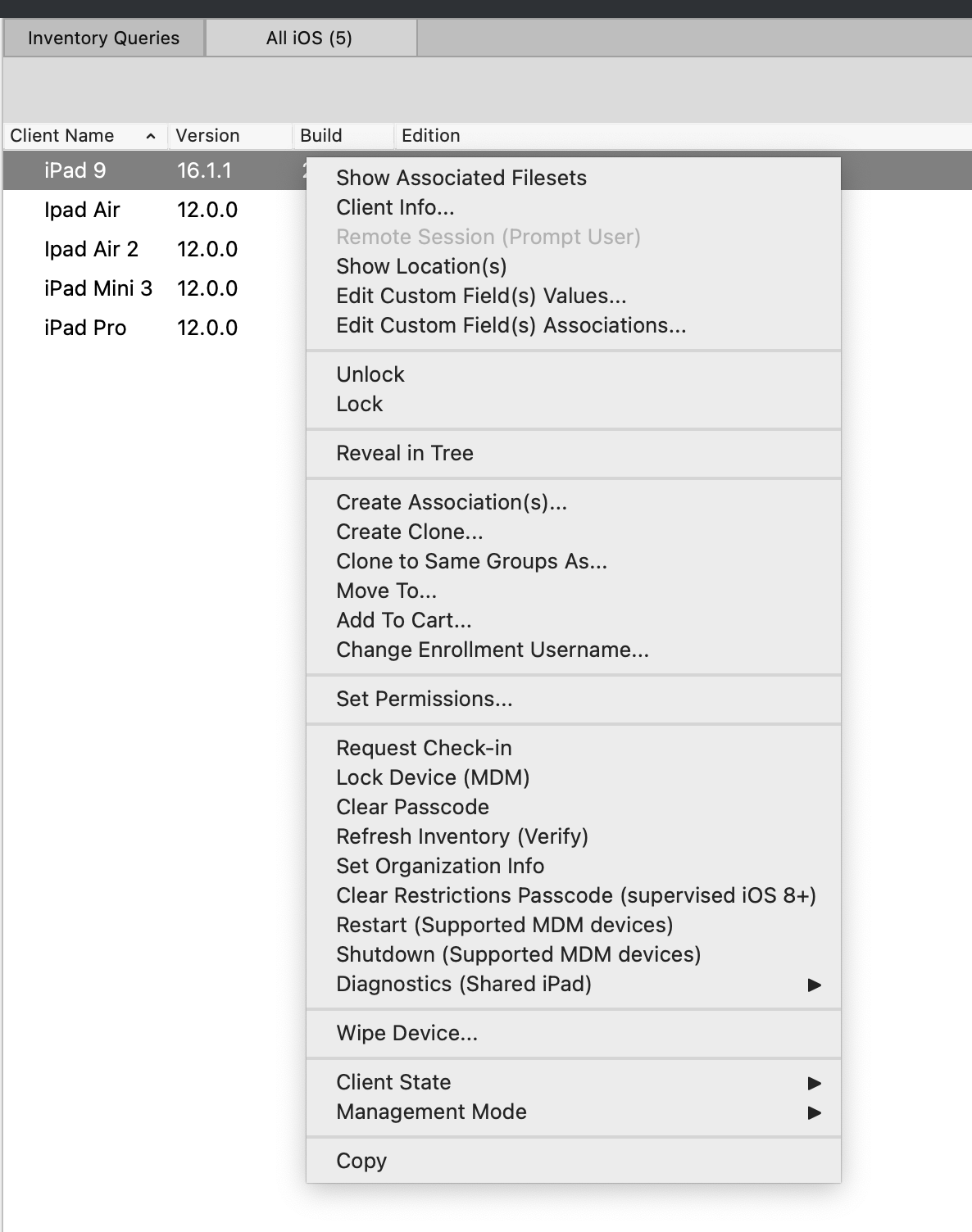
**Context menu on inventory query result:**
- **Warning!** Game-changing, awesome enhancement follows!
- When an inventory query returns device information, it is now possible to directly perform actions on devices in the report, without the extra "Reveal Client" step!
[](https://kb.filewave.com/uploads/images/gallery/2023-07/XziXYXdOsU1TIADV-image.png)
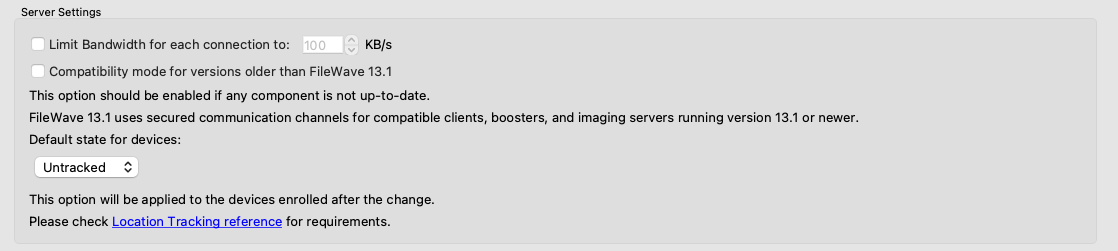
**Default tracking state:**
- There is a new option in Preferences to define what is the default tracking state for devices
[](https://kb.filewave.com/uploads/images/gallery/2023-07/ObXxBXxBVYYopJFp-image.png)
- This change allows you to set the device to "Tracked" for instance before it even enrolls. Then, when enrolled it will automatically be set.
**Duplicate profile filesets:**
- **Warning!** Game-changing, awesome enhancement follows!
- Profile filesets (Apple, Google, Windows and FileWave Policy) can new be duplicated both from FileWave Central and FileWave Anywhere admin consoles
[](https://kb.filewave.com/uploads/images/gallery/2023-07/x7f4nTmhRL9awqR1-image.png)
Notes:
- New UUIDs are re-generated for Apple Profiles to ensure unicity of duplicated profiles
- As changing UUIDs would break profile signature, signed profiles can't be duplicated
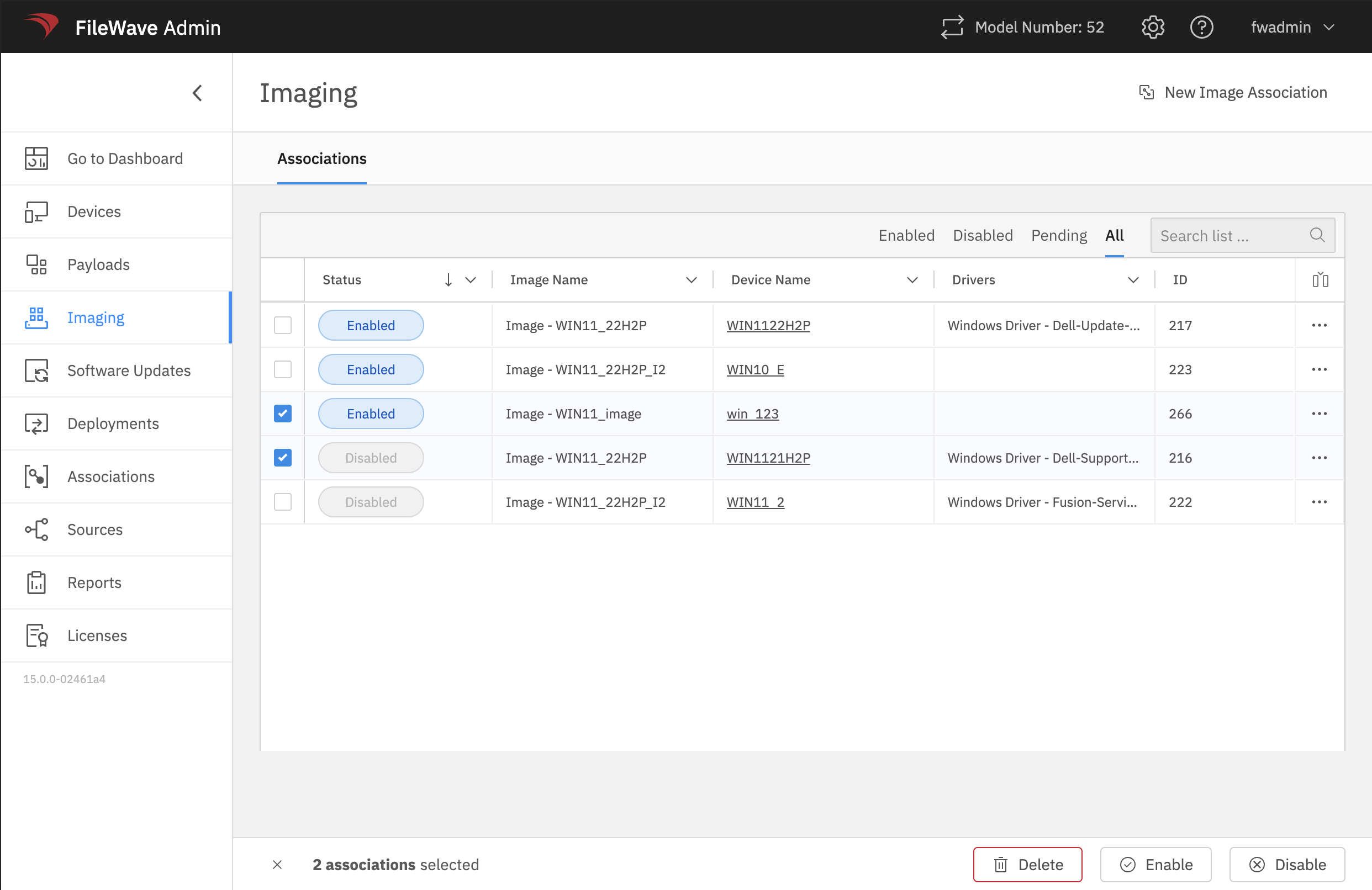
**Windows Imaging associations can be managed in FileWave Anywhere**
- Windows images (once created) can now be assigned to devices from FileWave Anywhere
[](https://kb.filewave.com/uploads/images/gallery/2023-07/yN6ot184SBeMaTqz-image.png)
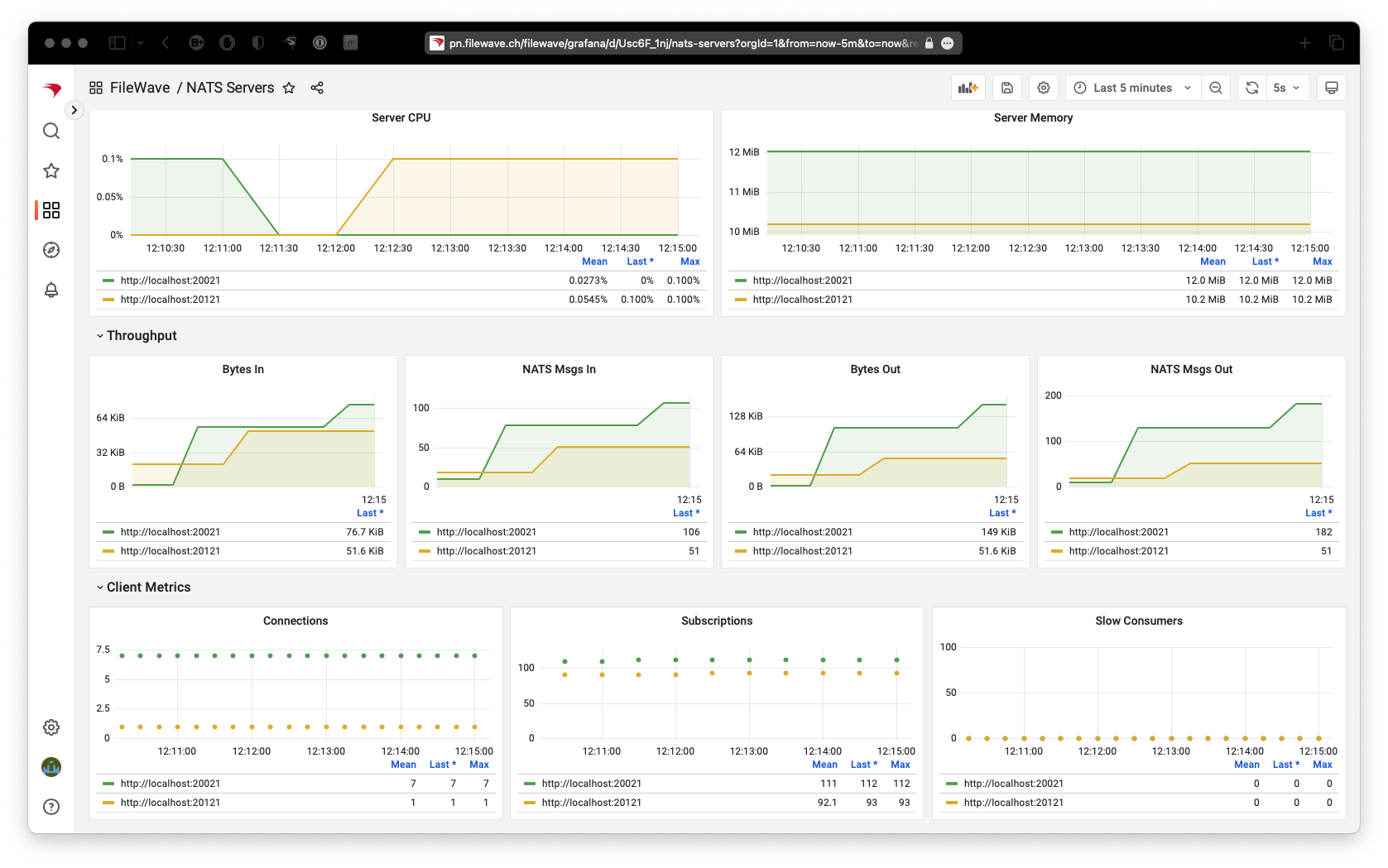
**Updated Dashboard Content (FileWave Anywhere)**
- A new dashboard for NATS has been added to the FileWave dashboard in FileWave Anywhere
- The NATS notification system, introduced with FileWave 14.8.0, is a critical system component: notifications are used to synchronize all admin consoles, and by all other components to quickly interact.
- Monitoring how the NATS sub-system is utilized/working is useful for maintaining your overall FileWave installation health
[](https://kb.filewave.com/uploads/images/gallery/2023-07/vrLTTFUllTEQFjQS-image.png)
**Updated Translations (FileWave Central & FileWave Anywhere)**
- Each new release of FileWave automatically includes updated translations
- Version 15 additionally has had some housekeeping done for German translations based on feedback from customers
Apple-Specific Changes
**FileWave 15 brings official support for the Apple 2023 Spring release, and more**
- **More detail for VPP License Usage (FileWave Central):**
- License report shows more details related to Apple VPP license consumption. This is a significant improvement over earlier versions of this detailed report.
[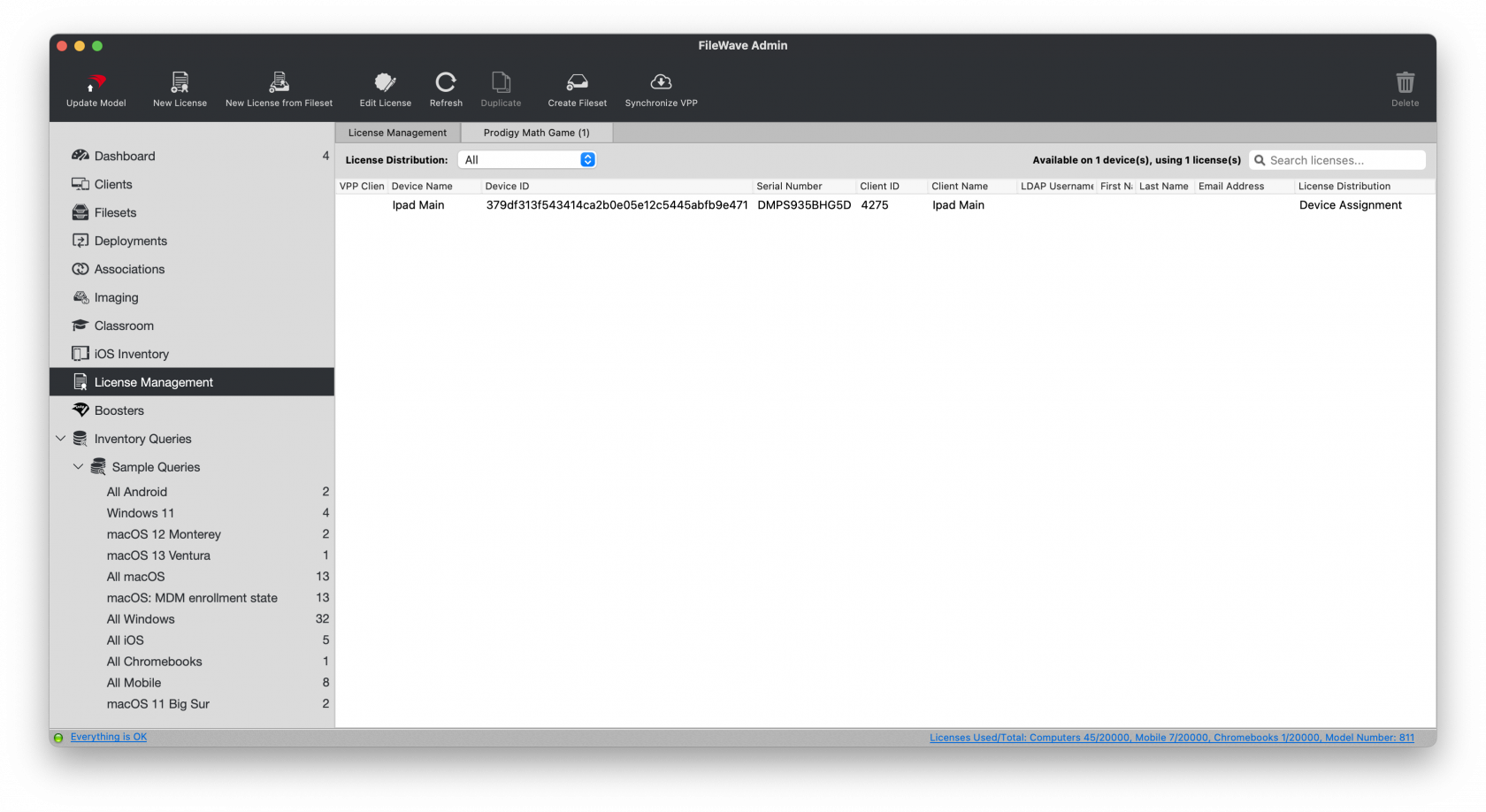](https://kb.filewave.com/uploads/images/gallery/2023-07/d5vD5DpUM20pgz7l-image.png)
- **Profile changes:**
- Content Caching Payload has a new *ListenWIthPeersAndParents* setting
- Proxy Payload has new *FallBackAllowed* and *ProxyCaptiveLoginAllowed* settings
- eMail Payload has a new allowMailDrop setting
- Security And Privacy Payload Firewall setting is not limited to currently installed apps and now allows to enter any bundle id
- Web Content Filter payload has new filtering options
- **Shared iPad**
- There is a new setting (added to Command Policy Profile) to skip language and locale setup for new users
- **DEP**
- There is a new option to skip "Safety" setting panel ; the option is also available in Setup Assistant payload for upgrade setup
- **Device information**
- Devices are now reporting the following data:
- EACSPreflight (macOS)
- HasBattery (macOS)
- ModelNumber (iOS/iPadOS)
- RecommendationsCadence for SoftwareUpdate (iOS/iPadOS)
- SupplementalBuildVersion and SupplementalOSVersionExtra
- SkipLanguageAndLocaleSetupForNewUsers (Shared iPads)
- **Tap to Pay Screen Lock**
- There is a new setting to enable Tap To Pay Screen Lock for a specific iOS application
FileWave Imaging (IVS)
- FileWave Networking Imaging 14.10.x brings compatibility with FileWave 15.0.x.
- PXE Kernel: 6.2.6
- Buildroot: 2023.02
- FileWave Windows Imaging is now supported in FileWave Anywhere, as mentioned above
Decommissioned Features
The following features have been **removed** from FileWave 15.0.1:
- **Device Discovery** (Network Scanning) function of FileWave Boosters
- Reason: This tool was never effective in production environments, has hardly ever been used, and is easily replaced by any off-the-shelf network scanning tool
- **ZMQ** based features for clients running 14.7 or older
- Reason: ZMQ has been replaced by NATs, so older client devices must be updated to use the new notification framework
Some features relying on notifications require the same notification library. This means that the following features will **stop** working for devices running **FileWave 14.7 or earlier versions**:
**Clients:**
- CRL update handling
- TeamViewer sessions
- Reboot command (Windows devices)
- Personal Recovery Key updates (macOS)
- Verify Command from FileWave Anywhere
- Client Monitor from FileWave Anywhere
**Boosters:**
- CRL update handling
- Handle server certificate renewal
- Automatic Upgrade from FileWave Central
- Discovery Scan from FileWave Central (Discovery is anyway decommissioned)
Other device management and inventory report features are **not** impacted by ZMQ removal.
Deprecated Features
The following features are deprecated in FileWave 15.0.1 and will be removed in a future version:
- Android device management prior to Android EMM (using APKs, etc)
- Reason: Android EMM is the replacement for the much older method of managing Android devices
Deprecated features are still functional in a current release, but will no longer be updated and in future will be removed.
Changes and Fixes in 15.0.1
- FWRD-227 Fixed an issue where fixing enrollment conflict would cause FileWave Central to incorrectly remove "(root") item from the screen, requiring admin restart
- FWRD-3799 Improved the error messaging when selecting a device without an Imaging MAC address.
- FWRD-3882 Fixed an issue where Model Update could fail when updating "Excluded" Status for devices excluded via SmartGroup in multiple deployments
- Qt has been upgraded to 5.15.14
- OpenSSL has been upgraded to 3.0.9
- Apache has been upgraded to 2.4.57
Changes and Fixes in 15.0.0
- FW-17271 Fixed a potential issue where changing Imaging association would not be properly applied
- FW-20764 Fixed a potential issue where fileset properties dialog "take control" would not work properly
- FW-20771 Fixed an issue where a failed preflight script would not be executed again after modifying it
- FWRD-73 An security issues has been adressed
- FWRD-276 A security issue regarding TeamViewer has been fixed
- FWRD-302 A critical bug has been fixed in profile editor, where SCEP certificates where not shown in trust tab
- FWRD-303 The search function in Profile Editor has been optimised.
- FWRD-307 A bug has been fixed in profile editor, where the add button in trusted certificates did not act correct.
- FWRD-588 Fixed internal issue when creating webclip profile in FileWave Central
- FWRD-675 New filewave logos have been implemented
- FWRD-719 A bug has been fixed, while converting associations to the existing deployment, the user has not been warned about possible issues.
- FWRD-957 we now show a warning, that you might overwrite data in case you save an empty value
- FWRD-1017 A bug has been fixed, where Software Update Permissions are not honored.
- FWRD-1283 Command history search function has been improved.
- FWRD-1297 Extension of Profile Editor Items - you can now for example Allow Air Drop
- FWRD-1300 A bug has been fixed, where DEP profile where not validated.
- FWRD-1314 Fixed several issues in Per-App VPN profile in FileWave Central
- FWRD-1318 Fixed and issue where we can't distinguish different SCEP profiles for reference in FileWave Central
- FWRD-1319 Fixed the list of available settings for Per-App-VPN profile in FileWave Central
- FWRD-1321 Fixed an issue related Airplay Mirroring Profile
- FWRD-1378 An security issues has been addressed
- FWRD-1393 Fixed an issue where FileWave Central would report an un-informative error "-1" when importing incorrect fileset
- FWRD-1408 Fixed an issue where FileWave Central would crash when moving Inventory Queries
- FWRD-1411 Fixed an issue where size and position of Fileset Report Window would not be restored in FileWave Central
- FWRD-1414 Fixed an issue where Serial Number field could be edited for real devices in FileWave Central
- FWRD-1419 Fixed an issue where "Reveal Client" would not work in Imaging section in FileWave Central
- FWRD-1426 Fixed an issue where Filesets could not be visible in Fileset view of Association section in FileWave Central
- FWRD-1427 Fixed an issue where it would be possible to edit serial number for Groups in FileWave Central
- FWRD-1433 Fixed internal issue where FileWave Central would check too frequently if EMM is enabled, which could lead to server load increase
- FWRD-1434 Fixed incorrect error when re-ordering queries in FileWave Central
- FWRD-1444 Fixed an issue where Synchronize EMM would be possible even if EMM is disabled in FileWave Central
- FWRD-1445 Fixed an issue where it would be possible for an admin to modify EMM Enterprise setup without Configure Enterprise permission
- FWRD-1562 Fixed an issue where IVS rpm would not include kernel changes, forcing upgrading kernel separately
- FWRD-1710 A bug in Single Sign-On Extensions, where the "Value" field in "Custom Configuration" table is not shown after saving the profile has been fixed.
- FWRD-1731 Fixed an issue related to Command Policy profile validation for Wallpaper
- FWRD-1738 You can not add multiple times the same field during edit devices anymore.
- FWRD-1742 A bug has been fixed, where the internal name was missing in different areas
- FWRD-1757 A bug has been fixed, where locking modus for Smart Groups and Deployments where not working correctly.
- FWRD-1758 A bug has been fixed, where a clone of a group could be moved in its own group.
- FWRD-1760 A bug has been fixed in profile editor, where error message behaviour was misleading
- FWRD-1796 Fixed an issue where FileWave Central could crash when moving files between filesets
- FWRD-1809 Fixed an issue where it would be possible to import any file for Windows Client Package in FileWave Central
- FWRD-1982 Renamed Client package upload permission to clarify it covers both macOS and Windows
- FWRD-1983 Fixed various cosmetic issues in FileWave Central Apple Profile Editor
- FWRD-1997 Implemented auto-refresh feature for Command History of Apple MDM devices in Anywhere Admin, ensuring up-to-date information.
- FWRD-2023 Help links have been updated.
- FWRD-2044 Added validation for mac addresses in Imaging.
- FWRD-2097 Fixed an issue where Fileset Report in Client Info would incorrectly filter results when switching between devices
- FWRD-2296 Fixed an issue where FRP Email template could be modified without corresponding permission
- FWRD-2434 Fixed an ordering issue in the "Choose Dependency" dialog
- FWRD-2598 Optimized payload loading performance in Anywhere for specific clients, resulting in faster load times.
- FWRD-2616 Fixed an issue where upload progress bar would not be displayed properly if uploaded file is larger than 2GB
- FWRD-2666 Fixed an issue where notification component of desktop clients (NATs) would not reconnect to booster if it ever has to connect directly to the server
- FWRD-2711 Fixed an issue in Inventory Extension for Chromebooks where additional windows would appear when retrieving geolocation.
- FWRD-2777 Fixed an issue where scheduler internal data would not be properly purged after restart
- FWRD-2841 Fixed an issue where multiple admins could run model update concurrently
- FWRD-2862 Fixed an issue where script would be considered as modified without changing any option
- FWRD-2900 Fixed an issue where imaging-control increase harddrive command would fail due to incorrect partition name
- FWRD-2927 Ensured reboot deadline is properly displayed in Anywhere when "Force reboot" is set in Payloads revisions.
- FWRD-2997 Fixed an issue where model update could be blocked due to concurrent smart group evaluation
- FWRD-3104 Fixed an issue where Model Update could be blocked due to auto-enrolled devices management
- FWRD-3288 Fixed an issue where external links would not be opened in default browser by iOS Native App Portal
- FWRD-3320 Fixed issues related to status filtering for Software Updates
- FWRD-3350 Fix: Resolved 500 error by correctly sending Smart Group criteria values as integers instead of strings.
- FWRD-3405 In Grafana, user profiles (e.g., "fwadmin" on Chrome and "rudi" on Safari) display non-unique values when logging out and back in.
- FWRD-3408 Fixed an issue where Traditional Chinese translations would not load (FileWave Central)
- Qt has been upgraded to 5.15.14
- OpenSSL has been upgraded to 3.0.9
- Apache has been upgraded to 2.4.57
macOS Downloads
[ ](https://fwdl.filewave.com/15.0.1/FileWave_macOS_15.0.1.dmg)(md5: 3799823817ffb7f30742864d2d78ba7b)[](https://kb.filewave.com/uploads/images/gallery/2023-06/76nOWO8TRbgPaH2X-apple.png)
[macOS Upgrade Fileset](https://fwdl.filewave.com/15.0.1/FileWave_macOS_Client_15.0.1_a8a2059a67.fileset.zip) (md5: 3a4e2bb5b0c181680d6d5489ea41f328)
[macOS Central (Admin)](https://fwdl.filewave.com/15.0.1/FileWave%20Admin.pkg) (md5: 950e3dab63b71a7a146d66e2da4772d7)
[macOS Booster](https://fwdl.filewave.com/15.0.1/FileWave%20Booster.pkg) (md5: 50793509311d8379371bcba7f7808a4c)
[macOS Server](https://fwdl.filewave.com/15.0.1/FileWave%20Server.pkg) (md5: b62c7ba9de4f3bb988de5be4fcfe98f5)
[macOS Client](https://fwdl.filewave.com/15.0.1/FileWave%20Client.pkg) (md5: 5d0c1e28c72f345bd446d997310169ca)
Windows Downloads

[Windows Upgrade Fileset](https://fwdl.filewave.com/15.0.1/FWWinClientUpgrade_15.0.1_a8a2059a.fileset.zip) (md5: 88c9c061a8614815c22d95b1720a5bae)
[Windows Central (Admin)](https://fwdl.filewave.com/15.0.1/FileWaveAdmin.msi) (md5: 8f67bc30f7eaf851123dd4a0eadaae5e)
[Windows Booster](https://fwdl.filewave.com/15.0.1/FileWaveBooster.msi) (md5: 4aa51881beddcaab602b1df6ddf0efa6)
[Windows Client](https://fwdl.filewave.com/15.0.1/FileWaveClient.msi) (md5: 0b6f8dbce16be7ed34be47c7e50a287c)
iOS Downloads
[](https://kb.filewave.com/uploads/images/gallery/2023-06/wENbdLgueSVvwqEL-ios.png)This is a native app version of the traditional Web Clip kiosk/app portal that is sent to devices; it provides for a better end-user experience and is required for location information.
iOS 12+ : [FileWave Enterprise.ipa](https://fwdl.filewave.com/15.0.1/filewave/App%20Portal%2015.0.1.ipa) (md5: 4c0fde7dcf915bdaed61ebc7e86a595c)
Static CDN URL :
`https://fwdl.filewave.com/15.0.1/filewave/App%20Portal%2015.0.1.ipa`
Chrome Extension
[](https://kb.filewave.com/uploads/images/gallery/2023-06/XP14ofjLt6jwkKXC-chrome-logo.png)The FileWave Inventory extension for Chromebook has to be installed via the Google Admin Console for your domain. Please see [Quickstart Guide for Chromebooks](https://kb.filewave.com/books/evaluation-guide/page/chromebook-client-pre-requisites "Quick Start Guide for Chromebooks") for detailed instructions
[White Labeling the Chromebook Extension](https://kb.filewave.com/books/white-labeling-filewave-components/page/chromebook-inventory-extension-white-labeling-eol "White Labeling the Chromebook Extension") (md5: 09973507a90f57c15c416aaff8dfaecf)
Linux Downloads
**[](https://kb.filewave.com/uploads/images/gallery/2023-06/GA5ALd5magf71KQy-linux.png)**
[Linux Installers](https://fwdl.filewave.com/15.0.1/FileWave_Linux_15.0.1.zip) (md5: c05dac3a4ba5974ad2f2618c61602cb0)
[Linux Server](https://fwdl.filewave.com/15.0.1/fwxserver-15.0.1-1.0.x86_64.rpm) (md5: 55053e80cb505fbb10a40c4da6d89d85)
[Linux Booster](https://fwdl.filewave.com/15.0.1/fwbooster-15.0.1-1.0.x86_64.rpm) (md5: c19db76c70c1647f25c4836fdd1f75d6)
**If when doing yum update or upgrade you get a note that no updates are available it may be that you block access to some countries. `yum clean all` can clear the cache so that the upgrades can happen.**
**Upgrading the FileWave Server**
To install or upgrade the FileWave Server, use the following :
```
# login via ssh / root
$ yum update -y
$ yum upgrade -y
$ yum install -y --nogpgcheck https://fwdl.filewave.com/15.0.1/fwxserver-15.0.1-1.0.x86_64.rpm
$ /usr/local/filewave/python/bin/python /usr/local/filewave/django/manage.pyc flush_scheduler
$ reboot
```
---
**Upgrading a Booster**
To install or upgrade the FileWave Booster, use the following :
```
# login via ssh / root
$ yum update -y
$ yum upgrade -y
$ yum install -y --nogpgcheck https://fwdl.filewave.com/15.0.1/fwbooster-15.0.1-1.0.x86_64.rpm
$ reboot
```
Note that you can upgrade boosters centrally using the Auto-Upgrade feature within the admin console. You can find out how to do that at [this](https://kb.filewave.com/books/boosters/chapter/booster-auto-upgrade "Booster Auto-Upgrade") KB article.
Most likely, your IVS is already at CentOS 7, and you can run the following to easily upgrade your existing IVS appliance:
```
# login via ssh / root
$ yum update -y
$ yum update -y filewave-IVS
$ yum upgrade -y
$ reboot
```
If you get a response to the above command that "no packages are marked for update", then you'll need to run the below just one time on this IVS:
```
# login via ssh / root
$ yum update -y
$ yum install -y filewave-IVS
$ yum upgrade -y
$ reboot
```
If the version of your IVS is still running on CentOS 6, the upgrade path requires replacing your current appliance as CentOS 6 is End of Life. Upgrade instructions are detailed here for this scenario : [IVS Upgrade/Migration Options](https://kb.filewave.com/books/network-imaging-ivs/page/ivs-migrations-options-centos-6-to-centos-7 "IVS Migrations Options (centOS 6 to centOS 7)").
Virtual Appliance Downloads
[](https://kb.filewave.com/uploads/images/gallery/2023-06/d7iBFQCGDdk0ZiLZ-virtual-appliance.png)[VMware and VirtualBox (OVA) Server Appliance](https://fwdl.filewave.com/15.0.1/FileWave_Server_15.0.1.ova) (md5: 30805c06862ad6d6b938d04db18d3739)
[VMware and VirtualBox (OVA) Booster Appliance](https://fwdl.filewave.com/15.0.1/FileWave_Booster_15.0.1.ova) (md5: 309b5b492cc826108c56bcf544b97416)
[VMware and VirtualBox (OVA) Imaging Appliance](https://fwdl.filewave.com/15.0.1/FileWave_IVS_15.0.1.ova) (md5: 9d60a7d7416468f45cecc985e70b30c2)
For more information about importing the appliances please see: [Importing FileWave Appliances](https://kb.filewave.com/books/network-imaging-ivs/chapter/getting-started-with-the-imaging-virtual-server "Getting started with the Imaging Virtual Server")
Hyper-V Appliance Downloads
[](https://kb.filewave.com/uploads/images/gallery/2023-06/1rHPEOO5khUHCB8f-hyper-v-logo.png)[Hyper-V (VHD) Server Appliance](https://fwdl.filewave.com/15.0.1/FileWave_Server_15.0.1_VHD.zip) (md5: 6afb21d54373c84a94c2cc395342c211)
[Hyper-V (VHD) Booster Appliance](https://fwdl.filewave.com/15.0.1/FileWave_Booster_15.0.1_VHD.zip) (md5: 867bd0b6cefcd20b06b19cdc758a111d)
[Hyper-V (VHD) Imaging Appliance](https://fwdl.filewave.com/15.0.1/FileWave_IVS_15.0.1_VHD.zip) (md5: f8bf72b3fce277c254d67001190ff9e1)