Fileset Status Meanings
What
Fileset status values show where a Fileset is in the client deployment workflow. Use this reference when Client Info > Fileset Status or deployment reporting shows a status code or status text that needs explanation.
MDM and DDM Fileset details in FileWave 16.4
FileWave 16.4 expands Client Info > Fileset Status for Apple MDM and Declarative Device Management (DDM) Filesets. In addition to the status itself, the view can expose application metadata, profile information, asset or configuration details, and deployment-specific attributes for the selected row.
Version boundary: The expanded MDM/DDM details and direct troubleshooting navigation described here require FileWave Central and FileWave Server 16.4 or later. The status-code reference below remains useful for other Fileset deployment paths and earlier versions.
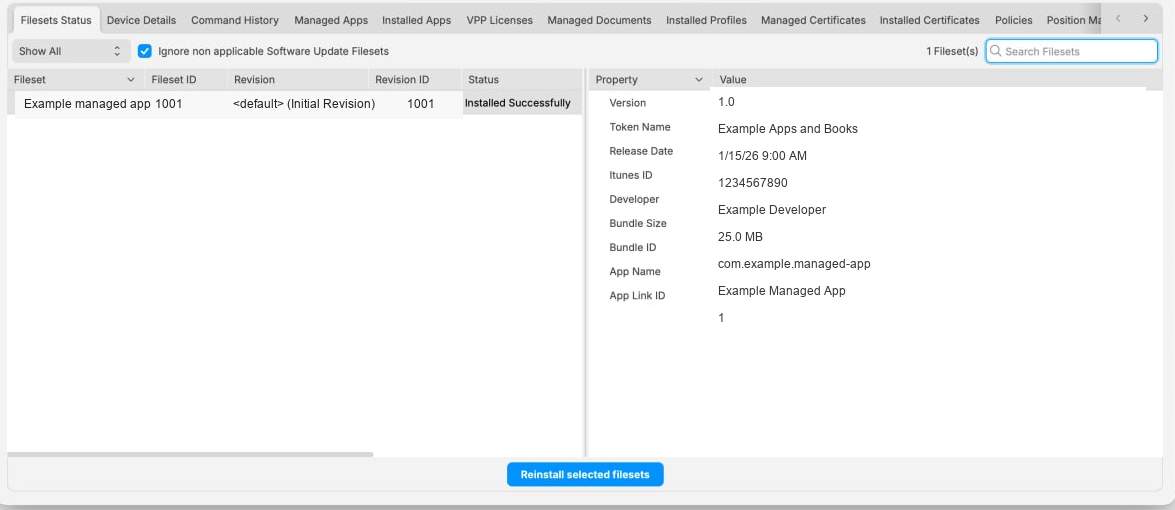
Review an MDM or DDM Fileset row
- Open the affected device in Client Info.
- Select Fileset Status.
- Select the application, profile, DDM configuration, or DDM asset row you need to investigate.
- Review the available details before deciding whether the status represents installation progress, an unmet requirement, a licensing problem, or a command/declaration failure.
- Where the row provides a context action, use it to open the associated MDM command in Command History or the corresponding DDM declaration. The action is shown only when that underlying object is available.
Troubleshoot from the underlying object
- MDM application or profile: Inspect the associated command, response, timestamp, and any Apple error in Command History. A completed FileWave association does not by itself prove that the device accepted every MDM command.
- DDM configuration or asset: Open the corresponding declaration and compare the reported declaration state with the Fileset Status details. See DDM Configurations and DDM Assets.
- VPP/Apps and Books application: Confirm that an assignable license is available. In 16.4, a device without an available license is no longer presented as successfully associated; use the shortage status and license reporting to determine which application needs more licenses.
- Mixed results: Compare a successful device and failing device that receive the same Deployment. Differences in OS version, enrollment type, supervision, available licenses, or declaration state usually narrow the cause faster than repeatedly running Verify.
Do not treat an informational status as a universal device-health verdict. Fileset Status, Command History, DDM declaration state, inventory, and the device’s actual installed configuration answer different parts of the troubleshooting question.
Status reference
The table below lists known Fileset status codes, their severity, the status text shown in Client Info, the deployment status category, and example ways to reproduce some statuses. Some statuses are platform-specific or only appear in certain deployment paths.
|
Code |
Status Type |
Severity |
Fileset Status (Client Info) |
Deployment Status |
Available Platform(s) |
Steps to Reproduce |
|
0 |
UNKNOWN_ERROR |
WARNING |
Fileset Error |
WARNING |
||
|
1 |
STATUS_IDLE |
OK |
Idle |
REMAINING |
N/A |
|
|
2 |
STATUS_FILESET_DOWNLOADING |
ACTIVITY |
Downloading: #% |
REMAINING |
||
|
3 |
STATUS_FILESET_DOWNLOADED |
OK |
Downloaded |
REMAINING |
||
|
4 |
STATUS_FILESET_ACTIVATED |
OK |
Installed as dependency Installed via Kiosk Active |
COMPLETED |
macOS Windows |
|
|
5 |
STATUS_FILESET_MADE_PASSIVE |
OK |
Passive |
COMPLETED |
|
|
|
6 |
STATUS_FILESET_DELETED |
OK |
Deleted |
COMPLETED |
iOS |
Easiest to see with iOS
|
|
7 |
STATUS_FILESET_INSTALLED_SUCCESSFULLY |
OK |
Installed successfully |
COMPLETED |
iOS |
|
|
8 |
STATUS_FILESET_INSTALL_FAILURE |
WARNING |
Install failed |
ERROR |
||
|
9 |
STATUS_FILESET_DISK_FULL |
WARNING |
Disk full |
ERROR |
|
|
|
10 |
STATUS_FILESET_INSTALLER_RUNNING |
ACTIVITY |
Installer running now |
REMAINING |
||
|
11 |
STATUS_FILESET_ERROR |
WARNING |
iOS: Please log in to your iTunes Store account Desktop: Error: 4 |
ERROR |
Now only see "Error: 4" if setting last_status for fileset to 11 manually in admin.user_status table
Steps (iOS)...
|
|
|
13 |
CANT_LOAD_DATA_FILE_FROM_SERVER_ERROR |
WARNING |
Error while downloading from server |
WARNING |
Note: Only have seen 'Fileset Error' |
|
|
14 |
STATUS_FILESET_ASSOCIATED |
IGNORE |
Associated |
REMAINING |
macOS Windows Android iOS |
|
|
15 |
BOOSTER_SERVER_DISK_FULL_STATUS |
ERROR |
Booster/Server disk full |
ERROR |
||
|
16 |
STATUS_FILESET_INSTALLATION_CANCELLED |
WARNING |
Installation cancelled by the user |
COMPLETED |
Android |
Easiest to see with Android
|
|
17 |
STATUS_FILESET_INSTALLER_OUTDATED |
WARNING |
Fileset install failed, a more recent version is installed |
ERROR |
||
|
18 |
STATUS_FILESET_UNINSTALLER_RUNNING |
ACTIVITY |
Uninstaller running now |
REMAINING |
||
|
19 |
STATUS_FILESET_UNINSTALL_FAILURE |
WARNING |
Uninstall failed |
WARNING |
||
|
21 |
ACTIVATING_STATUS |
ACTIVITY |
Activating |
REMAINING |
||
|
22 |
STATUS_FILESET_SCRIPT_FAILED |
WARNING |
Script execution failure |
ERROR |
||
|
23 |
STATUS_INVENTORY_ONLY_CLIENT |
WARNING |
Not installed: client is inventory only |
COMPLETED |
||
|
25 |
STATUS_IN_KIOSK_UNINSTALLED |
OK |
Excluded from Kiosk (Dependency) Available in Kiosk |
COMPLETED |
macOS Windows |
|
|
-52 |
PLEASE_REBOOT_RESULT |
ACTIVITY |
Waiting for user to log out |
REMAINING |
macOS Windows |
|
|
-51 |
FAILED_TO_LOGOUT_RESULT |
ACTIVITY |
Waiting for user to log out |
REMAINING |
macOS Windows |
|
|
-50 |
WAITING_FOR_USER_TO_LOGIN_RESULT |
ACTIVITY |
Waiting for user to log in |
REMAINING |
macOS Windows |
|
|
99 |
FILESET_PRIORITY_ERROR |
ACTIVITY |
Waiting for higher priority filesets |
REMAINING |
|
|
|
98 |
FILESET_REQUIREMENTS_ARCH_ERROR |
INFO |
Requirements not met: architecture |
COMPLETED |
|
|
|
97 |
FILESET_REQUIREMENTS_VERSION_ERROR |
INFO |
Requirements not met: system version |
COMPLETED |
|
|
|
96 |
FILESET_REQUIREMENTS_MEMORY_ERROR |
INFO |
Requirements not met: insufficient memory |
COMPLETED |
|
|
|
95 |
FILESET_REQUIREMENTS_SCRIPT_ERROR |
INFO |
Requirements not met: script |
COMPLETED |
|
|
|
666 |
FILESET_REMOTE_WIPE_EXECUTED |
ACTIVITY |
Remote wipe executed |
REMAINING |
||
|
-5 |
WAITING_FOR_BOOSTER_RESULT |
ACTIVITY |
Waiting for booster |
REMAINING |
||
|
-32 |
NETWORK_GENERIC_ERROR |
WARNING |
Network error |
ERROR |
||
|
-149 |
FAILED_CRC_CHECK_ERROR |
ERROR |
Failed CRC validation |
ERROR |
||
|
101 |
MAC_APP_STORE_FATAL_ERROR |
WARNING |
Mac App Store license fatal error |
ERROR |
||
|
102 |
MAC_APP_STORE_LICENSE_ASSOCIATED |
IGNORE |
Mac App Store license associated |
REMAINING |
||
|
103 |
MAC_APP_STORE_NOT_ENOUGH_LICENSES |
WARNING |
Not enough Mac App Store VPP license |
WARNING |
||
|
104 |
MAC_APP_STORE_VPP_USER_NOT_ASSOCIATED |
WARNING |
User needs to accept the invite to the organization with a valid iTunes account |
REMAINING |
||
|
105 |
MAC_APP_STORE_NO_LICENSE_NEEDED |
WARNING |
No VPP license associated to this fileset |
REMAINING |
||
|
106 |
MAC_APP_STORE_NO_VPP_USER |
WARNING |
No VPP user for this application's VPP token associated to the device |
WARNING |
||
|
107 |
MAC_APP_STORE_VPP_USER_RETIRED |
WARNING |
VPP user is retired |
WARNING |
||
|
108 |
MAC_APP_STORE_NO_VPP_TOKEN |
WARNING |
No VPP token associated to this fileset |
WARNING |
||
|
109 |
MAC_APP_STORE_INSTALLED |
OK |
Installed via Mac App Store |
COMPLETED |
||
|
110 |
MAC_APP_STORE_INSTALLING |
ACTIVITY |
Installing via Mac App Store (can take some time) |
REMAINING |
||
|
111 |
MAC_APP_STORE_ASSET_NO_DEVICE_ASSIGNABLE |
WARNING |
VPP license for asset can not be assigned to a device |
WARNING |
||
|
112 |
MAC_APP_STORE_NOT_VPP_APP |
WARNING |
Not a VPP application Fileset Error |
WARNING |
Note: Only have seen 'Fileset Error' |
|
|
130 |
DEPENDENCIES_DOWNLOAD_FAILED |
WARNING |
Download of dependency fileset failure |
ERROR |
|
|
|
131 |
DEPENDENCIES_ACTIVATION_FAILED |
WARNING |
Activation of dependency fileset failure |
ERROR |
||
|
132 |
DEPENDENCIES_PASSIVE_FAILED |
WARNING |
Failed to make dependencies passive |
WARNING |
Note: Only have seen 'Fileset Error' |
|
|
133 |
DEPENDENCIES_DELETE_FAILED |
WARNING |
Failed to delete dependencies |
WARNING |
Note: Only have seen 'Fileset Error' |
|
|
134 |
DEPENDENCIES_UPDATE_FAILED |
WARNING |
Update of dependency fileset failure |
ERROR |
||
|
135 |
DEPENDENCIES_LOGOUT_FAILED |
ACTIVITY |
Waiting for user to log out to install dependency |
REMAINING |
||
|
136 |
DEPENDENCIES_FAILED |
WARNING |
Dependency fileset failed |
WARNING |
||
|
210 |
FILESET_REQUIREMENTS_OK_SKIP_INSTALL |
OK |
Skipped |
COMPLETED |
||
|
220 |
FILESET_REQUIREMENTS_ERROR_STOP_TRYING |
INFO |
Requirements not met: will not retry |
COMPLETED |
||
|
1024 |
CHECK_REQUIREMENTS_OK |
ACTIVITY |
Requirements met |
REMAINING |
||
|
2048 |
STATUS_FILESET_INSTALLED_BY_PROFILES_COMMAND |
OK |
Installed |
COMPLETED |
||
|
2049 |
STATUS_FILESET_INSTALLED_BY_MDM_SERVER |
OK |
Handled via MDM |
COMPLETED |
||
|
2050 |
STATUS_FILESET_FAILED_TO_INSTALL_BY_PROFILES_COMMAND |
ERROR |
Profile Installation Failure |
ERROR |