# Permanently Remove a Device from FileWave Anywhere

## What it does

**Remove from System** in FileWave Anywhere is the permanent device-removal action. Administrators familiar with older FileWave interfaces may remember it as **Delete**. FileWave Anywhere separates removal from the system from removal of a device copy or group membership so the destructive action is clearer.

## Before you remove a device

**Remove from System** permanently removes the device, its copies, inventory history, and payload and deployment assignments from FileWave. For an MDM-enrolled device, removal also initiates unenrollment when the preference below is enabled. You must update the model before the removal is completed.

<p class="callout warning">**MDM unenrollment is preference-controlled.** FileWave sends the unenrollment command only when this FileWave Central preference is enabled:  
  
**Preferences &gt; Mobile &gt; Remove MDM profile from devices removed from FileWave model**  
  
The command is sent through MDM, including for devices whose Automated Device Enrollment (DEP) profile prevents local user removal.</p>

A device with the FileWave Client still installed can check in again after removal, but it must be onboarded again before normal management resumes.

<p class="callout danger">**This action is destructive.** Confirm that the device, its inventory, and its deployment assignments are no longer needed before continuing.</p>

## How

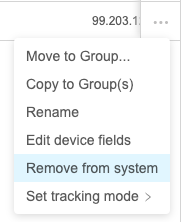
In FileWave Anywhere, open the device action menu (**…**), choose **Remove from System**, and then perform an **Update Model** to complete the removal.
![1N5zn1v3EswJozxR-embedded-image-lukdh357.png](https://kb.filewave.com/uploads/images/gallery/2023-07/1N5zn1v3EswJozxR-embedded-image-lukdh357.png)