# Troubleshooting Deployment Issues with the FileWave Upgrade Fileset
If you’re experiencing issues deploying the Upgrade Fileset to devices, the resolution steps depend on the target operating system.
**Scope:** This article covers upgrade fileset deployment, redeploy, and Windows import/extraction issues. If the Windows upgrade fileset imports and deploys but the client upgrade itself does not complete, the client version does not update in inventory, or the service does not restart, see [Troubleshooting Windows Client Upgrade Fileset Issues](https://kb.filewave.com/books/filewave-client/page/troubleshooting-windows-client-upgrade-fileset-issues).
## macOS Deployment
##### Issue: Devices show that the latest FileWave Client is not installed despite deploying the Fileset.
##### Solutions:
1. **Reinstall on Selected Devices**:
- Navigate to the Upgrade Fileset in FileWave Admin Central.
- Select **Fileset Report** from the top menu.
- Highlight all devices listed.
- Choose **Reinstall on Selected Devices**.
**2. Alternatively, you can Redeploy the Fileset**:
- Remove the Fileset Association from all devices, or remove targets from the Deployment.
- Perform model update after removing the association/deployment.
- Re-add to deployment or recreate association, Update Model.
##### Cause:
This issue occurs due to the **Privacy Preferences Profile (v3)** required for the FileWave Client. The profile must install first, but it cannot complete until the FileWave Client is deployed. Redeploying ensures proper installation order.
**Note**: This should be a one-time occurrence unless a new profile is required with a major macOS update post-Sequoia.
## Windows Deployment
##### Issue: Errors occur when deploying the Fileset due to improper extraction during setup.
##### Solution:
1. **Remove and Recreate the Fileset**:
- Remove the Fileset association from devices.
- Delete the current Fileset from FileWave.
2. **Redownload and Extract the Fileset**:
- Download the Upgrade Fileset again.
- Right-click the downloaded file and select **Extract All**.
- Open the extracted folder, which should look like this: ~Upgrade\_Fileset\_for\_Windows.fileset.
- Inside, you’ll find another folder with the same name. **Drag and drop this inner folder into FileWave** to create the new Fileset.
##### Verification:
After importing the Fileset, ensure its contents are correctly displayed in FileWave.
##### Examples:
**Broken Example:**
[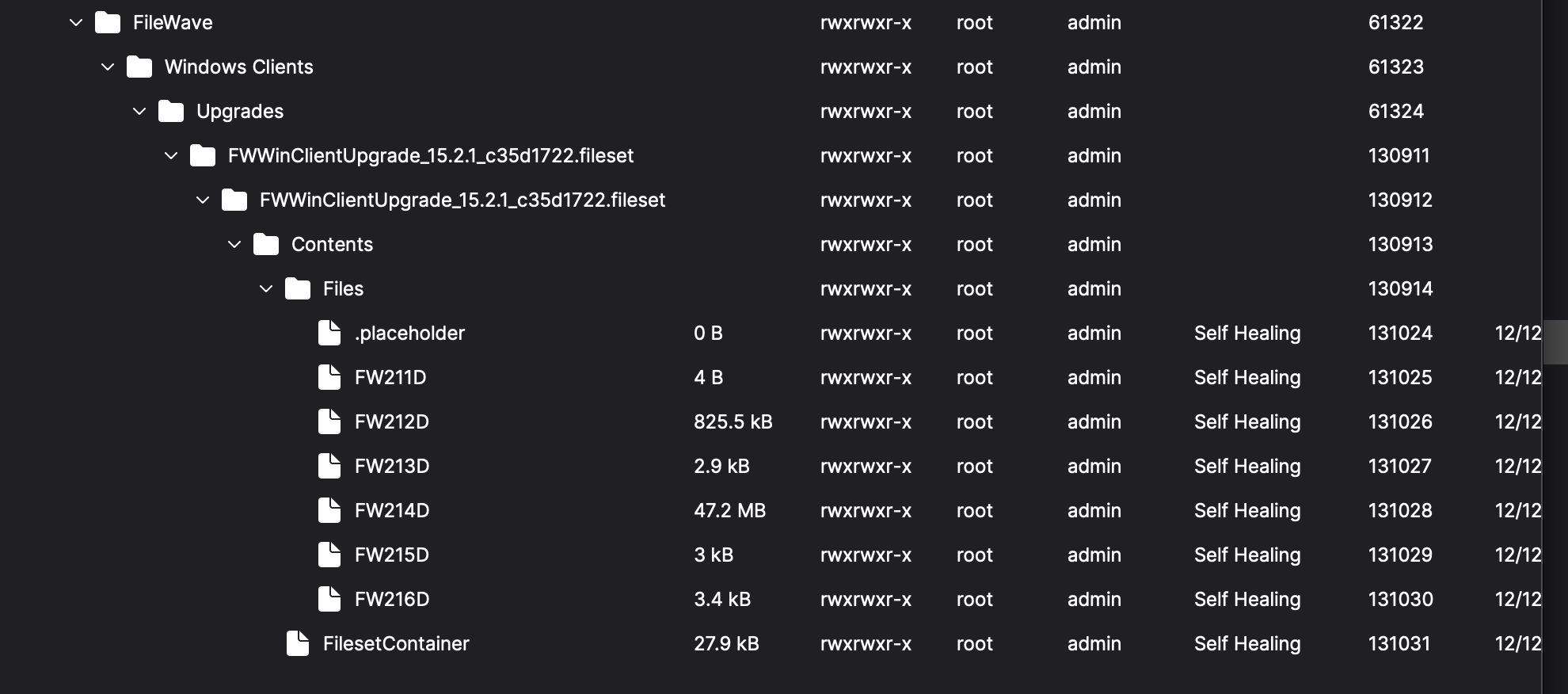](https://kb.filewave.com/uploads/images/gallery/2024-11/Rb6ZptLoHSnodegT-image.png)
**Working Example:**
[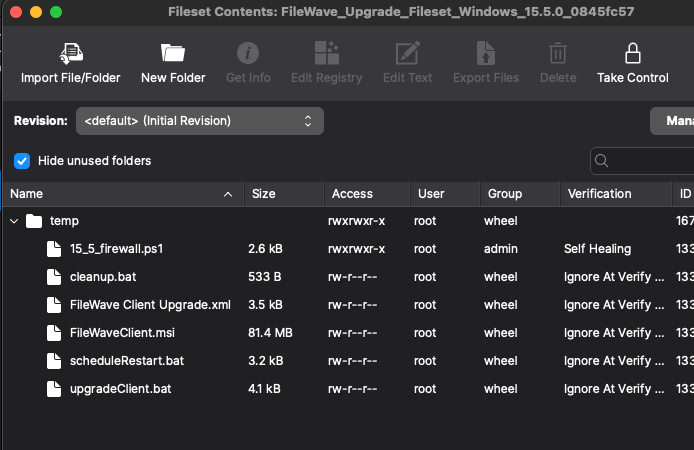](https://kb.filewave.com/uploads/images/gallery/2024-11/4w8O8a0KFKQGbOP8-image.png)
By following these steps and verifying with the examples, you can ensure successful deployment of the FileWave Upgrade Fileset. If further assistance is needed, please contact [FileWave Support](https://kb.filewave.com/books/community-engagement/page/customer-technical-support "Customer Technical Support").