# Default TCP and UDP Port Usage

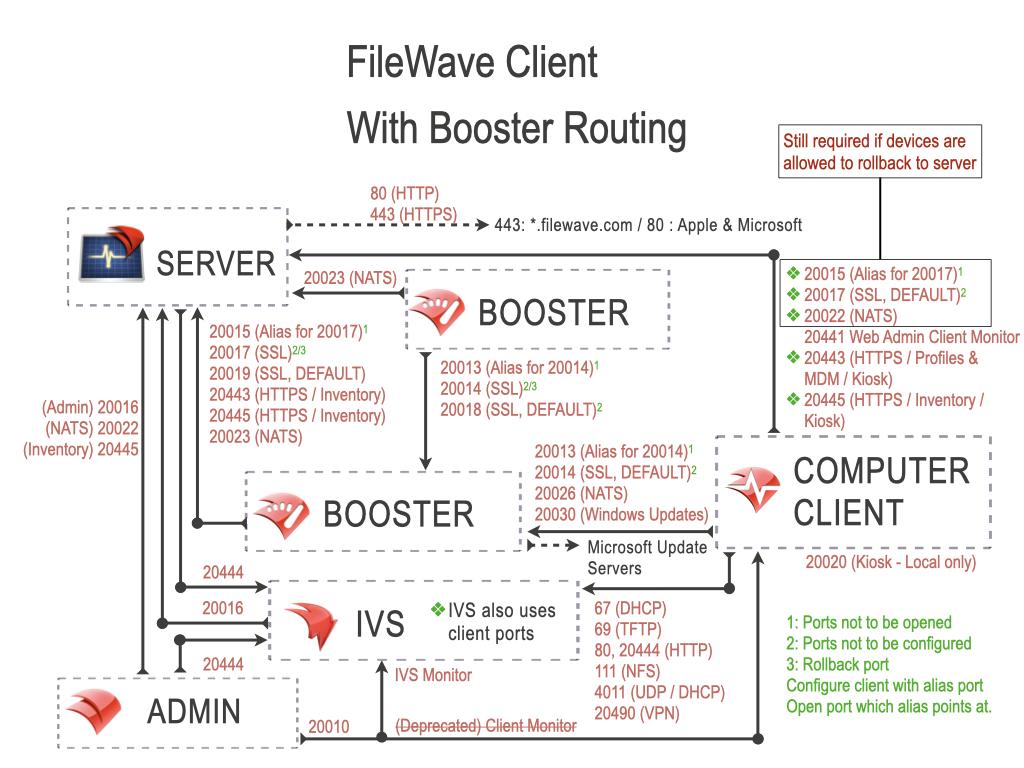
FileWave software uses the below-listed TCP/IP ports. These are default settings and may be configured to listen on different ports if required. Consider [FileWave Server should not have IPv6 enabled](https://kb.filewave.com/books/filewave-server/page/filewave-server-should-not-have-ipv6-enabled "FileWave Server should not have IPv6 enabled") for the best experience.

## Port Testing

Please consider downloading the [FileWave Port Testing](https://supportresources.filewave.com) macOS/Windows utility to confirm communication of Google Cloud Messaging, Apple Push Notifications and connectivity between device network(s) and Server/Boosters.

The following may be run from the server to confirm Apple, Microsoft, and FileWave services:

**Server Command Line**

```
sudo /usr/local/filewave/python/bin/python /usr/local/filewave/django/manage.pyc check_connections
```

## TeamViewer Ports

TeamViewer has an additional set of ports to consider:

[https://community.teamviewer.com/English/kb/articles/4139-ports-used-by-teamviewer](https://community.teamviewer.com/English/kb/articles/4139-ports-used-by-teamviewer)

## FileWave Server Ports

<p class="callout info">MDM default port is now 20445 as shown throughout this KB. On older versions of FileWave, this was 20443. To confirm the defined port, check the Port setting in FileWave Central &gt; Preferences &gt; Mobile &gt; MDM Server &gt; Port</p>

<p class="callout success">The ports in this table are listed from the FileWave Server’s perspective, so the “Server In/Out” column indicates the direction of traffic relative to the Server.</p>

<table id="bkmrk-server-ports-service" style="width: 100%; height: 1023.84px;"><thead><tr style="height: 46.5938px;"><td style="width: 22.5268%; background-color: rgb(251, 238, 184); height: 46.5938px;">**Server Ports**</td><td style="width: 14.5411%; background-color: rgb(251, 238, 184); height: 46.5938px;">**Service**</td><td style="width: 15.1371%; background-color: rgb(251, 238, 184); height: 46.5938px;">**Protocol**</td><td style="width: 10.9654%; background-color: rgb(251, 238, 184); height: 46.5938px;">**Server In/Out**</td><td style="width: 36.8296%; background-color: rgb(251, 238, 184); height: 46.5938px;">**Description**</td></tr></thead><tbody><tr style="height: 46.5938px;"><td style="width: 22.5268%; height: 46.5938px;">80</td><td style="width: 14.5411%; height: 46.5938px;">HTTP</td><td style="width: 15.1371%; height: 46.5938px;">TCP</td><td style="width: 10.9654%; height: 46.5938px;">Outgoing</td><td style="width: 36.8296%; height: 46.5938px;">FileWave Software Updates (apple.com &amp; microsoft.com) \*\*\*

</td></tr><tr style="height: 264.953px;"><td style="width: 22.5268%; height: 264.953px;">443</td><td style="width: 14.5411%; height: 264.953px;">HTTPS</td><td style="width: 15.1371%; height: 264.953px;">TCP</td><td style="width: 10.9654%; height: 264.953px;">Outgoing</td><td style="width: 36.8296%; height: 264.953px;">\* FileWave License Server (fwks.filewave.com &amp; logstash.filewave.com) \* FileWave Software Updates (apple.com) \*\*\*

\* FileWave/TeamViewer Session Server (rcs.filewave.com)

\* FileWave/TeamViewer Push Notification Server (fwpn.filewave.com)

\* FileWave Kiosk ( \*.filewave.cloud )

\* FileWave AutoPkg integration (le7bqzikha.execute-api.us-east-1.amazonaws.com)  
\* FileWave Software Updates (apple.com &amp; microsoft.com) \*\*\*  
\* notifications.filewave.com - Anywhere/Central news notifications  
\* installer-info.filewave.com - Version checks to find latest client version

</td></tr><tr style="height: 68.9922px;"><td style="width: 22.5268%; height: 68.9922px;">443</td><td style="width: 14.5411%; height: 68.9922px;">HTTPS</td><td style="width: 15.1371%; height: 68.9922px;">TCP</td><td style="width: 10.9654%; height: 68.9922px;">Incoming</td><td style="width: 36.8296%; height: 68.9922px;">\* API endpoints - [Anywhere API (v2 API)](https://kb.filewave.com/books/application-programming-interface-api/page/filewave-anywhere-api-v2 "Anywhere API (v2 API)")

\* Device to Server (Enrollment URL) - Google/Azure/Okta

</td></tr><tr style="height: 29.7969px;"><td style="width: 22.5268%; height: 29.7969px;">20016</td><td style="width: 14.5411%; height: 29.7969px;">SSL</td><td style="width: 15.1371%; height: 29.7969px;">TCP</td><td style="width: 10.9654%; height: 29.7969px;">Incoming</td><td style="width: 36.8296%; height: 29.7969px;">FileWave Central to Server</td></tr><tr style="height: 63.3906px;"><td style="width: 22.5268%; height: 63.3906px;">20017</td><td style="width: 14.5411%; height: 63.3906px;">SSL</td><td style="width: 15.1371%; height: 63.3906px;">TCP</td><td style="width: 10.9654%; height: 63.3906px;">Incoming</td><td style="width: 36.8296%; height: 63.3906px;">FileWave Client to Server: Secure

**Set port 20015, not 20017, in Client Configuration**

</td></tr><tr style="height: 29.7969px;"><td style="width: 22.5268%; height: 29.7969px;">20019</td><td style="width: 14.5411%; height: 29.7969px;">SSL</td><td style="width: 15.1371%; height: 29.7969px;">TCP</td><td style="width: 10.9654%; height: 29.7969px;">Incoming</td><td style="width: 36.8296%; height: 29.7969px;">Booster to Server: Priority Traffic</td></tr><tr style="height: 80.1875px;"><td style="width: 22.5268%; height: 80.1875px;">20022</td><td style="width: 14.5411%; height: 80.1875px;">SSL</td><td style="width: 15.1371%; height: 80.1875px;">TCP</td><td style="width: 10.9654%; height: 80.1875px;">Incoming</td><td style="width: 36.8296%; height: 80.1875px;">FileWave Central to Server: NATS FileWave Client to Server: NATS

IVS to Server: NATS

</td></tr><tr style="height: 29.7969px;"><td style="width: 22.5268%; height: 29.7969px;">20023</td><td style="width: 14.5411%; height: 29.7969px;">SSL</td><td style="width: 15.1371%; height: 29.7969px;">TCP</td><td style="width: 10.9654%; height: 29.7969px;">Incoming</td><td style="width: 36.8296%; height: 29.7969px;">FileWave Booster to Server: NATS

</td></tr><tr style="height: 80.1875px;"><td style="width: 22.5268%; height: 80.1875px;">20124</td><td style="width: 14.5411%; height: 80.1875px;">SSL</td><td style="width: 15.1371%; height: 80.1875px;">TCP</td><td style="width: 10.9654%; height: 80.1875px;">Incoming</td><td style="width: 36.8296%; height: 80.1875px;"><span style="color: rgb(0, 0, 0);"><span style="color: rgb(52, 73, 94);">FileWave</span> <span style="color: rgb(52, 73, 94);">Server JSON Websockets (JWT) Websocket connections for NATS SERVER used between FW Anywhere and Central to FW Server.</span></span></td></tr><tr style="height: 96.9844px; background-color: rgb(230, 126, 35);"><td style="width: 22.5268%; height: 96.9844px;">20441</td><td style="width: 14.5411%; height: 96.9844px;">Proprietary</td><td style="width: 15.1371%; height: 96.9844px;">TCP</td><td style="width: 10.9654%; height: 96.9844px;">Incoming</td><td style="width: 36.8296%; height: 96.9844px;">**DO NOT OPEN**  
FileWave Client to Server: Remote Client Monitor  
(Removed in FileWave 16.1+)  
Server no longer listens on this port.</td></tr><tr style="height: 48px;"><td style="width: 22.5268%; height: 48px;">20443</td><td style="width: 14.5411%; height: 48px;">HTTPS</td><td style="width: 15.1371%; height: 48px;">TCP</td><td style="width: 10.9654%; height: 48px;">Incoming</td><td rowspan="2" style="width: 36.8296%; height: 186.57px;">\* FileWave Client to Server: Inventory

\* Apple Devices to Server: Inventory, Profiles, DDM, MDM

\* Android Devices to Server: Companion App

\* Chromebook to Server: Inventory

\* Booster to Server: Inventory/Discovery  
\* API endpoints - [Command Line API (v1)](https://kb.filewave.com/books/application-programming-interface-api/page/command-line-api-v1 "Command Line API (v1)")

\* App Portal to Server

\* FileWave Central and FileWave Anywhere to Dashboard

</td></tr><tr style="height: 138.57px;"><td style="width: 22.5268%; height: 138.57px;">20445</td><td style="width: 14.5411%; height: 138.57px;">HTTPS</td><td style="width: 15.1371%; height: 138.57px;">TCP</td><td style="width: 10.9654%; height: 138.57px;">Incoming</td></tr></tbody></table>

*NATS includes: Remote Control Publishing, Remote Control Routing, device renaming, revoking device certificates, push notifications  
\*\*\* Also used by FileWave Central to vendor Software Update Servers.*

<p class="callout warning">Configuring port 20015 also automatically configures SSL port; 20017 \[port entered +2\]. 20015 is now deprecated and 20017 will be used where 20015 is set. Open port 20017 alone for Client communication.</p>

## FileWave Central Ports

<p class="callout success">The ports in this table are listed from FileWave Central's perspective, so the “In/Out” column indicates the direction of traffic relative to the macOS or Windows running Central there.</p>

<table id="bkmrk-server-ports-service-1" style="width: 100%; height: 914px;"><thead><tr style="height: 45px;"><td style="width: 22.5268%; background-color: rgb(251, 238, 184); height: 45px;">**Server Ports**</td><td style="width: 14.5411%; background-color: rgb(251, 238, 184); height: 45px;">**Service**</td><td style="width: 15.1371%; background-color: rgb(251, 238, 184); height: 45px;">**Protocol**</td><td style="width: 10.965435%; background-color: rgb(251, 238, 184); height: 45px;">**In/Out**</td><td style="width: 36.8296%; background-color: rgb(251, 238, 184); height: 45px;">**Description**</td></tr></thead><tbody><tr style="height: 205px;"><td style="width: 22.5268%; height: 205px;">443</td><td style="width: 14.5411%; height: 205px;">HTTPS</td><td style="width: 15.1371%; height: 205px;">TCP</td><td style="width: 10.965435%; height: 205px;">Outgoing</td><td style="width: 36.8296%; height: 205px;">\* FileWave License Server (fwks.filewave.com &amp; logstash.filewave.com) \* FileWave/TeamViewer Session Server (rcs.filewave.com)

\* FileWave/TeamViewer Push Notification Server (fwpn.filewave.com)

\* FileWave AutoPkg integration (le7bqzikha.execute-api.us-east-1.amazonaws.com)  
\* notifications.filewave.com - Anywhere/Central news notifications  
\* AI Chatbot - app.wonderchat.ai (Anywhere also goes there)  
*\** Roadmap/Feedback portals - \*.filewavex.org

</td></tr><tr><td style="width: 22.5268%; height: 29px;">20016</td><td style="width: 14.5411%; height: 29px;">SSL</td><td style="width: 15.1371%; height: 29px;">TCP</td><td style="width: 10.965435%; height: 29px;">Outgoing</td><td style="width: 36.8296%; height: 29px;">FileWave Central to Server</td></tr><tr><td style="width: 22.5268%; height: 77px;">20022</td><td style="width: 14.5411%; height: 77px;">SSL</td><td style="width: 15.1371%; height: 77px;">TCP</td><td style="width: 10.965435%; height: 77px;">Outgoing</td><td style="width: 36.8296%; height: 77px;">FileWave Central to Server: NATS</td></tr><tr><td style="width: 22.5268%; height: 29px;">20443</td><td style="width: 14.5411%; height: 29px;">HTTPS</td><td style="width: 15.1371%; height: 29px;">TCP</td><td style="width: 10.965435%; height: 29px;">Outgoing</td><td rowspan="2" style="width: 36.8296%; height: 115px;">\* FileWave Central and FileWave Anywhere to Dashboard on Server

</td></tr><tr><td style="width: 22.5268%; height: 86px;">20445</td><td style="width: 14.5411%; height: 86px;">HTTPS</td><td style="width: 15.1371%; height: 86px;">TCP</td><td style="width: 10.965435%; height: 86px;">Outgoing</td></tr></tbody></table>

## FileWave Kiosk Ports

<p class="callout success">The ports in this table are listed from the Kiosk on the Client's perspective, so the “In/Out” column indicates the direction of traffic relative to the macOS or Windows Kiosk running there.</p>

<table id="bkmrk-client-ports-service" style="width: 100%;"><tbody><tr><td style="width: 21.454112%; background-color: rgb(251, 238, 184);">**Kiosk Ports**</td><td style="width: 14.302741%; background-color: rgb(251, 238, 184);">**Service**</td><td style="width: 16.328963%; background-color: rgb(251, 238, 184);">**Protocol**</td><td style="width: 10.965435%; background-color: rgb(251, 238, 184);">**In/Out**</td><td style="width: 36.829559%; background-color: rgb(251, 238, 184);">**Description**</td></tr><tr><td style="width: 21.454112%;">443</td><td style="width: 14.302741%;">HTTPS</td><td style="width: 16.328963%;">TCP</td><td style="width: 10.965435%;">Out</td><td style="width: 36.829559%;">Devices to \*.filewave.cloud (To download the Kiosk App)</td></tr><tr><td style="width: 21.454112%;">20443</td><td style="width: 14.302741%;">HTTPS</td><td style="width: 16.328963%;">TCP</td><td style="width: 10.965435%;">Out</td><td style="width: 36.829559%;">Devices to FileWave Server</td></tr><tr><td style="width: 21.454112%;">20445</td><td style="width: 14.302741%;">HTTPS</td><td style="width: 16.328963%;">TCP</td><td style="width: 10.965435%;">Out</td><td style="width: 36.829559%;">Devices to FileWave Server</td></tr></tbody></table>

## FileWave Client Ports

<p class="callout success">The ports in this table are listed from the FileWave Client's perspective, so the “In/Out” column indicates the direction of traffic relative to the macOS or Windows Client.</p>

<table id="bkmrk-client-ports-service-1" style="width: 100%; height: 93.1875px;"><tbody><tr style="height: 29.7969px;"><td style="width: 21.4541%; background-color: rgb(251, 238, 184); height: 29.7969px;">**Client Ports**</td><td style="width: 14.3027%; background-color: rgb(251, 238, 184); height: 29.7969px;">**Service**</td><td style="width: 16.329%; background-color: rgb(251, 238, 184); height: 29.7969px;">**Protocol**</td><td style="width: 10.9654%; background-color: rgb(251, 238, 184); height: 29.7969px;">**In/Out**</td><td style="width: 36.8296%; background-color: rgb(251, 238, 184); height: 29.7969px;">**Description**</td></tr><tr><td style="width: 21.4541%;">443</td><td style="width: 14.3027%;">HTTPS</td><td style="width: 16.329%;">TCP</td><td style="width: 10.9654%;">Out</td><td style="width: 36.8296%;">FileWave Software Updates (apple.com &amp; microsoft.com) \*\*\*</td></tr><tr><td style="width: 21.4541%;">443</td><td style="width: 14.3027%;">HTTPS</td><td style="width: 16.329%;">TCP</td><td style="width: 10.9654%;">Out</td><td style="width: 36.8296%;">**For Hosted Customers Only. If blocked then a Booster can be used so that the configured Booster can reach these and a Client would not need to:**

Cloudflare host for Filesets in the Cloud -

c7b0813948fe034d9fe3ca8c90faddab.r2.cloudflarestorage.com

Cloudflare IP addresses as listed on [https://www.cloudflare.com/ips-v4](https://www.cloudflare.com/ips-v4) -

173.245.48.0/20  
103.21.244.0/22  
103.22.200.0/22  
103.31.4.0/22  
141.101.64.0/18  
108.162.192.0/18  
190.93.240.0/20  
188.114.96.0/20  
197.234.240.0/22  
198.41.128.0/17  
162.158.0.0/15  
104.16.0.0/13  
104.24.0.0/14  
172.64.0.0/13  
131.0.72.0/22

</td></tr></tbody></table>

*\*\*\* Also used by FileWave Central to vendor Software Update Servers.*

*[![PortDiagramFileWaveClient.jpeg](https://kb.filewave.com/uploads/images/gallery/2025-10/scaled-1680-/SG3qVJkeiA9kWjMm-portdiagramfilewaveclient.jpeg)](https://kb.filewave.com/uploads/images/gallery/2025-10/SG3qVJkeiA9kWjMm-portdiagramfilewaveclient.jpeg)*

## FileWave Booster Ports

<p class="callout success">The ports in this table are listed from the Booster's perspective, so the “In/Out” column indicates the direction of traffic relative to the Booster.</p>

<table id="bkmrk-booster-ports-servic" style="width: 100%;"><thead><tr><td style="width: 25.2682%; background-color: rgb(251, 238, 184);">**Booster Ports**</td><td style="width: 12.5149%; background-color: rgb(251, 238, 184);">**Service**</td><td style="width: 14.3027%; background-color: rgb(251, 238, 184);">**Protocol**</td><td style="width: 10.9654%; background-color: rgb(251, 238, 184);">**In/Out**</td><td style="width: 36.8296%; background-color: rgb(251, 238, 184);">**Description**</td></tr></thead><tbody><tr><td style="width: 25.2682%;">443</td><td style="width: 12.5149%;">HTTPS</td><td style="width: 14.3027%;">TCP</td><td style="width: 10.9654%;">Out</td><td style="width: 36.8296%;">FileWave Software Updates (microsoft.com) \*\*\*</td></tr><tr><td style="width: 25.2682%;">20014</td><td style="width: 12.5149%;">SSL</td><td style="width: 14.3027%;">TCP</td><td style="width: 10.9654%;">Incoming</td><td style="width: 36.8296%;">FileWave Client to Booster: Secure (Booster Priority fallback)

**Set port 20013, not 20014, in Booster Configuration**

</td></tr><tr><td style="width: 25.2682%;">20018</td><td style="width: 12.5149%;">SSL</td><td style="width: 14.3027%;">TCP</td><td style="width: 10.9654%;">Incoming</td><td style="width: 36.8296%;">Booster to Booster: Priority Traffic</td></tr><tr><td style="width: 25.2682%;">20026</td><td style="width: 12.5149%;">SSL </td><td style="width: 14.3027%;">TCP</td><td style="width: 10.9654%;">Incoming</td><td style="width: 36.8296%;"><span style="color: rgb(0, 0, 0);">FileWave Client to Booster connections using NATS Server</span></td></tr><tr><td style="width: 25.2682%;">20030</td><td style="width: 12.5149%;">SSL</td><td style="width: 14.3027%;">TCP</td><td style="width: 10.9654%;">Incoming</td><td style="width: 36.8296%;"><span style="color: rgb(0, 0, 0);">FileWave Client to Booster for Windows OS updates</span></td></tr><tr><td style="width: 25.2682%;">443</td><td style="width: 12.5149%;">HTTPS</td><td style="width: 14.3027%;">TCP</td><td style="width: 10.9654%;">Out</td><td style="width: 36.8296%;">**For Hosted Customers Only:**

Cloudflare host for Filesets in the Cloud -

c7b0813948fe034d9fe3ca8c90faddab.r2.cloudflarestorage.com

Cloudflare IP addresses as listed on [https://www.cloudflare.com/ips-v4](https://www.cloudflare.com/ips-v4) -

173.245.48.0/20  
103.21.244.0/22  
103.22.200.0/22  
103.31.4.0/22  
141.101.64.0/18  
108.162.192.0/18  
190.93.240.0/20  
188.114.96.0/20  
197.234.240.0/22  
198.41.128.0/17  
162.158.0.0/15  
104.16.0.0/13  
104.24.0.0/14  
172.64.0.0/13  
131.0.72.0/22

</td></tr></tbody></table>

*NATS includes: Remote Control Publishing, Remote Control Routing, device renaming, revoking device certificates, push notifications*  
*\*\*\* Also used by FileWave Central to vendor Software Update Servers.*

<p class="callout warning">Configuring port 20013 also automatically configures SSL ports; 20014 \[port entered +1\] and 20018 \[port entered + 5\]. 20013 is now deprecated and 20014 will be used where 20013 is set. Open port 20014 alone for Client to Booster communication. Open ports 20014 and 20018 for Booster to Booster communication.</p>

<p class="callout info">Booster should be able to connect with Microsoft OS Updates URL, if using FileWave to manage Windows Software Updates.</p>

[![PortDiagramFileWaveClientRouting.jpeg](https://kb.filewave.com/uploads/images/gallery/2025-10/scaled-1680-/oSthEn2gkmjPz1aS-portdiagramfilewaveclientrouting.jpeg)](https://kb.filewave.com/uploads/images/gallery/2025-10/oSthEn2gkmjPz1aS-portdiagramfilewaveclientrouting.jpeg)

## Apple MDM Ports

<p class="callout success">The ports in this table are listed from the FileWave Server’s perspective, so the “Server In/Out” column indicates the direction of traffic relative to the Server and these ports are specifically those needed to manage Apple devices. Apple devices will also need to reach the Apple servers on 17.0.0.0/8.</p>

<table id="bkmrk-apple-mdm-ports-serv" style="width: 100%;"><thead><tr><td style="width: 20.6428%; background-color: rgb(251, 238, 184);">**Apple MDM Ports**</td><td style="width: 13.6048%; background-color: rgb(251, 238, 184);">**Service**</td><td style="width: 17.792%; background-color: rgb(251, 238, 184);">**Protocol**</td><td style="width: 11.0012%; background-color: rgb(251, 238, 184);">**Server In/Out**</td><td style="width: 36.8356%; background-color: rgb(251, 238, 184);">**Description**</td></tr></thead><tbody><tr><td style="width: 20.6428%;">443</td><td style="width: 13.6048%;">HTTPS</td><td style="width: 17.792%;">TCP</td><td style="width: 11.0012%;">Outgoing</td><td style="width: 36.8356%;">FileWave Server to Apple's servers (17.0.0.0/8)

FileWave Admin to iTunes, DEP &amp; VPP (17.0.0.0/8)

Device to iTunes, DEP &amp; VPP (17.0.0.0/8)

</td></tr><tr><td style="width: 20.6428%;">443</td><td style="width: 13.6048%;">HTTPS</td><td style="width: 17.792%;">TCP</td><td style="width: 11.0012%;">Incoming</td><td style="width: 36.8356%;">VPP v2 [Notifications](https://kb.filewave.com/books/apple-school-business-manager/page/vpp-notifications-apple-vpp-api-v2 "VPP Notifications (Apple VPP API v2)") from Apple

</td></tr><tr><td style="width: 20.6428%;">5223</td><td style="width: 13.6048%;">APNS</td><td style="width: 17.792%;">TCP</td><td style="width: 11.0012%;">Outgoing</td><td style="width: 36.8356%;">FileWave Server to Apple's servers (17.0.0.0/8)</td></tr><tr><td style="width: 20.6428%;">20443</td><td style="width: 13.6048%;">HTTPS</td><td style="width: 17.792%;">TCP</td><td style="width: 11.0012%;">Incoming</td><td style="width: 36.8356%;">Device to Server: Profiles &amp; MDM</td></tr><tr><td style="width: 20.6428%;">20445</td><td style="width: 13.6048%;">HTTPS</td><td style="width: 17.792%;">TCP</td><td style="width: 11.0012%;">Incoming</td><td style="width: 36.8356%;">FileWave Central to Server</td></tr></tbody></table>

[![image.png](https://kb.filewave.com/uploads/images/gallery/2024-01/scaled-1680-/6sr5AGcIgYhlyqfj-image.png)](https://kb.filewave.com/uploads/images/gallery/2024-01/6sr5AGcIgYhlyqfj-image.png)

## Android EMM Ports

<p class="callout success">The ports in this table are listed from the FileWave Server’s perspective, so the “Server In/Out” column indicates the direction of traffic relative to the Server and these ports are specifically those needed to manage Android devices. Android devices will also need to reach the Google's servers.</p>

<table id="bkmrk-android-emm-ports-se" style="width: 100%;"><thead><tr><td style="width: 20.3956%; background-color: rgb(251, 238, 184);">**Android EMM Ports**</td><td style="width: 14.7162%; background-color: rgb(251, 238, 184);">**Service**</td><td style="width: 16.9278%; background-color: rgb(251, 238, 184);">**Protocol**</td><td style="width: 11.0012%; background-color: rgb(251, 238, 184);">**Server In/Out**</td><td style="width: 36.8356%; background-color: rgb(251, 238, 184);">**Description**</td></tr></thead><tbody><tr><td style="width: 20.3956%;">443</td><td style="width: 14.7162%;">HTTPS</td><td style="width: 16.9278%;">TCP</td><td style="width: 11.0012%;">Outgoing</td><td style="width: 36.8356%;">Server to EMM commands (androidmanagement.googleapis.com)

Device to Activation servers (\*.clients.google.com)

Device to Play Store (play.google.com)

EMM commands (androidmanagement.googleapis.com)

FileWave Central to Play Store (play.google.com)

</td></tr><tr><td style="width: 20.3956%;">20016</td><td style="width: 14.7162%;">SSL</td><td style="width: 16.9278%;">TCP</td><td style="width: 11.0012%;">Incoming</td><td style="width: 36.8356%;">FileWave Central to Server</td></tr><tr><td style="width: 20.3956%;">20445</td><td style="width: 14.7162%;">HTTPS</td><td style="width: 16.9278%;">TCP</td><td style="width: 11.0012%;">Incoming</td><td style="width: 36.8356%;">FileWave Central to Server: Inventory Companion App to Server: Location Tracking

</td></tr></tbody></table>

[![image.png](https://kb.filewave.com/uploads/images/gallery/2024-01/scaled-1680-/Khge6bXjb6cMtguT-image.png)](https://kb.filewave.com/uploads/images/gallery/2024-01/Khge6bXjb6cMtguT-image.png)

## Chromebook Ports

<p class="callout success">The ports in this table are listed from the FileWave Server’s perspective, so the “Server In/Out” column indicates the direction of traffic relative to the Server and these ports are specifically those needed to manage Google Chromebook devices. Chromebook devices will also need to reach the Google's servers.</p>

<table id="bkmrk-chromebook-ports-ser" style="width: 100%;"><thead><tr><td style="width: 21.0136%; background-color: rgb(251, 238, 184);">**Chromebook Ports**</td><td style="width: 14.7155%; background-color: rgb(251, 238, 184);">**Service**</td><td style="width: 16.3105%; background-color: rgb(251, 238, 184);">**Protocol**</td><td style="width: 11.0012%; background-color: rgb(251, 238, 184);">**Server In/Out**</td><td style="width: 36.8356%; background-color: rgb(251, 238, 184);">**Description**</td></tr></thead><tbody><tr><td style="width: 21.0136%;">443</td><td style="width: 14.7155%;">HTTPS</td><td style="width: 16.3105%;">TCP</td><td style="width: 11.0012%;">Outgoing</td><td style="width: 36.8356%;">Server to Chrome API

Chromebook to Chrome API (www.googleapis.com)

</td></tr><tr><td style="width: 21.0136%;">20016</td><td style="width: 14.7155%;">SSL</td><td style="width: 16.3105%;">TCP</td><td style="width: 11.0012%;">Incoming</td><td style="width: 36.8356%;">FileWave Central to Server</td></tr><tr><td style="width: 21.0136%;">20445</td><td style="width: 14.7155%;">HTTPS</td><td style="width: 16.3105%;">TCP</td><td style="width: 11.0012%;">Incoming</td><td style="width: 36.8356%;">FileWave Central to Server

Chromebook Inventory Extension to Server

</td></tr></tbody></table>

[![image.png](https://kb.filewave.com/uploads/images/gallery/2024-01/scaled-1680-/ICpgTIhEQx6NiMuX-image.png)](https://kb.filewave.com/uploads/images/gallery/2024-01/ICpgTIhEQx6NiMuX-image.png)

## Windows MDM Ports

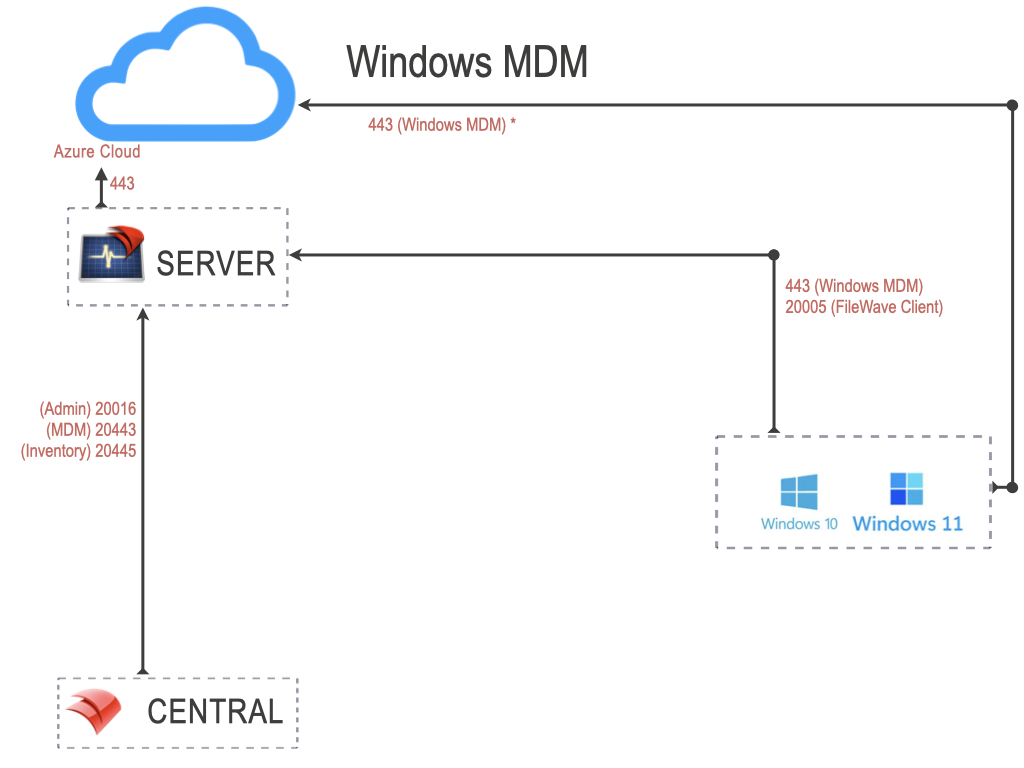
<p class="callout success">The ports in this table are listed from the FileWave Server’s perspective, so the “Server In/Out” column indicates the direction of traffic relative to the Server and these ports are specifically those needed to manage Windows MDM devices. Windows devices will also need to reach the Microsoft's servers.</p>

<table id="bkmrk-windows-mdm-ports-se" style="width: 100%; height: 5652.95px;"><thead><tr style="height: 46.5938px;"><td style="width: 23.2386%; height: 46.5938px; background-color: rgb(251, 238, 184);">**Windows MDM Ports**</td><td style="width: 13.351%; height: 46.5938px; background-color: rgb(251, 238, 184);">**Service**</td><td style="width: 15.45%; height: 46.5938px; background-color: rgb(251, 238, 184);">**Protocol**</td><td style="width: 11.0012%; height: 46.5938px; background-color: rgb(251, 238, 184);">**Server In/Out**</td><td style="width: 36.8356%; height: 46.5938px; background-color: rgb(251, 238, 184);">**Description**</td></tr></thead><tbody><tr style="height: 46.5938px;"><td style="width: 23.2386%; height: 46.5938px;">443</td><td style="width: 13.351%; height: 46.5938px;">HTTPS</td><td style="width: 15.45%; height: 46.5938px;">TCP</td><td style="width: 11.0012%; height: 46.5938px;">Incoming</td><td style="width: 36.8356%; height: 46.5938px;">Device to Server (Enrollment URL)</td></tr><tr style="height: 29.7969px;"><td style="width: 23.2386%; height: 29.7969px;">443</td><td style="width: 13.351%; height: 29.7969px;">HTTPS</td><td style="width: 15.45%; height: 29.7969px;">TCP</td><td style="width: 11.0012%; height: 29.7969px;">Outgoing</td><td style="width: 36.8356%; height: 29.7969px;">Server to Windows MDM (\*.azure.com)

Device to Windows MDM (\*.azure.com)

</td></tr></tbody></table>

<p class="callout info">NOTE: The FileWave client will also be installed and all previously listed FileWave client ports are required.</p>

[![image.png](https://kb.filewave.com/uploads/images/gallery/2024-01/scaled-1680-/afsudCOM7XCyO5qr-image.png)](https://kb.filewave.com/uploads/images/gallery/2024-01/afsudCOM7XCyO5qr-image.png)

## FileWave IVS Ports

<table id="bkmrk-ivs-%28imaging%29-ports-" style="width: 100%; height: 620.547px;"><thead><tr style="height: 46.5938px;"><td style="width: 10.8461%; background-color: rgb(251, 238, 184); height: 46.5938px;">**IVS Ports**</td><td style="width: 8.58179%; background-color: rgb(251, 238, 184); height: 46.5938px;">**Service**</td><td style="width: 10.1311%; background-color: rgb(251, 238, 184); height: 46.5938px;">**Protocol**</td><td style="width: 9.65435%; background-color: rgb(251, 238, 184); height: 46.5938px;">**From**</td><td style="width: 9.29678%; background-color: rgb(251, 238, 184); height: 46.5938px;">**To**</td><td style="width: 34.8033%; background-color: rgb(251, 238, 184); height: 46.5938px;">**Notes**</td><td style="width: 16.8057%; background-color: rgb(251, 238, 184); height: 46.5938px;">**Open port on...**</td></tr></thead><tbody><tr style="height: 29.7969px;"><td style="width: 10.8461%; height: 29.7969px;">67</td><td style="width: 8.58179%; height: 29.7969px;">DHCP</td><td style="width: 10.1311%; height: 29.7969px;">UDP</td><td style="width: 9.65435%; height: 29.7969px;">Client</td><td style="width: 9.29678%; height: 29.7969px;">IVS</td><td style="width: 34.8033%; height: 29.7969px;">‡‡</td><td style="width: 16.8057%; height: 29.7969px;">IVS</td></tr><tr style="height: 29.7969px;"><td style="width: 10.8461%; height: 29.7969px;">69</td><td style="width: 8.58179%; height: 29.7969px;">TFTP</td><td style="width: 10.1311%; height: 29.7969px;">UDP</td><td style="width: 9.65435%; height: 29.7969px;">Client</td><td style="width: 9.29678%; height: 29.7969px;">IVS</td><td style="width: 34.8033%; height: 29.7969px;">‡‡</td><td style="width: 16.8057%; height: 29.7969px;">IVS</td></tr><tr style="height: 29.7969px;"><td style="width: 10.8461%; height: 29.7969px;">80</td><td style="width: 8.58179%; height: 29.7969px;">HTTP</td><td style="width: 10.1311%; height: 29.7969px;">TCP</td><td style="width: 9.65435%; height: 29.7969px;">Client

</td><td style="width: 9.29678%; height: 29.7969px;">IVS</td><td style="width: 34.8033%; height: 29.7969px;">  
</td><td style="width: 16.8057%; height: 29.7969px;">IVS</td></tr><tr style="height: 29.7969px;"><td style="width: 10.8461%; height: 29.7969px;">111</td><td style="width: 8.58179%; height: 29.7969px;">NFS</td><td style="width: 10.1311%; height: 29.7969px;">TCP/UDP</td><td style="width: 9.65435%; height: 29.7969px;">Client</td><td style="width: 9.29678%; height: 29.7969px;">IVS</td><td style="width: 34.8033%; height: 29.7969px;">‡</td><td style="width: 16.8057%; height: 29.7969px;">IVS</td></tr><tr style="height: 29.7969px;"><td style="width: 10.8461%; height: 29.7969px;">4011</td><td style="width: 8.58179%; height: 29.7969px;">DHCP</td><td style="width: 10.1311%; height: 29.7969px;">UDP</td><td style="width: 9.65435%; height: 29.7969px;">Client</td><td style="width: 9.29678%; height: 29.7969px;">IVS</td><td style="width: 34.8033%; height: 29.7969px;">UEFI PXE‡‡</td><td style="width: 16.8057%; height: 29.7969px;">IVS</td></tr><tr style="height: 61px;"><td style="width: 10.8461%; height: 61px;">2049</td><td style="width: 8.58179%; height: 61px;">NFS</td><td style="width: 10.1311%; height: 61px;">TCP/UDP</td><td style="width: 9.65435%; height: 61px;">Client</td><td style="width: 9.29678%; height: 61px;">IVS</td><td style="width: 34.8033%; height: 61px;">Client to IVS‡ when [Secure Imaging](https://kb.filewave.com/books/network-imaging-ivs/page/windows-imaging-in-filewave-secure-imaging-option-155 "Windows Imaging in FileWave: Secure Imaging Option (15.5+)") is disabled.</td><td style="width: 16.8057%; height: 61px;">IVS</td></tr><tr style="height: 29.7969px;"><td style="width: 10.8461%; height: 29.7969px;">5201</td><td style="width: 8.58179%; height: 29.7969px;">iperf3</td><td style="width: 10.1311%; height: 29.7969px;">TCP</td><td style="width: 9.65435%; height: 29.7969px;">Client</td><td style="width: 9.29678%; height: 29.7969px;">IVS</td><td style="width: 34.8033%; height: 29.7969px;">For [Performance testing](https://kb.filewave.com/books/network-imaging-ivs/page/imaging-speed-test-for-ivs-performance-verification "Imaging Speed Test for IVS Performance Verification")</td><td style="width: 16.8057%; height: 29.7969px;">IVS</td></tr><tr style="height: 29.7969px;"><td style="width: 10.8461%; height: 29.7969px;">20016</td><td style="width: 8.58179%; height: 29.7969px;">SSL</td><td style="width: 10.1311%; height: 29.7969px;">TCP</td><td style="width: 9.65435%; height: 29.7969px;">IVS</td><td style="width: 9.29678%; height: 29.7969px;">Server</td><td style="width: 34.8033%; height: 29.7969px;">  
</td><td style="width: 16.8057%; height: 29.7969px;">Server</td></tr><tr style="height: 29.7969px;"><td style="width: 10.8461%; height: 29.7969px;">20017</td><td style="width: 8.58179%; height: 29.7969px;">SSL</td><td style="width: 10.1311%; height: 29.7969px;">TCP</td><td style="width: 9.65435%; height: 29.7969px;">IVS</td><td style="width: 9.29678%; height: 29.7969px;">Server</td><td style="width: 34.8033%; height: 29.7969px;">  
</td><td style="width: 16.8057%; height: 29.7969px;">Server</td></tr><tr style="height: 29.7969px;"><td style="width: 10.8461%; height: 29.7969px;">20022</td><td style="width: 8.58179%; height: 29.7969px;">SSL</td><td style="width: 10.1311%; height: 29.7969px;">TCP</td><td style="width: 9.65435%; height: 29.7969px;">IVS</td><td style="width: 9.29678%; height: 29.7969px;">Server</td><td style="width: 34.8033%; height: 29.7969px;"><span style="color: rgb(0, 0, 0);">NATS</span></td><td style="width: 16.8057%; height: 29.7969px;"><span style="color: rgb(0, 0, 0);">Server</span></td></tr><tr style="height: 29.7969px;"><td style="width: 10.8461%; height: 29.7969px;">20443</td><td style="width: 8.58179%; height: 29.7969px;">HTTPS</td><td style="width: 10.1311%; height: 29.7969px;">TCP</td><td style="width: 9.65435%; height: 29.7969px;">IVS</td><td style="width: 9.29678%; height: 29.7969px;">Server</td><td style="width: 34.8033%; height: 29.7969px;">Inventory</td><td style="width: 16.8057%; height: 29.7969px;">Server</td></tr><tr style="height: 34.5938px;"><td rowspan="3" style="height: 94.1876px; width: 10.8461%;">20444  
</td><td rowspan="3" style="height: 94.1876px; width: 8.58179%;">HTTPS  
</td><td rowspan="3" style="height: 94.1876px; width: 10.1311%;">TCP  
</td><td style="width: 9.65435%; height: 34.5938px;">Server</td><td style="width: 9.29678%; height: 34.5938px;">IVS</td><td style="width: 34.8033%; height: 34.5938px;">Non Hosted Only

</td><td rowspan="3" style="height: 94.1876px; width: 16.8057%;">IVS

</td></tr><tr style="height: 29.7969px;"><td style="width: 9.65435%; height: 29.7969px;">Client</td><td style="width: 9.29678%; height: 29.7969px;">IVS</td><td style="width: 34.8033%; height: 29.7969px;"></td></tr><tr style="height: 29.7969px;"><td style="width: 9.65435%; height: 29.7969px;">  
</td><td style="width: 9.29678%; height: 29.7969px;">IVS</td><td style="width: 34.8033%; height: 29.7969px;">IVS Django

</td></tr><tr style="height: 29.7969px;"><td style="width: 10.8461%; height: 29.7969px;">20490</td><td style="width: 8.58179%; height: 29.7969px;">VPN</td><td style="width: 10.1311%; height: 29.7969px;">TCP/UDP</td><td style="width: 9.65435%; height: 29.7969px;">Client</td><td style="width: 9.29678%; height: 29.7969px;">IVS</td><td style="width: 34.8033%; height: 29.7969px;">Client to IVS‡ when [Secure Imaging](https://kb.filewave.com/books/network-imaging-ivs/page/windows-imaging-in-filewave-secure-imaging-option-155 "Windows Imaging in FileWave: Secure Imaging Option (15.5+)") is enabled.</td><td style="width: 16.8057%; height: 29.7969px;">IVS</td></tr><tr style="height: 30px;"><td style="width: 10.846104%; height: 30px;">20445</td><td style="width: 8.581787%; height: 30px;">HTTPS</td><td style="width: 10.131108%; height: 30px;">TCP</td><td style="width: 9.65435%; height: 30px;">IVS</td><td style="width: 9.296782%; height: 30px;">Server</td><td style="width: 34.803337%; height: 30px;">Inventory</td><td style="width: 16.805721%; height: 30px;">Server</td></tr></tbody></table>

*‡* *TCP/IP &amp; UDP ‡‡ UDP only*