# Networking - Assign static IP Address for a FileWave Appliance
For the Linux based FileWave Server, Booster, or IVS if you cannot use the port [https://server:10000](https://server:10000/) to change network setting please follow the instructions below:
#### Debian Linux
Changing the IP address in Debian involves different steps compared to CentOS. The following guide is tailored for Debian servers using the interfaces file, but you could also use [Webmin](https://kb.filewave.com/books/filewave-server/page/webmin-gui-on-premise "Webmin GUI (On-Premise)") on your server assuming the server comes online initially with DHCP.
For Webmin know that you will need to go to Webmin -> Webmin Configuration -> Operating System and Environment and make sure it's set to Debian 12.4 (Or whatever version we are at when you set up your system. You can see this with `cat /etc/debian_version` on the server.
1. **Locate Network Interface**:
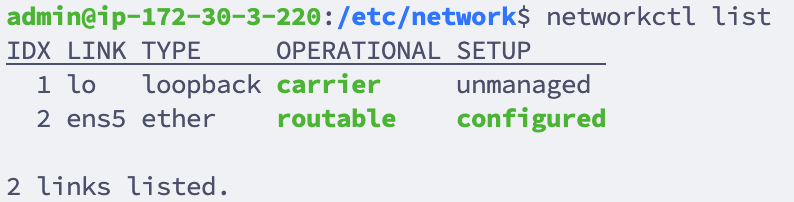
First, identify the network interface you wish to configure. You can list all network interfaces using:
```shell
networkctl list
```
[](https://kb.filewave.com/uploads/images/gallery/2024-01/1mWKjVXFvMUjRTH7-image.png)
2. **Edit the /etc/network/interfaces file:** Using 'nano', edit the interfaces file to set the network configurations.
```
nano /etc/network/interfaces
```
Your default interfaces file should look something like this (your interface name may be different):
```
# The loopback network interface
auto lo eth0
iface lo inet loopback
# The primary network interface
iface eth0 inet dhcp
```
Change the file to look like this, using your network preferences (note 'dhcp' has been changed to 'static' in line 6)
```
# The loopback network interface
auto lo eth0
iface lo inet loopback
# The primary network interface
iface eth0 inet static
address 192.168.10.33
netmask 255.255.255.0
broadcast 192.168.10.255
dns-nameservers 192.168.10.254 192.168.10.255
```
3. **Verify Resolv.conf, hosts and hostname files:** Verify that these files in /etc/ are configured correctly for your network and server.
/etc/resolv.conf: This file should list your DNS servers
/etc/hosts: This file should point your FQDN to localhost (127.0.0.1)
/etc/hostname: Specifies the hostname for your server. This is **filewave** by default.
4. **Disable IPv6 (For IVS):** Edit the sysctl.config file by adding the following lines to the end of the file
```
nano /etc/sysctl.config
```
```
net.ipv6.conf.all.disable_ipv6 = 1
net.ipv6.conf.default.disable_ipv6 = 1
net.ipv6.conf.lo.disable_ipv6 = 1
net.ipv6.conf.tun0.disable_ipv6 = 1
```
5. **Restart/Check Network Status:** ```
systemctl restart networking.service
systemctl status networking.service
```
6. **Verify IP:** ```
ip a
```
## Related Content
- [FileWave Debian Appliances and Networking Issues](https://kb.filewave.com/books/filewave-general-info/page/troubleshoot-dhcp-and-static-ips-on-filewave-debian-appliances "FileWave Debian Appliances and Networking Issues")