**Security and Trust Relationship** Running recipes directly from a cloned repo will bypass AutoPkg's security mechanism. As such an Override recipe should always be created and run. This builds a local recipe with a trust relationship between this and any linked 'parent' recipes, see below. For additional information on Override recipes and more, please view the Foundry video: [FileWave and AutoPkg](https://foundry.filewave.com/mod/scorm/view.php?id=304)
- Congratulations ! Your AutoPkgr setup is now complete. Choose the recipes you would like to run on a regular basis , and then schedule AutoPkgr to run every 24 hours. 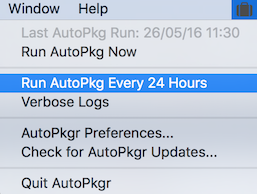**Recipe Updates** On occasion recipes that were working will fail to run. Typically this is because something has changed regarding the 3rd party's website or download. This will require the author of the relevant recipe to update their recipe to implement this change. In this instance of failed recipes, check for recipe updates 'Update Recipes Now'. For any updated recipe, changes should be observed and then the trust relationship will need to be updated too; see below. Override recipes can additionally customise the Fileset, Fileset groups, etc.
### Override Recipes & Trust Relationship For security, a trust relationship was added between recipes. The idea is the child recipe is made to trust it's parent recipes. If an updated version of a parent recipe is pulled from a repository, then this parent will no longer be trusted by that child, until the trust relationship is manually updated. AutoPkgr does not offer the ability to change trust and so this must be done via the command line. With no trust, when a recipe is run that relies on parent recipes you will see an error similar when running the recipe from Terminal: ```shell $ autopkg run -v OracleJava8.filewave.local Processing OracleJava8.filewave.local... Failed local trust verification. Receipt written to /tmp/receipts/OracleJava8.filewave-receipt-20180409-141621.plist The following recipes failed: OracleJava8.filewave.local No trust information present. Nothing downloaded, packaged or imported. ``` In this example, Creating a Recipe Override will create a recipe that has trust added for us. Using the above Java8 example, first make an Override recipe. The Override recipe and initial trust can be created in either AutoPkgr or using the command line. The Java 8 override recipe will be called "Java8.filewave.override". The last entry is reference to the parent recipe to be overridden (this can be either be recipe name or it's identifier, recipe name used in this example): ```shell $ autopkg make-override -n Java8.filewave.override Java8.filewave ``` By making the override file in this way, the trust relationship has been added automatically to the Override recipe. Now there is a trust relationship, the override file can be used to run the recipe (either through Terminal or AutoPkgr): ```shell $ autopkg run -v OracleJava8.filewave.override Processing OracleJava8.filewave.override... [lines removed] The following fileset was imported: Fw Fileset Id Fw Fileset Group Fw Fileset Name ------------- ---------------- --------------- 194266 Root Java - 1.8.161.12 The following packages were copied: Pkg Path -------- /Users/Shared/Autopkg/Cache/local.override.filewave.OracleJava8/Java-1.8.161.12.pkg The following new items were downloaded: Download Path ------------- /Users/Shared/Autopkg/Cache/local.override.filewave.OracleJava8/downloads/Java.dmg ``` If after updating repos, the trust relationship error is flagged against any recipes, this indicates that a parent has been updated and trust is no longer in place. At this point, the parent should be reviewed to observe the changes made. Changes to a recipe can easily be viewed by navigating to the relevant recipe on GitHub and viewing the 'History'. Once confirmation has been made that the changes are acceptable, a new trust relationship should be created. As an override file already exits, the trust will need to be updated for the Java 8 override recipe; as such re-trusting all parents: ```shell $ autopkg update-trust-info Java8.filewave.override ``` Although it is possible to disable trust relationship, this should not be recommended for security reasons. Current status can be seen by running the following and checking the value of 'FAIL\_RECIPES\_WITHOUT\_TRUST\_INFO': ```shell $ autopkg info ``` It is possible to temporarily override the trust relationship, such that it is ignored: ```shell $ autopkg run --ignore-parent-trust-verification-errors [name of recipe] ``` ### Important**Review before deployment.** Inspect recipe changes before allowing AutoPkg to import them into FileWave. Test every created Fileset on representative Macs before expanding the Deployment.
## Related Content - [Integrated AutoPkg (v15.5+)](https://kb.filewave.com/books/integrations/page/autopkg-filewave-integrated-v155 "Integrated AutoPkg (v15.5+)") - [Autopkg(r) FAIL\_RECIPES\_WITHOUT\_TRUST\_INFO](https://kb.filewave.com/books/integrations/page/autopkgr-fail-recipes-without-trust-info "Autopkg(r) FAIL_RECIPES_WITHOUT_TRUST_INFO") - FileWave & AutoPkg Instructions - [https://github.com/autopkg/filewave](https://github.com/autopkg/filewave) - The primary site for AutoPkg - [http://autopkg.github.io/autopkg](http://autopkg.github.io/autopkg) - Github Site for AutoPkg - [https://github.com/autopkg/autopkg](https://github.com/autopkg/autopkg) - AutoPkgr website - [http://www.lindegroup.com/autopkgr](http://www.lindegroup.com/autopkgr) - AutoPkg Trust - [https://github.com/autopkg/autopkg/wiki/AutoPkg-and-recipe-parent-trust-info](https://github.com/autopkg/autopkg/wiki/AutoPkg-and-recipe-parent-trust-info)