# macOS 26 Compatible Devices (Custom Field)
## Description
Details on identifying compatible devices for macOS 26 (Tahoe) using a Custom Field.
| **macOS**
|
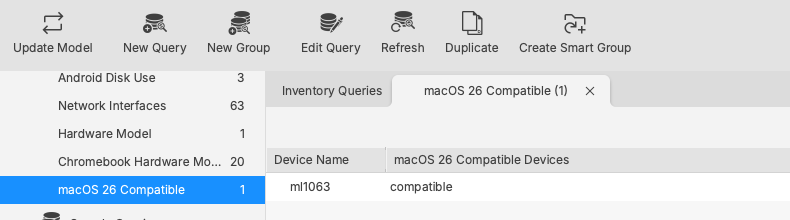
| Custom Field, returns either: compatible or incompatible
|
Example query view:
[](https://kb.filewave.com/uploads/images/gallery/2026-03/AAJqjtTHJSRsImcQ-image.png)
## Ingredients
- macOS - Custom Field exported file: [FileWave CF macOS 26 Compatible.customfields](https://kb.filewave.com/attachments/506)
## Directions
- Download the Custom Field exported file and unzip
- From the Admin console, open: **Assistants** > **Custom Fields**
- Choose **Import**
- After importing, select desired value for **Assigned to all devices**
- Save
Details for[ Importing and Exporting Custom Field Files](https://kb.filewave.com/books/custom-fields/page/importing-and-exporting-custom-field-files "Importing and Exporting Custom Field Files")
May be assigned to all devices, since Windows script is configured to return: NA