Microsoft Enterprise Platform Single Sign-on for macOS
What
Platform Single Sign-on (Platform SSO or PSSO) extends Apple's Extensible SSO framework to the macOS login and account experience. For Microsoft Entra ID deployments, this workflow builds on FileWave's Microsoft Enterprise SSO plug-in for Apple devices guidance and Apple's Platform Single Sign-on for macOS framework.
With password authentication, Platform SSO can synchronize the user's local macOS account password with their Microsoft Entra ID password. Depending on the operating system version, identity provider support, and payload settings, Platform SSO can also support other authentication methods such as Secure Enclave-backed platform credentials or smart cards.
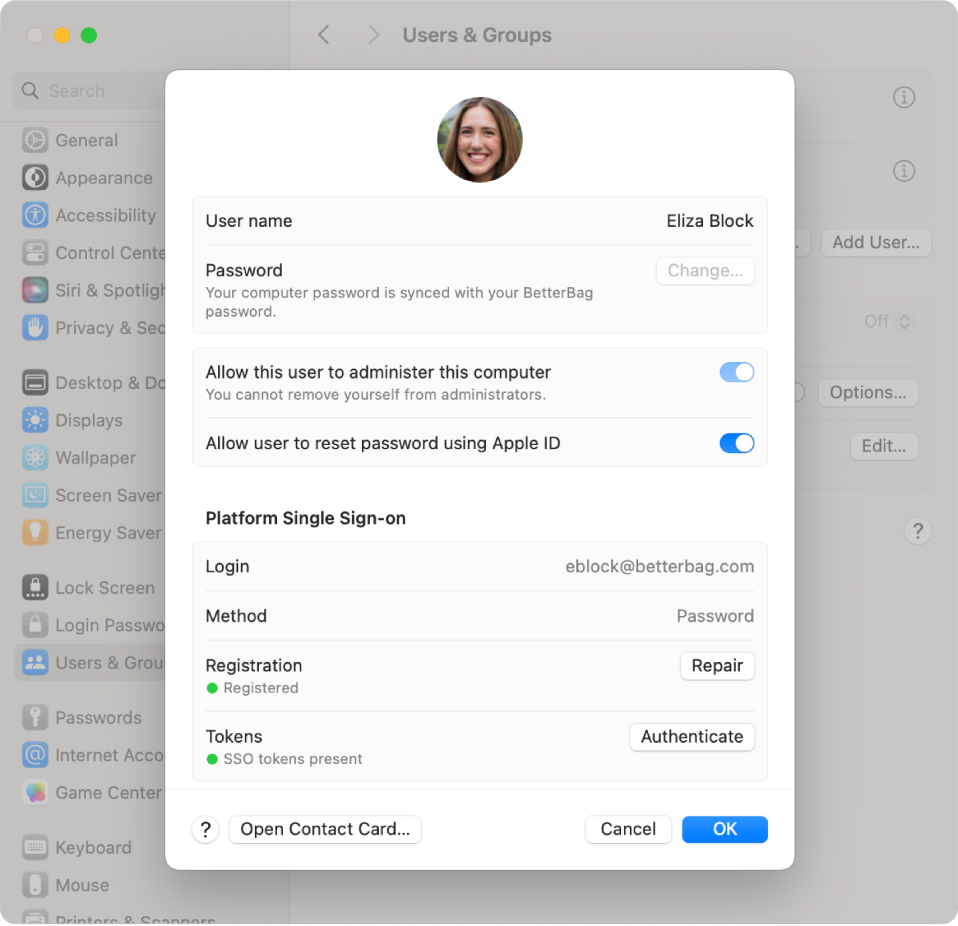
After registration, Platform Single Sign-on status appears under the user's account in System Settings > Users & Groups:
When/Why
Use Platform SSO when you manage Mac computers with FileWave and want users to sign in with their Microsoft Entra ID identity while reducing local password drift. This builds on the Microsoft Enterprise SSO plug-in by extending the SSO experience closer to the local Mac account and login workflow.
How
Below are the main requirements and deployment steps to review before using the example profile.
FileWave 16.4 Single Sign-On Extension fields
FileWave Anywhere 16.4 adds fields to the Apple Single Sign-On Extensions payload for the new-user authentication methods supported by the selected identity-provider extension:
- Password
- Smart Card
- Access Key
- Synchronize profile picture
- Temporary session quick login
Configure only methods supported by the identity-provider extension, the target macOS version, and the organization’s sign-in policy. Adding a method to the payload does not add support to an extension that does not implement it.
Access Key Reader Issuer Certificate
When Access Key authentication is used, FileWave 16.4 can associate an Access Key Reader Issuer Certificate from an existing certificate payload. The certificate validates the terminal identity of the access-key reader during authentication.
- Select the certificate through the same existing-certificate selection workflow used by Network and VPN profile payloads.
- The certificate must use an elliptic-curve key, as required by Apple’s platform.
- The reader issuer must match the selected certificate. A mismatch causes authentication to fail.
- Deploy and validate the certificate dependency before relying on Access Key sign-in for production users.
Do not enable Password, Smart Card, and Access Key merely because all three fields are available. Choose the intended authentication method with the identity team, validate the provider prerequisites, and pilot registration, login, recovery, and device replacement.
Platform SSO requirements
A Mac running macOS 13 or later. Microsoft currently recommends macOS 14 Sonoma or later for the best Entra Platform SSO experience, and some newer Apple Platform SSO features require later macOS versions.
A mobile device management (MDM) solution that supports the Extensible Single Sign-on payload with Platform SSO settings. In FileWave, this means an MDM-enrolled Mac, such as Automated Device Enrollment or User Approved MDM enrollment.
An identity provider and SSO extension that support the Platform SSO authentication method you plan to use.
For Microsoft Entra ID Platform SSO, Microsoft lists the Company Portal app version 5.2404.0 or later, Microsoft Authenticator, and user permissions to register or join devices to Microsoft Entra ID as requirements.
One of the supported authentication methods for your deployment. This example focuses on password authentication, where the user's local password and Entra ID password are synchronized.
Note: If the Mac is unenrolled from MDM, Apple notes that the Mac is also unregistered from the identity provider.
WS-Trust federation
WS-Trust federation is supported in macOS 13.3 or later. This allows Platform SSO to authenticate users when their account is managed by an identity provider federated with Microsoft Entra ID.
Deployment
The example below uses a Profile Fileset with a default password-authentication Platform SSO configuration:
- Profile - Entra ID Platform SSO.fileset.zip
Install the Microsoft Company Portal app before targeting users for Platform SSO. You can deploy it through FileWave or have users install it manually. Microsoft provides the current Company Portal app here: Company Portal app.

Please note: Company Portal is required for Microsoft's Platform SSO implementation because it contains the Microsoft SSO extension. Users generally do not need to configure Company Portal directly, but the app must be present and current enough before Platform SSO registration is expected to work.
End-user interaction required
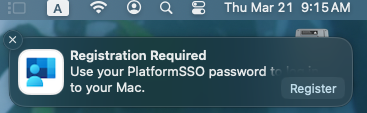
After successful deployment, the user should see a Registration Required notification in macOS:
When the user starts registration, macOS and Microsoft Entra ID will prompt the user to authenticate. Depending on the configuration, this can include entering the local or Platform SSO password and completing Microsoft Entra device registration:
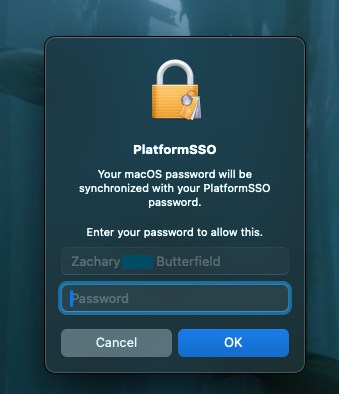
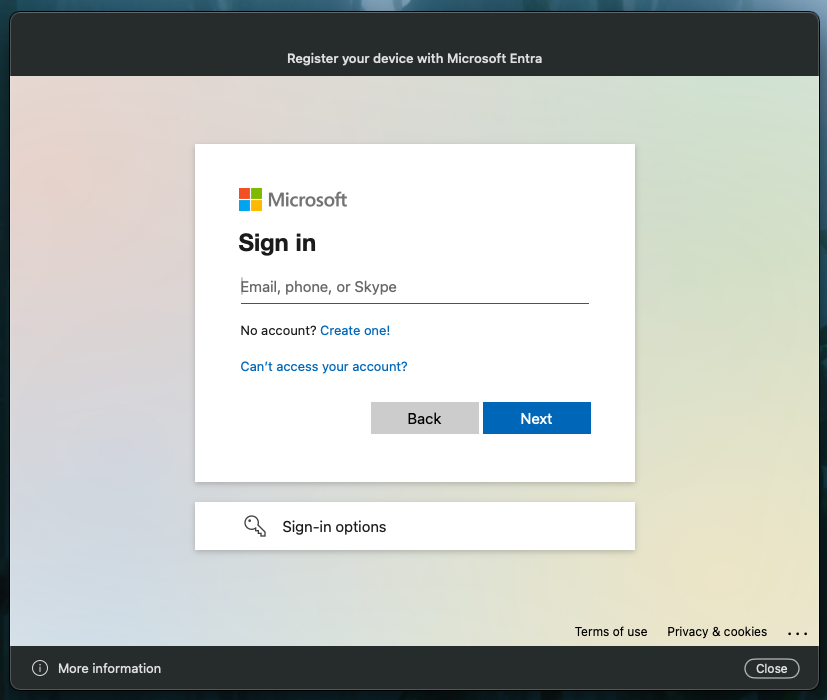
After registration, the user can confirm status in System Settings > Users & Groups by clicking the information button next to their account. The Platform Single Sign-on section should show the configured method, registration state, and token state.
Notes and Observations
- If multi-factor authentication is enabled in your environment, Microsoft app sign-in prompts depend on your Microsoft Entra ID and Conditional Access/security settings.
- The downloadable example Fileset is a starting point. Review the payload, registration-token placeholder, authentication method, and tenant-specific settings before deploying it in production.