Windows 64-Bit Client and Fileset Behavior
What
With the release of FileWave 15.5, significant changes have been made to enhance security and performance on Windows platforms. FileWave now relies on updated open-source components, notably Qt 6, which supports only 64-bit operating systems. This shift means that FileWave Client, FileWave Booster, and FileWave Central are now exclusively 64-bit applications on Windows. As a result, FileWave 15.5 and later cannot run on Windows 32-bit editions.
The 64-bit transition affects FileWave component compatibility, Fileset file paths, Registry views, and script execution. Review older Windows Filesets before changing their architecture behavior.
Current FileWave Windows Client versions run 64-bit. Custom Fields can also run 64-bit when On Windows, run as 64-bit is enabled. Older Custom Fields may remain configured for 32-bit execution after an upgrade so existing scripts continue to behave as before. Enable 64-bit execution only after validating PowerShell modules, Registry views, paths, executables, and other external dependencies. See Running Built-in PowerShell Commands with Custom Fields for the detailed Custom Field workflow.
When to review Windows architecture
When to Be Aware
- Upgrading FileWave Components on Windows: If you plan to upgrade the FileWave Client, Booster or Central on Windows devices to version 15.5 or newer.
- Managing Windows Devices: When deploying filesets to Windows devices, especially during the transition from 32-bit to 64-bit clients and servers.
Why This Change Matters
- Performance Improvements: 64-bit applications can handle more memory and may perform better than their 32-bit counterparts.
- Future-Proofing: Aligns FileWave with modern operating systems, many of which are phasing out 32-bit support.
However, this change necessitates adjustments in how filesets are configured and deployed, particularly concerning file system paths and registry entries on Windows devices.
How
Impact on Fileset Delivery and Management
On Windows systems, the installation paths differ between 32-bit and 64-bit architectures:
- 32-bit Windows: Applications install to C:\Program Files\
- 64-bit Windows:
- 32-bit Applications: Install to C:\Program Files (x86)\
- 64-bit Applications: Install to C:\Program Files\
To maintain compatibility with legacy 32-bit applications, Windows uses a system called WOW64 (Windows On Windows 64). This system automatically redirects file system calls from 32-bit applications attempting to access C:\Program Files\ to C:\Program Files (x86)\, ensuring that older applications function correctly on 64-bit systems.
Previous Behavior with FileWave 15.4 and Earlier
- FileWave Client, Booster, and Central on Windows were 32-bit applications.
- Due to the FileWave Client running in 32bit mode it would sometimes lead to confusion about paths used by the OS for someone new to FileWave until an administrator would remember to always factor that in.
- This redirection affected file deployment locations, registry entries, and script execution environments.
Configure current Windows Filesets
New Windows Filesets use 64-bit execution by default. For existing content, open the Fileset properties in FileWave Central and choose the architecture behavior deliberately:
- Enabled — On Windows, run as 64-bit: Use when the payload or script needs native 64-bit PowerShell modules, Windows components, Registry view, or normal 64-bit path behavior.
- Disabled — preserve 32-bit execution: Use only when the application, COM component, script, Registry view, executable, or path behavior deliberately depends on the 32-bit environment.
- File paths: 64-bit applications normally use
C:\Program Files\; 32-bit applications normally useC:\Program Files (x86)\. - Registry: 32-bit processes can be redirected to
Wow6432Node. Test the exact Registry view your Fileset changes. - Scripts: Use
Sysnativeonly when a 32-bit process must reach the native 64-bitSystem32tools. It is not required for scripts already running 64-bit.
Configure Windows Blocker Scripts
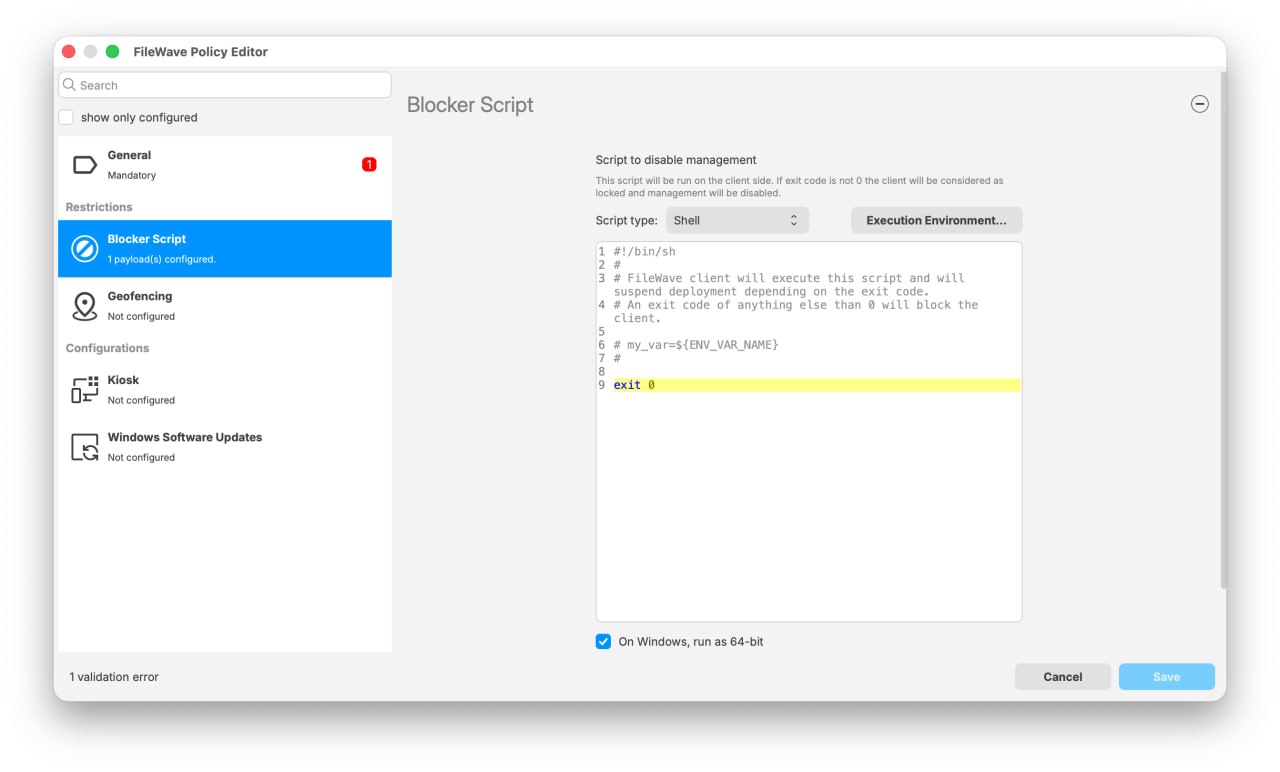
Blocker Scripts have the same On Windows, run as 64-bit control in the FileWave Policy Editor. The setting is checked by default for a new Blocker Script.
Older Blocker Scripts remain unchecked after upgrade so they continue to run with their existing 32-bit behavior. Do not enable 64-bit execution on an older script merely to match the new default. First review and test its PowerShell modules, Registry view, paths, executables, COM components, and other dependencies; then enable the setting when the script has been updated and validated for 64-bit execution.
Migration Considerations
To facilitate the transition:
- New Filesets:
- Filesets created with FileWave 15.5 or later default to 64-bit.
- Existing Filesets:
- Filesets created before FileWave 15.5 are automatically marked as 32-bit during the upgrade to maintain their original behavior.
- You can change these filesets to 64-bit if necessary by editing their properties.
A script that depends on a 32-bit path, Registry view, or executable may need changes before you switch its Fileset to 64-bit execution.
Before wide deployment, test filesets to ensure they install correctly on target Windows devices with the appropriate architecture settings.
Impact on FileWave Booster and Central
The transition also affects FileWave Booster and FileWave Central on Windows:
- FileWave Booster:
- Now a 64-bit application on Windows, requiring a 64-bit Windows operating system.
- Ensure that the hardware and OS of the server running the Booster are compatible before upgrading.
- FileWave Central:
- Also transitioned to 64-bit on Windows, necessitating updates to any Windows systems running this component.
- Verify system compatibility.
Careful planning and testing are essential to ensure a smooth transition and to prevent deployment errors on Windows devices.