Imaging Issue After Upgrading FileWave and Using Self-Signed SSL Certificate
What
After upgrading FileWave Server, IVS, and clients, imaging may fail when the environment uses a self-signed SSL certificate.
When/Why
Use this workaround when IVS imaging fails after an upgrade and the environment does not use a root-trusted SSL certificate. Add the check to your IVS upgrade process for self-signed certificate deployments.
How
- Access the IVS via SSH or locally:
- Connect to the IVS by SSH or local console. Use
sudo -sso the following file edit runs as root.
- Connect to the IVS by SSH or local console. Use
- Edit the dnsmasq.lua file:
- Use your preferred command-line editor, such as vi or nano, to edit
/imaging/scripts/bin/dnsmasq.lua:vi /imaging/scripts/bin/dnsmasq.luanano /imaging/scripts/bin/dnsmasq.lua
- Use your preferred command-line editor, such as vi or nano, to edit
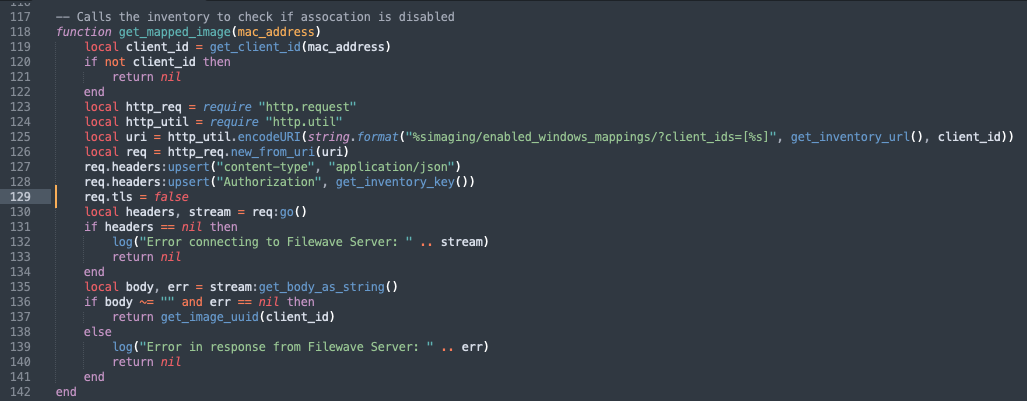
- Navigate to line 128:
- Navigate to line 128.

- Navigate to line 128.
- Switch to insert mode:
- In vi, press
ito switch to insert mode. In nano, move the cursor to the line and edit directly.
- In vi, press
- Add the following line:
req.tls = false
- Save and exit vi or nano:
- Press the Esc key to exit insert mode.
- In vi, type
:wqand press Enter to save and exit. In nano, press Ctrl+X and save the file when prompted.
- Verify functionality:
- Test imaging again after saving the file.