# Using Parameters in Apple iOS/macOS Profiles

Creating profiles with parameters in them is the ability to insert string/bool/int/datetime parameters into a profile so that they can be dynamically used on many devices.

The following will help you understand what fields can be used, and what information will come from them.

Remember: The below options are for FileWave's built in abilities. You can always create your own options by creating [**custom fields**](https://kb.filewave.com/books/custom-fields/page/custom-fields "Custom Fields") that are either mapped to LDAP attributes, custom scripts, or manually entered parameters. See [Custom Fields](https://kb.filewave.com/books/custom-fields/page/custom-fields "Custom Fields") for more information.

## What are my Options

## LDAP Parameters

FileWave version 6.1 allows you to use Directory based parameters in your profile payloads.

<table id="bkmrk-%25first_name%25-%25last_n"><tbody><tr><td>%first\_name%

%last\_name%

%full\_name%

%short\_name%

%email%

%job\_title%

%mobile\_phone%

%guid%

</td></tr></tbody></table>

Setting up a directory server for use with Parameterized Profiles is easy. Navigate to the FileWave Preferences Screen and fill out the appropriate information for your OpenDirectory, Active Directory or E-Directory. For issues and troubleshooting related to your LDAP preferences, please refer to the [LDAP section](https://kb.filewave.com/books/filewave-central-anywhere/page/ldap-preferences "LDAP Preferences").

You must also be using LDAP authentication for iOS device enrollment. Instructions for that setup are in the [Using LDAP to enroll macOS/iOS/Android devices](https://kb.filewave.com/books/evaluation-guide/page/using-ldap-to-enroll-macosiosandroid-devices "Using LDAP to enroll macOS/iOS/Android devices").

<p class="callout info">For the above user strings to work you must be pointed to an Directory server and have it selected as authentication</p>

<p class="callout info">You can also map custom fields to LDAP parameters to extend the above list.  
See [Custom Fields](https://kb.filewave.com/books/custom-fields/page/custom-fields "Custom Fields") for more information.</p>

## Inventory / Device Parameters

Starting in FileWave **6.1+** you can reference specific information about the device as well, directly from FileWave Inventory. Those fields are:

<table id="bkmrk-%25osversion%25-%25serialn"><tbody><tr><td>%OSVersion%

%SerialNumber%

%ProductName%

%BuildVersion%

%WIFIMAC%

%ICCID%

%IMEI%

</td></tr></tbody></table>

## All Devices

<table id="bkmrk-common-device-variab" style="width: 70%; height: 1197.94px;"><tbody><tr style="height: 35.3984px;"><td style="width: 52.0116%; height: 35.3984px;">Common Device Parameters

</td><td style="width: 12.9575%; height: 35.3984px;">Type

</td><td style="width: 34.8559%; height: 35.3984px;">FileWave Version Introduced

</td></tr><tr style="height: 35.3984px;"><td style="width: 52.0116%; height: 35.3984px;">%archived%

</td><td style="width: 12.9575%; height: 35.3984px;">datetime

</td><td style="width: 34.8559%; height: 35.3984px;">13.0.0

</td></tr><tr style="height: 35.3984px;"><td style="width: 52.0116%; height: 35.3984px;">%auth\_username%

</td><td style="width: 12.9575%; height: 35.3984px;">string

</td><td style="width: 34.8559%; height: 35.3984px;">13.0.0

</td></tr><tr style="height: 35.3984px;"><td style="width: 52.0116%; height: 35.3984px;">%cpu\_count%

</td><td style="width: 12.9575%; height: 35.3984px;">int

</td><td style="width: 34.8559%; height: 35.3984px;">13.0.0

</td></tr><tr style="height: 35.3984px;"><td style="width: 52.0116%; height: 35.3984px;">%cpu\_type%

</td><td style="width: 12.9575%; height: 35.3984px;">string

</td><td style="width: 34.8559%; height: 35.3984px;">13.0.0

</td></tr><tr style="height: 35.3984px;"><td style="width: 52.0116%; height: 35.3984px;">%current\_ip\_address%

</td><td style="width: 12.9575%; height: 35.3984px;">string

</td><td style="width: 34.8559%; height: 35.3984px;">13.0.0

</td></tr><tr style="height: 35.3984px;"><td style="width: 52.0116%; height: 35.3984px;">%last\_enterprise\_app\_validation\_date%

</td><td style="width: 12.9575%; height: 35.3984px;">datetime

</td><td style="width: 34.8559%; height: 35.3984px;">13.0.0

</td></tr><tr style="height: 35.3984px;"><td style="width: 52.0116%; height: 35.3984px;">%last\_state\_change\_date%

</td><td style="width: 12.9575%; height: 35.3984px;">datetime

</td><td style="width: 34.8559%; height: 35.3984px;">13.0.0

</td></tr><tr style="height: 35.3984px;"><td style="width: 52.0116%; height: 35.3984px;">%department%

</td><td style="width: 12.9575%; height: 35.3984px;">string

</td><td style="width: 34.8559%; height: 35.3984px;">13.0.0

</td></tr><tr style="height: 35.3984px;"><td style="width: 52.0116%; height: 35.3984px;">%device\_id%

</td><td style="width: 12.9575%; height: 35.3984px;">string

</td><td style="width: 34.8559%; height: 35.3984px;">13.0.0

</td></tr><tr style="height: 35.3984px;"><td style="width: 52.0116%; height: 35.3984px;">%device\_name%

</td><td style="width: 12.9575%; height: 35.3984px;">string

</td><td style="width: 34.8559%; height: 35.3984px;">13.0.0

</td></tr><tr style="height: 35.3984px;"><td style="width: 52.0116%; height: 35.3984px;">%device\_product\_name%

</td><td style="width: 12.9575%; height: 35.3984px;">string

</td><td style="width: 34.8559%; height: 35.3984px;">13.0.0

</td></tr><tr style="height: 35.3984px;"><td style="width: 52.0116%; height: 35.3984px;">%enroll\_date%

</td><td style="width: 12.9575%; height: 35.3984px;">datetime

</td><td style="width: 34.8559%; height: 35.3984px;">13.0.0

</td></tr><tr style="height: 35.3984px;"><td style="width: 52.0116%; height: 35.3984px;">%filewave\_client\_name%

</td><td style="width: 12.9575%; height: 35.3984px;">string

</td><td style="width: 34.8559%; height: 35.3984px;">13.0.0

</td></tr><tr style="height: 35.3984px;"><td style="width: 52.0116%; height: 35.3984px;">%filewave\_id%

</td><td style="width: 12.9575%; height: 35.3984px;">string

</td><td style="width: 34.8559%; height: 35.3984px;">13.0.0

</td></tr><tr style="height: 35.3984px;"><td style="width: 52.0116%; height: 35.3984px;">%free\_disk\_space%

</td><td style="width: 12.9575%; height: 35.3984px;">int

</td><td style="width: 34.8559%; height: 35.3984px;">13.0.0

</td></tr><tr style="height: 35.3984px;"><td style="width: 52.0116%; height: 35.3984px;">%is\_system\_integrity\_protection\_enabled%

</td><td style="width: 12.9575%; height: 35.3984px;">bool

</td><td style="width: 34.8559%; height: 35.3984px;">13.0.0

</td></tr><tr style="height: 35.3984px;"><td style="width: 52.0116%; height: 35.3984px;">%is\_tracking\_enabled%

</td><td style="width: 12.9575%; height: 35.3984px;">bool

</td><td style="width: 34.8559%; height: 35.3984px;">13.0.0

</td></tr><tr style="height: 35.3984px;"><td style="width: 52.0116%; height: 35.3984px;">%last\_check\_in%

</td><td style="width: 12.9575%; height: 35.3984px;">datetime

</td><td style="width: 34.8559%; height: 35.3984px;">13.0.0

</td></tr><tr style="height: 35.3984px;"><td style="width: 52.0116%; height: 35.3984px;">%last\_ldap\_username%

</td><td style="width: 12.9575%; height: 35.3984px;">string

</td><td style="width: 34.8559%; height: 35.3984px;">13.0.0

</td></tr><tr style="height: 35.3984px;"><td style="width: 52.0116%; height: 35.3984px;">%last\_logged\_in\_username%

</td><td style="width: 12.9575%; height: 35.3984px;">string

</td><td style="width: 34.8559%; height: 35.3984px;">13.0.0

</td></tr><tr style="height: 35.3984px;"><td style="width: 52.0116%; height: 35.3984px;">%location%

</td><td style="width: 12.9575%; height: 35.3984px;">string

</td><td style="width: 34.8559%; height: 35.3984px;">13.0.0

</td></tr><tr style="height: 35.3984px;"><td style="width: 52.0116%; height: 35.3984px;">%management\_mode%

</td><td style="width: 12.9575%; height: 35.3984px;">int

</td><td style="width: 34.8559%; height: 35.3984px;">13.0.0

</td></tr><tr style="height: 35.3984px;"><td style="width: 52.0116%; height: 35.3984px;">%monitor\_id%

</td><td style="width: 12.9575%; height: 35.3984px;">string

</td><td style="width: 34.8559%; height: 35.3984px;">13.0.0

</td></tr><tr style="height: 35.3984px;"><td style="width: 52.0116%; height: 35.3984px;">%ram\_size%

</td><td style="width: 12.9575%; height: 35.3984px;">int

</td><td style="width: 34.8559%; height: 35.3984px;">13.0.0

</td></tr><tr style="height: 35.3984px;"><td style="width: 52.0116%; height: 35.3984px;">%serial\_number%

</td><td style="width: 12.9575%; height: 35.3984px;">string

</td><td style="width: 34.8559%; height: 35.3984px;">13.0.0

</td></tr><tr style="height: 35.3984px;"><td style="width: 52.0116%; height: 35.3984px;">%state%

</td><td style="width: 12.9575%; height: 35.3984px;">int

</td><td style="width: 34.8559%; height: 35.3984px;">13.0.0

</td></tr><tr style="height: 35.3984px;"><td style="width: 52.0116%; height: 35.3984px;">%total\_disk\_space%

</td><td style="width: 12.9575%; height: 35.3984px;">int

</td><td style="width: 34.8559%; height: 35.3984px;">13.0.0

</td></tr><tr style="height: 35.3984px;"><td style="width: 52.0116%; height: 35.3984px;">%unenrolled%

</td><td style="width: 12.9575%; height: 35.3984px;">bool

</td><td style="width: 34.8559%; height: 35.3984px;">13.0.0

</td></tr><tr style="height: 35.3984px;"><td style="width: 52.0116%; height: 35.3984px;">%is\_user\_enrollment%

</td><td style="width: 12.9575%; height: 35.3984px;">bool

</td><td style="width: 34.8559%; height: 35.3984px;">13.2.0

</td></tr><tr style="height: 35.3984px;"><td style="width: 52.0116%; height: 35.3984px;">%is\_activation\_lock\_manageable%

</td><td style="width: 12.9575%; height: 35.3984px;">bool

</td><td style="width: 34.8559%; height: 35.3984px;">13.2.0

</td></tr><tr style="height: 35.3984px;"><td style="width: 52.0116%; height: 35.3984px;">%remote\_desktop\_enabled%

</td><td style="width: 12.9575%; height: 35.3984px;">bool

</td><td style="width: 34.8559%; height: 35.3984px;">13.2.0

</td></tr><tr style="height: 35.3984px;"><td style="width: 52.0116%; height: 35.3984px;">%external\_boot\_level%

</td><td style="width: 12.9575%; height: 35.3984px;">bool

</td><td style="width: 34.8559%; height: 35.3984px;">13.2.0

</td></tr></tbody></table>

## Desktop Specific (macOS &amp; Windows)

<table id="bkmrk-desktop-device-varia"><tbody><tr><td>Desktop Device Parameters

</td><td>Type

</td><td> </td></tr><tr><td>%device\_manufacturer%

</td><td>string

</td><td>13.0.0

</td></tr><tr><td>%filewave\_client\_locked%

</td><td>bool

</td><td>13.0.0

</td></tr><tr><td>%filewave\_client\_version%

</td><td>string

</td><td>13.0.0

</td></tr><tr><td>%filewave\_model\_number%

</td><td>int

</td><td>13.0.0

</td></tr><tr><td>%rom\_bios\_version%

</td><td>string

</td><td>13.0.0

</td></tr></tbody></table>

## iOS Specific

<table id="bkmrk-ios-device-variables"><tbody><tr><td>iOS Device Parameters

</td><td>Type

</td><td> </td></tr><tr><td>%battery\_level%

</td><td>float (from 0 to 1)

</td><td>13.0.0

</td></tr><tr><td>%last\_cloud\_backup\_date%

</td><td>datetime

</td><td>13.0.0

</td></tr><tr><td>%last\_wallpaper\_change\_date%

</td><td>datetime

</td><td>13.0.0

</td></tr><tr><td>%apple\_device\_id%

</td><td>string

</td><td>13.0.0

</td></tr><tr><td>%eas\_device\_identifier%

</td><td>string

</td><td>13.0.0

</td></tr><tr><td>%is\_activation\_lock\_enabled%

</td><td>bool

</td><td>13.0.0

</td></tr><tr><td>%is\_device\_locator\_service\_enabled%

</td><td>bool

</td><td>13.0.0

</td></tr><tr><td>%is\_do\_not\_disturb\_in\_effect%

</td><td>bool

</td><td>13.0.0

</td></tr><tr><td>%is\_cloud\_backup\_enabled%

</td><td>bool

</td><td>13.0.0

</td></tr><tr><td>%is\_mdm\_lost\_mode\_enabled%

</td><td>bool

</td><td>13.0.0

</td></tr><tr><td>%is\_supervised%

</td><td>bool

</td><td>13.0.0

</td></tr><tr><td>%awaiting\_configuration%

</td><td>bool

</td><td>13.0.0

</td></tr><tr><td>%is\_network\_tethered%

</td><td>bool

</td><td>13.0.0

</td></tr><tr><td>%itunes\_store\_account\_is\_active%

</td><td>bool

</td><td>13.0.0

</td></tr><tr><td>%itunes\_store\_account\_hash%

</td><td>string

</td><td>13.0.0

</td></tr><tr><td>%languages%

</td><td>string

</td><td>13.0.0

</td></tr><tr><td>%locales%

</td><td>string

</td><td>13.0.0

</td></tr><tr><td>%maximum\_resident\_users%

</td><td>int

</td><td>13.0.0

</td></tr><tr><td>%meid%

</td><td>string

</td><td>13.0.0

</td></tr><tr><td>%model%

</td><td>string

</td><td>13.0.0

</td></tr><tr><td>%organization\_info%

</td><td>string

</td><td>13.0.0

</td></tr><tr><td>%product%

</td><td>string

</td><td>13.0.0

</td></tr><tr><td>%product\_name%

</td><td>string

</td><td>13.0.0

</td></tr></tbody></table>

<p class="callout info">You can also map custom fields to script results to extend the above list.  
See [Custom Fields](https://kb.filewave.com/books/custom-fields/page/custom-fields "Custom Fields") for more information.</p>

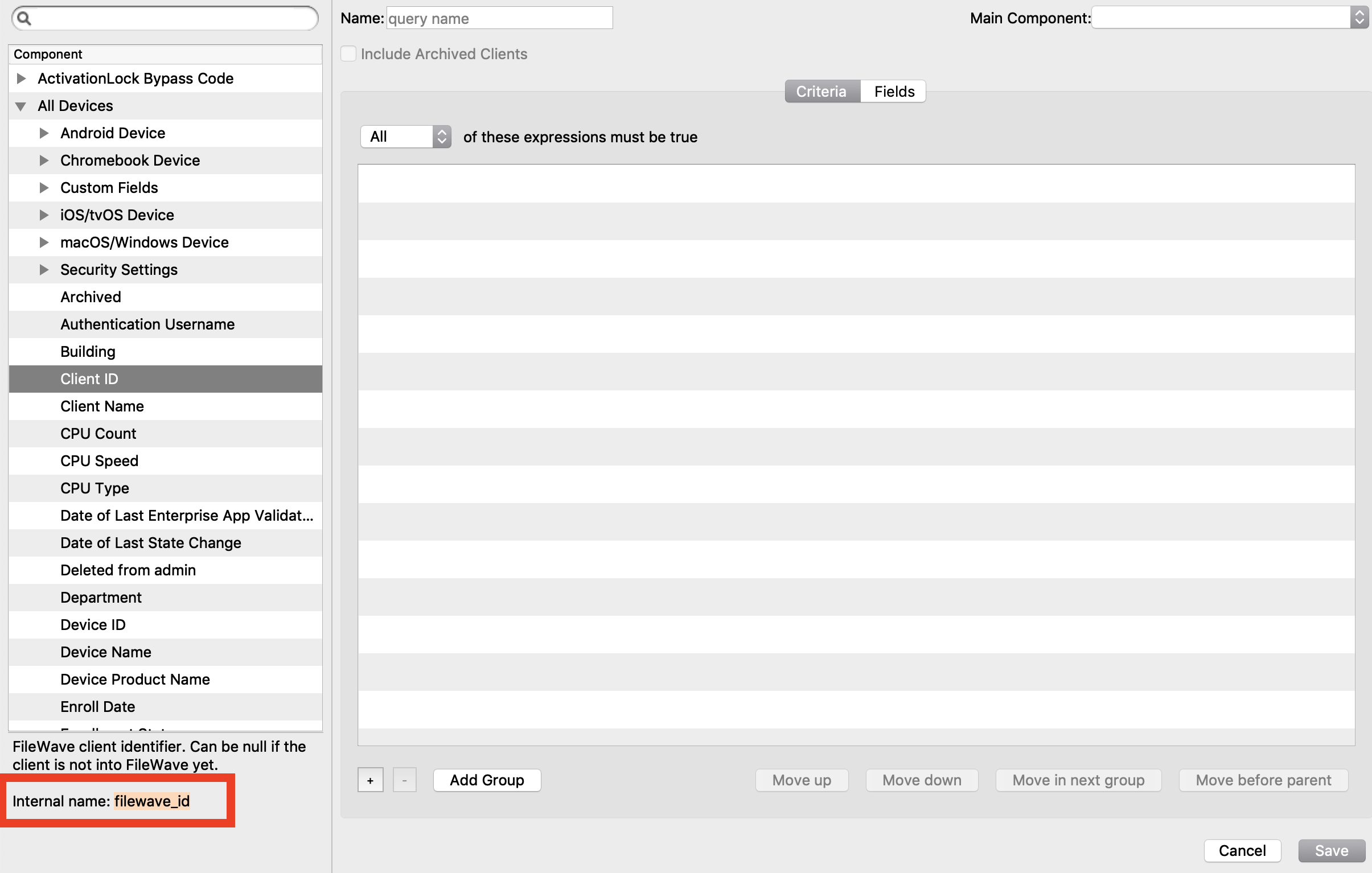
<table id="bkmrk-you-can-also-look-in"><tbody><tr><td>You can also look in the inventory query builder and it will tell you the internal name in the bottom left:
![](https://kb.filewave.com/uploads/images/gallery/2023-07/4F26Y4L3crRdGfmj-embedded-image-yph2mvxb.png)

</td></tr></tbody></table>

## Using parameters in profiles

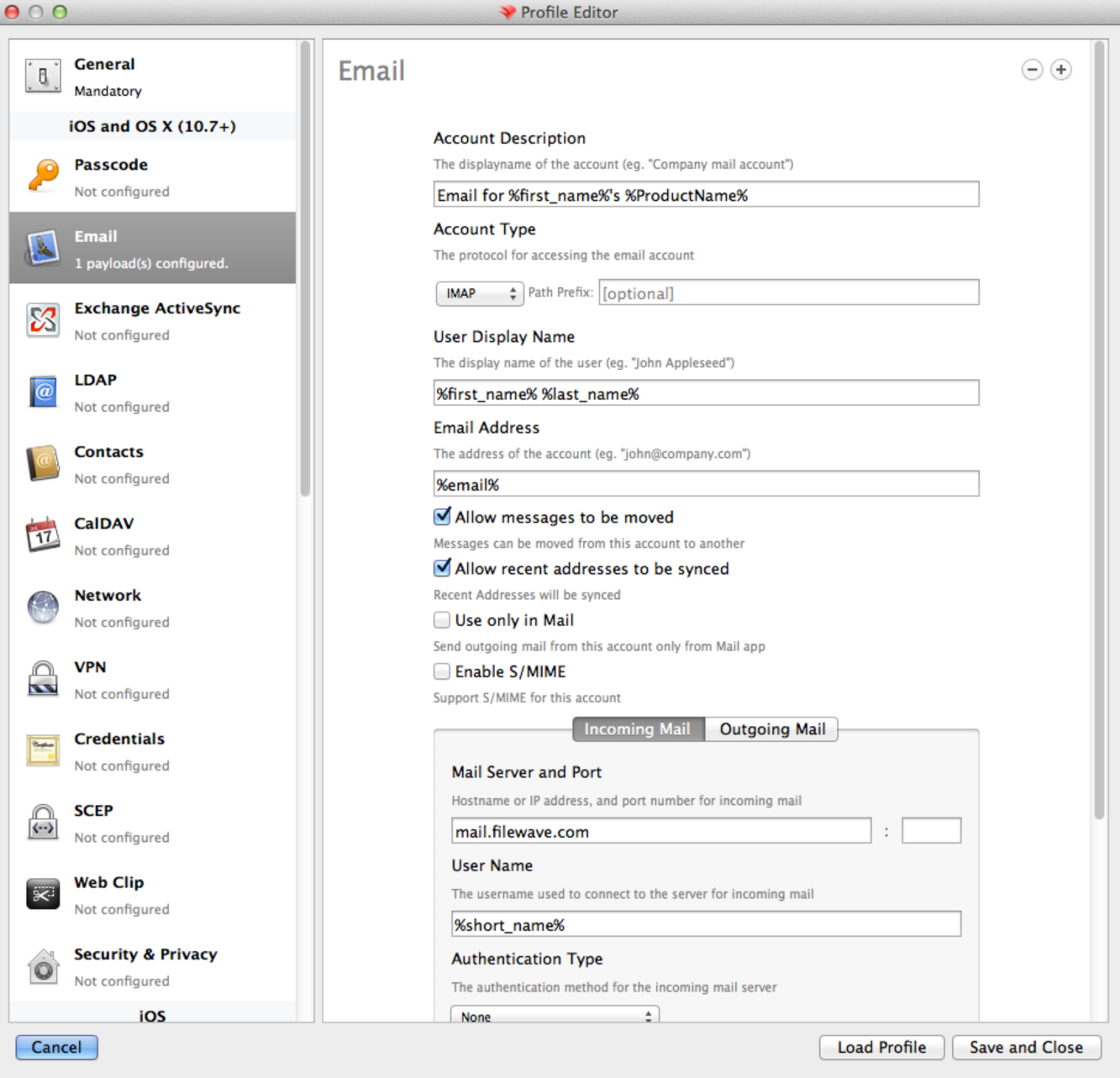
To add parameters to your profiles, simple replace the normal value with one from the list above.

For instance, you might create an email profile with the account information. See the example here:
![Sample Profile](https://kb.filewave.com/uploads/images/gallery/2023-07/RPXWLT7uIa4Dofll-embedded-image-qz82u7gq.png)

## Appendix

Directory servers use their own values for common fields. Below is the mapping for each supported directory:

## E-Directory

<table id="bkmrk-profile-variable-lda"><tbody><tr><td>Profile Parameters

</td><td>LDAP attribute name

</td><td>Remarks

</td></tr><tr><td>short\_name

</td><td>uid

</td><td> </td></tr><tr><td>first\_name

</td><td>givenName

</td><td> </td></tr><tr><td>last\_name

</td><td>sn

</td><td> </td></tr><tr><td>full\_name

</td><td>fullName

</td><td> </td></tr><tr><td>email

</td><td>mail

</td><td> </td></tr><tr><td>job\_title

</td><td>title

</td><td> </td></tr><tr><td>mobile\_phone

</td><td>mobile

</td><td> </td></tr><tr><td>guid

</td><td>GUID

</td><td>A binary read-only attribute

</td></tr></tbody></table>

## Open Directory

<table id="bkmrk-profile-variable-lda-1"><tbody><tr><td>Profile Parameters

</td><td>LDAP attribute name

</td></tr><tr><td>email

</td><td>mail

</td></tr><tr><td>first\_name

</td><td>givenName

</td></tr><tr><td>full\_name

</td><td>fullName

</td></tr><tr><td>guid

</td><td>apple-generateduid

</td></tr><tr><td>job\_title

</td><td>title

</td></tr><tr><td>last\_name

</td><td>sn

</td></tr><tr><td>mobile\_phone

</td><td>mobile

</td></tr><tr><td>short\_name

</td><td>uid

</td></tr></tbody></table>

## Active Directory

<table id="bkmrk-profile-variable-lda-2"><tbody><tr><td>Profile Parameters

</td><td>LDAP attribute name

</td></tr><tr><td>email

</td><td>mail

</td></tr><tr><td>first\_name

</td><td>givenName

</td></tr><tr><td>full\_name

</td><td>fullName

</td></tr><tr><td>guid

</td><td>objectGUID

</td></tr><tr><td>job\_title

</td><td>title

</td></tr><tr><td>last\_name

</td><td>sn

</td></tr><tr><td>mobile\_phone

</td><td>mobile

</td></tr><tr><td>short\_name

</td><td>sAMAccountName

</td></tr></tbody></table>