# Renew - A tool to get users to reboot periodically (macOS Script)
## Description
For remote tools to work reliably, and for security patches to be properly installed, users need to restart their workstations regularly. But we all get focused on our day-to-day, and taking 10 minutes to restart our workstations just gets pushed to the back-burner. [SecondSonConsulting](https://www.secondsonconsulting.com/giving-back/) developed Renew to encourage users to restart their workstations on a regular basis, and the timing can be customized to the environment. This tool can be delivered via MDM, or other methods, but then is self-sustaining, running locally without any other tool controlling it. For the safety of their work, it will never restart the computer without the user’s consent.
## Ingredients
- FW Central
- [swiftDialog Deployment (macOS PKG)](https://kb.filewave.com/books/software-deployment-recipes-macos/page/deploy-swiftdialog-on-macos-with-a-pkg-fileset "swiftDialog Deployment (macOS PKG)")
- Renew PKG - [https://github.com/SecondSonConsulting/Renew/releases](https://github.com/SecondSonConsulting/Renew/releases)
## Directions
1. Install SwiftDialog v2.0 or later: [swiftDialog Deployment (macOS PKG)](https://kb.filewave.com/books/software-deployment-recipes-macos/page/deploy-swiftdialog-on-macos-with-a-pkg-fileset "swiftDialog Deployment (macOS PKG)")
2. Install the latest Renew PKG from their [Releases](https://github.com/SecondSonConsulting/Renew/releases) page as a PKG Fileset. Here is an example: [PKG - Renew.fileset.zip](https://kb.filewave.com/attachments/212)
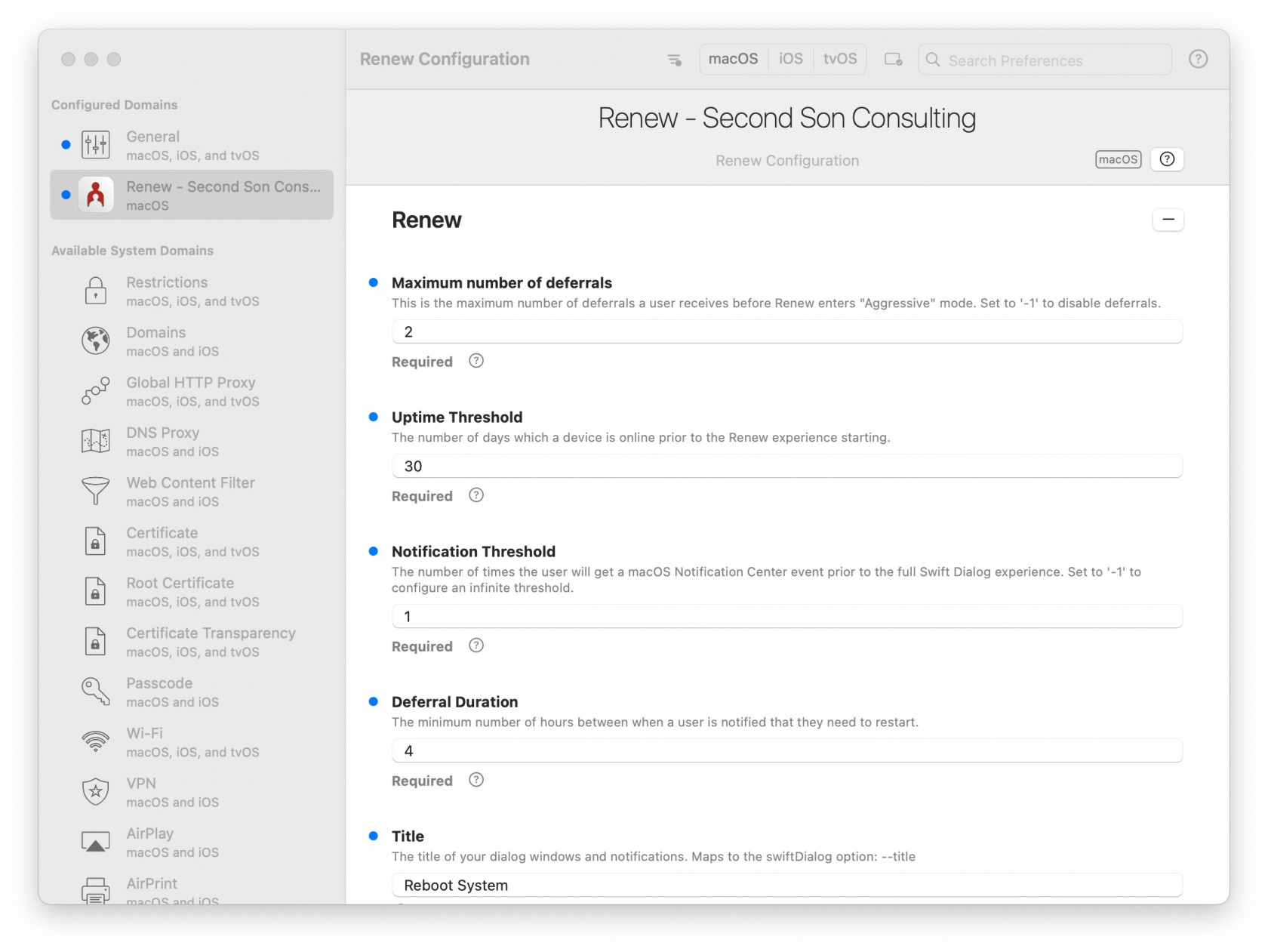
3. Deploy a config profile. This can be done most easily by using [iMazing Profile Editor (free)](https://imazing.com/profile-editor) which has a template for Renew's options.
- Save the profile and then drag and drop it in FileWave Central to make a Profile Fileset. An Example Profile from iMazing is here: [Renew Configuration.mobileconfig](https://kb.filewave.com/attachments/214) and the Fileset made from it is here: [Profile - Renew Configuration.fileset.zip](https://kb.filewave.com/attachments/213)
Note that you can not edit the profile in the FileWave profile editor. It will not display the custom payload.
[](https://kb.filewave.com/uploads/images/gallery/2023-07/XYb9mbJQqZp8ElvW-renew-configuration-2023-07-30-at-8-52-58-pm.jpg)
## Additional Recommended Steps
1. Use the [`OptionalArguments`](https://github.com/SecondSonConsulting/Renew/wiki/OptionalArguments) profile keys to make Renew look and function right for your environment.
2. For macOS Ventura+ compatibility, create a BackgroundItems MDM profile and enforce the LaunchAgent Label ID: `com.secondsonconsulting.renew`with an example here: [Profile - Renew LaunchAgent.fileset.zip](https://kb.filewave.com/attachments/215)
## Examples
### Notification Mode Default User Experience
[](https://github.com/SecondSonConsulting/Renew/blob/main/Example%20Screenshots/Renew-NotificationDefault.png?raw=true#gh-light-mode-only)
### Normal Mode Default User Experience
[](https://github.com/SecondSonConsulting/Renew/blob/main/Example%20Screenshots/Renew-NormalDefaultDialog.png?raw=true#gh-light-mode-only)
### Aggressive Mode Default User Experience
[](https://github.com/SecondSonConsulting/Renew/blob/main/Example%20Screenshots/Renew-AggressiveDefaultDialog.png?raw=true#gh-light-mode-only)
### Custom Fields Design Example Image
SwiftDialog allows a high degree of customization, and Renew allows you to continue to easily take advantage of that. This is an example of how you can customize the user experience to suit your branding and taste.
This example uses a banner image tailored to the window size, and the following OptionalArgument in the configuration file.
```
AdditionalDialogOptions--width 300 --height 350 --messagefont size=15 --position topright --ontop --messagealignment centre
```
[](https://github.com/SecondSonConsulting/Renew/blob/main/Example%20Screenshots/Renew-CustomizedDialog.png?raw=true#gh-light-mode-only)
## Related Content
- [SecondSonConsulting/Renew: A macOS script to encourage users to restart their workstations (github.com)](https://github.com/SecondSonConsulting/Renew)
- [Home · SecondSonConsulting/Renew Wiki (github.com)](https://github.com/SecondSonConsulting/Renew/wiki)