**Review licensing and application compatibility first.** Confirm that your organization is licensed to deploy the selected Oracle Java release and that dependent applications support removing older JRE versions.
## Requirements - FileWave Central - Java Installer (EXE) ## Build and test the Fileset 1. Download the offline EXE update from: [Oracle Download Page](https://www.java.com/en/download/manual.jsp) 2. Create an empty Fileset and drag the Java install EXE to an appropriate location, e.g. ProgramData > fwEXE 3. Select the EXE and choose Get Info > Executable 4. Set to 'Execute once when activated' 5. Add the following launch argument to install silently and remove JRE versions below Oracle's security baseline: ``` "/s REMOVEOUTOFDATEJRES=1" ``` 6. Associate the Fileset with a representative test device, run the deployment, and verify the required Java application before wider rollout. [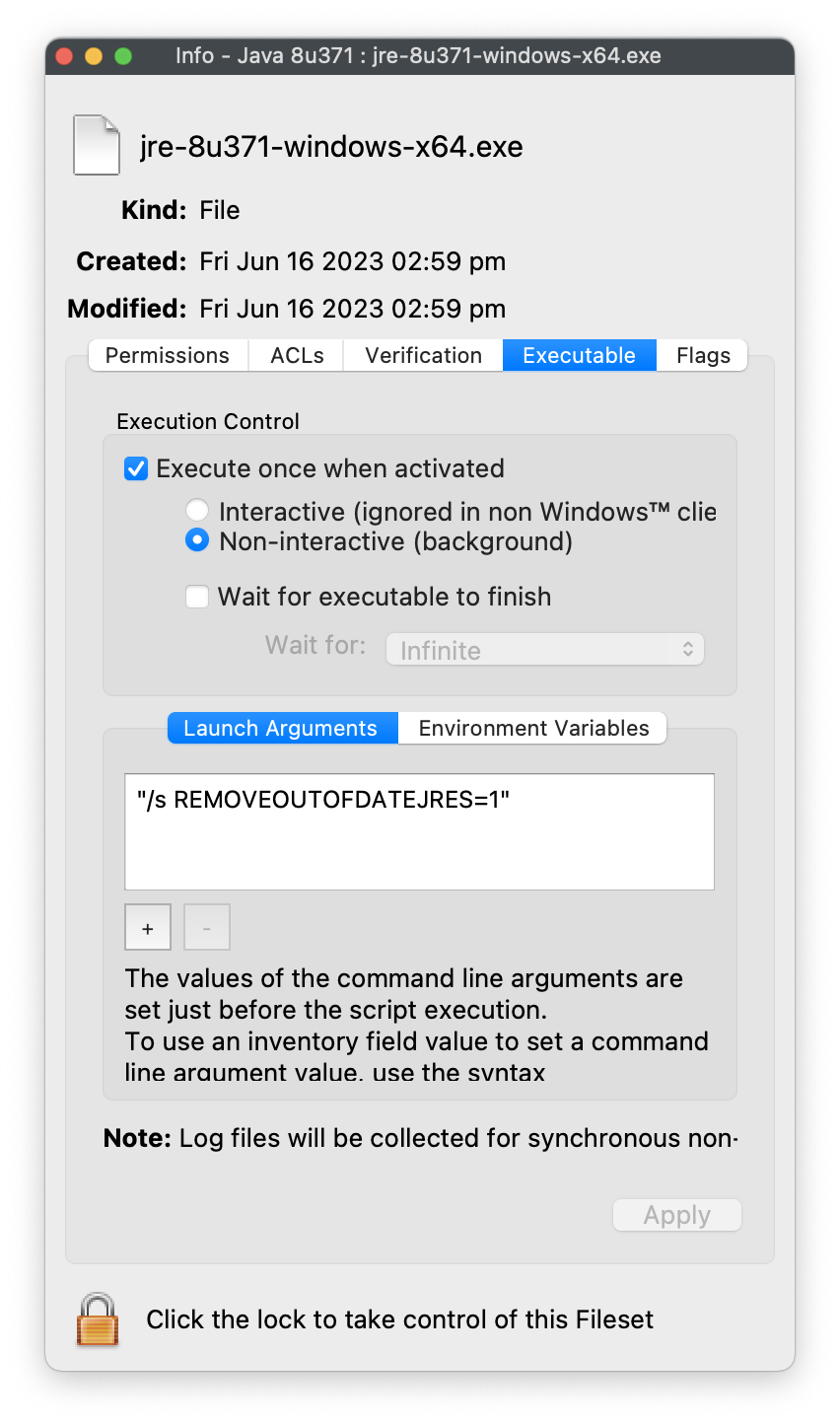](https://kb.filewave.com/uploads/images/gallery/2023-06/p2bwRk03monpN6Qs-javagetinfo.png)**Do not remove older JREs by default.** Omit `REMOVEOUTOFDATEJRES=1` or set it to `0` when an application still depends on an older runtime. Plan the application rollback before broad deployment.
## Oracle installer option [Oracle's Configuration Documentation](https://docs.oracle.com/javase/8/docs/technotes/guides/install/config.html) Applicable to online and offline installers only (.exe files and wrappers). Enables uninstallation of existing out-of-date JREs during JRE install. **REMOVEOUTOFDATEJRES** - REMOVEOUTOFDATEJRES=0 leaves all out-of-date Java versions on the system. - REMOVEOUTOFDATEJRES=1 removes all out-of-date Java versions from the system. For example, running jre1.8.0\_60.exe /s REMOVEOUTOFDATEJRES=1 will remove all JREs below the security baseline.**JREs above the security baseline will not be uninstalled.** Details of baseline may be observed from Oracle's release notes: [https://www.oracle.com/technetwork/java/javase/8all-relnotes-2226344.html](https://www.oracle.com/technetwork/java/javase/8all-relnotes-2226344.html)
**Legacy installers** Use the newest release supported by the dependent application. Older releases are available from [Oracle's Java archive](https://www.oracle.com/java/technologies/downloads/archive/) and may require an Oracle account and appropriate license.