Fileset Script Logging on macOS and Windows
What FileWave records
FileWave enables logging by default for scripts added to a Fileset through the Script view. The log records the script's standard output, timestamps, and exit code.

Where to find Fileset script logs
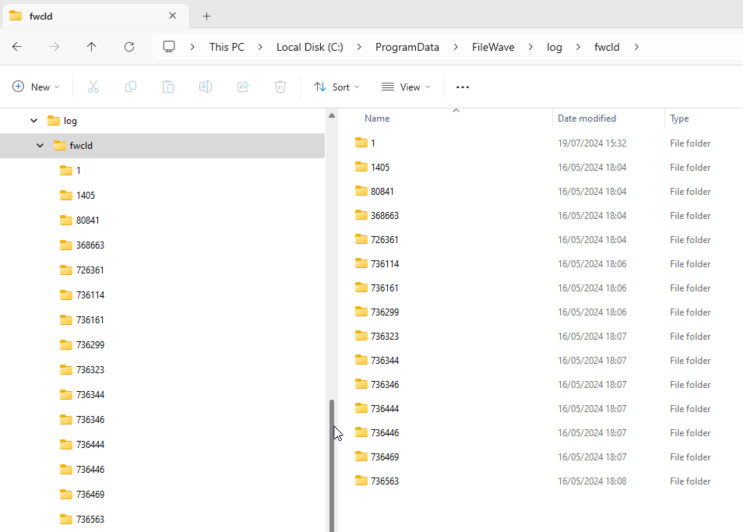
Each time FileWave runs the script, it creates or appends to a log file. Logs are stored in a subfolder named for the Fileset ID. The examples below show the macOS and Windows locations.
macOS
# ls -al /private/var/log/fwcld/
total 0
drwxrwxrwx  17 root  wheel   544 Mar  5 16:01 .
drwxr-xr-x  83 root  wheel  2656 Jul 31 08:27 ..
drwxrwxrwx   3 root  wheel    96 Aug  1  2023 1
drwxrwxrwx   5 root  wheel   160 Sep 25  2023 54231
drwxrwxrwx   6 root  wheel   192 Sep 26  2023 54235
drwxrwxrwx   3 root  wheel    96 Nov  9  2023 54367
drwxrwxrwx   3 root  wheel    96 Nov  9  2023 54368
drwxrwxrwx   3 root  wheel    96 Nov  9  2023 54374
drwxrwxrwx   3 root  wheel    96 Nov  9  2023 54379
drwxrwxrwx   3 root  wheel    96 Nov 10  2023 54384
drwxrwxrwx   3 root  wheel    96 Nov 10  2023 54396
drwxrwxrwx   3 root  wheel    96 Nov 10  2023 54401
drwxrwxrwx   3 root  wheel    96 Nov 10  2023 54406
drwxrwxrwx   3 root  wheel    96 Dec 15  2023 54417
drwxrwxrwx   3 root  wheel    96 Dec 15  2023 54419
drwxrwxrwx   3 root  wheel    96 Dec 15  2023 54421
drwxrwxrwx   3 root  wheel    96 Mar  5 16:01 55188
Windows
Read a script log
This example uses macOS. Windows logs contain the same header, script output, footer, and exit-code information.
Consider this simple shell script that runs a command to output the username that ran the command:

On running the command, the user running the command will be reported. For example, running this locally on a device might reply:
% whoami
sholden
Viewing the log generated by FileWave:
# cat /private/var/log/fwcld/54421/whoami.sh.log
----------------------- HEADER - Date: (Fri Dec 15 2023) - Time: (16:40:21) -----------------------
root
----------------------- FOOTER - Date: (Fri Dec 15 2023) - Time: (16:40:22) - Exit code: (0) -----------------------
The log contains:
Add useful diagnostic output
Some commands produce no standard output. Add concise echo statements or the equivalent for the script language so the log identifies the step being attempted, the condition found, and the reason for a nonzero exit.
Here is an example of a Fileset Requirement Script, waiting for confirmation of a Profile to be installed before activating the Fileset:

The script is outputting additional information, showing the ID of the Profile, found or not. On success, exit 0, else exit 1.
By default, a Requirement Script retries every two minutes until it succeeds, unless the script or Fileset logic changes that behavior.
----------------------- HEADER - Date: (Thu Jul 31 2024) - Time: (11:03:12) -----------------------
Did not find ml1063.local.aa0bd493-960d-4dc0-9631-a3fea189191e.Configuration.aa0bd493-960d-4dc0-9631-a3fea189191e
Did not find ml1063.local.5a57bcb9-7293-4cba-a20b-126eb2660b25.Configuration.5a57bcb9-7293-4cba-a20b-126eb2660b25
----------------------- FOOTER - Date: (Thu Jul 31 2024) - Time: (11:03:12) - Exit code: (1) -----------------------

----------------------- HEADER - Date: (Thu Jul 31 2024) - Time: (11:05:12) -----------------------
Found installed profile:  ml1063.local.aa0bd493-960d-4dc0-9631-a3fea189191e.Configuration.aa0bd493-960d-4dc0-9631-a3fea189191e
----------------------- FOOTER - Date: (Thu Jul 31 2024) - Time: (11:05:12) - Exit code: (0) -----------------------
On first attempt, the log shows two Profiles were searched and not found, with the script exiting a value of 1. On second attempt, the first Profile ID is now showing as installed and the script exited with a value of 0.
Scripts without a Fileset log
Some FileWave script contexts, including Policy Blocker scripts, do not create the Fileset script log shown above. The FileWave Client log may record only that the script ran.
When that context needs more detail, have the script write a dedicated log file and include only the diagnostic output administrators need.
Plan log rotation.
Choose whether each run should overwrite or append, and prevent an append-only log from growing without a limit.