
Apple MDM Lost Mode
What
Apple Managed Lost Mode locksis devicesan MDM command for supervised iPhone and iPad devices. When FileWave places a supported device in the Missing Client State, FileWave sends Apple’s Lost Mode MDM command. The device is locked from use until Lost Mode is disabled.disabled Thisby enhancesMDM.
Managed Lost Mode applies to supervised iOS and iPadOS devices. Apple does not provide the securitysame whilstManaged devicesLost areMode inworkflow anfor unknown location.macOS.
Why
OnUse occasion,Lost usersMode canwhen misplacea devices.supervised ToiPhone assistor theiPad protectionis ofmisplaced, datalost, andor preventsuspected anyonestolen. fromIt usinghelps protect the device untilby relocated,locking the current user out while still allowing an MDM command may be sentadministrator to Lockdisplay a recovery message, request location, and play a sound after the device.device receives the command.
Information
Lost Mode is enabled by setting a supported device into the 'Missing'Missing Client State,State viafrom the right right-click contextual menu:
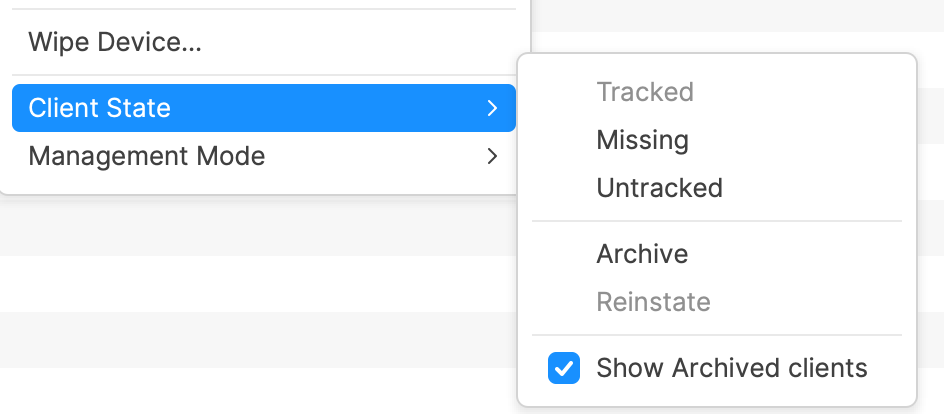
To disable Lost Mode, select any otheranother Client State, such as Tracked or Untracked.Untracked. A Model Update is required after alteringchanging the Client State before the MDM command will beis sent to the device.
Devices require a network connection to receive the command to enable or disable Lost Mode.
If a device is Lockedlocked and unablecannot toconnect receivebecause networknearby due to the surrounding W-Wi-Fi networks are not yet being configured, consider connecting the device to ethernetEthernet. (adaptorAn adapter may be required).required.
Locating Devices
WhilstWhile locked,a assupported welldevice asis devicesin beingLost unusable,Mode, additionalFileWave featurescan help locate it in addition to keeping the device locked.
Location
After beinga supported device is set as Lost,Missing, location data will beis sent back to the FileWave Server,Server wherewhen the device has a network connection. Location may be viewed on a map from the Client Info viewview, as well asand related location data beingis available from Inventory Queries.
Apple’s Managed Lost Mode can request location from a supervised iPhone or iPad even if Location Services are off, and it does not require Find My to be enabled on the device.
Sound
Location is all very well,useful, but what ifsometimes the device is in a bag, cupboardcupboard, or similar.similar place. To further assist retrieval of the device,retrieval, when a supported device is in the Lost Mode 'missing'Missing state, an additional right-click menu option willis beavailable: available from the right click menu: 'Play Lost Mode Sound'Sound. PreviousThe setprevious volume setting is not a consideration andconsidered; the device will makeplays an audible set of tones.
macOS and other Apple devices
macOS does not support Apple MDM Managed Lost Mode. For Mac, Apple provides different MDM security commands instead:
These Mac commands are separate from Managed Lost Mode and do not provide the same iOS/iPadOS Lost Mode location and sound workflow.
Apple reference: Lock and locate Apple devices.