
Managing Client States via the FileWave API
What
This article explains how to manage client device states in FileWave, specifically focusing on how to archive and reinstate clients using the FileWave API. The client state can be defined as Tracked, Archived, Missing, or Untracked, each represented by a numerical value.
When/Why
Changing the state of a client may be necessary during device management tasks such as inventory control, security audits, or when a device is no longer in active use but needs to be retained in the system for record-keeping. Archiving clients helps in decluttering the active management list without permanently deleting the device record, allowing for easy reinstatement if needed.
Note that Apple MDM enrolled devices will break their MDM enrollment upon being Archived so they can't as easily be reinstated simply by changing their state.
How
To change the state of a device, you can useUse the FileWave API to send a PATCH request that updates the device state. Below is a script using zsh followed by a PowerShell script to change the state ofmove a device and ensurebetween the modelTracked, Archived, Missing, and Untracked states.
0 = Tracked
1 = Archived
2 = Missing
3 = Untracked
When/Why
This is updateduseful when you need to reflectarchive thisa change.retired Thedevice, DeviceIDreinstate a device that should be managed again, or script state changes as part of cleanup or offboarding work.
Archiving Apple MDM-enrolled devices can beremove seenor break their MDM enrollment. Reinstating the record later does not automatically restore that enrollment.
How
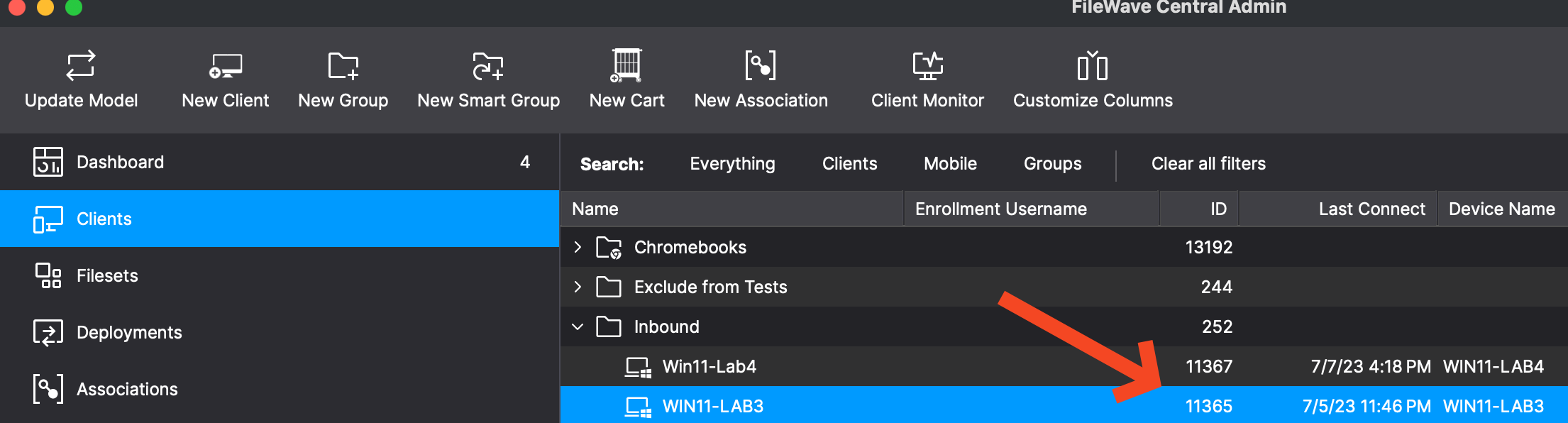
Find the DeviceID in FileWave CentralCentral, as shown inbelow, or copy it from the below image orURL in FileWave Anywhere youwhen willviewing seethe itdevice. Then send a PATCH request to update the state and run update_model so the change is reflected in the URLFileWave whenmanagement looking at a device.interface.
Shell script:
#!/bin/zsh

# Variables
ServerURL="https://fwjoshlab.filewave.net"   # Replace with your server address.
Token="your_token_here"  # Replace 'your_token_here' with your actual token.
DeviceID="11365"         # Specify the device ID.
NewState="0"             # Set the desired state (0: Tracked, 1: Archived, 2: Missing, 3: Untracked).

# Update device state
curl -X PATCH "$ServerURL/filewave/api/devices/v1/devices/$DeviceID" \
     -H "Authorization: Bearer $Token" \
     -H 'Content-Type: application/json' \
     -d '{"state":'$NewState'}'

# Update the model to reflect changes
curl -X POST "$ServerURL/filewave/api/fwserver/update_model" \
     -H "Authorization: Bearer $Token" \
     -H 'Content-Type: application/json'
PowerShell:
# PowerShell Script to Manage FileWave Client States

# Variables
$ServerURL = "https://fwjoshlab.filewave.net" # Replace with your server address.
$Token = "your_token_here"  # Replace 'your_token_here' with your actual token.
$DeviceID = "11365"         # Specify the device ID.
$NewState = "0"             # Set the desired state (0: Tracked, 1: Archived, 2: Missing, 3: Untracked).

# Headers for authorization and content type
$headers = @{
    "Authorization" = "Bearer $Token"
    "Content-Type" = "application/json"
}

# Body data for changing the state
$body = @{
    "state" = $NewState
} | ConvertTo-Json

# Update device state
Invoke-RestMethod -Uri "$ServerURL/filewave/api/devices/v1/devices/$DeviceID" -Method Patch -Headers $headers -Body $body

# Update the model to reflect changes
Invoke-RestMethod -Uri "$ServerURL/filewave/api/fwserver/update_model" -Method Post -Headers $headers

# Output for user confirmation
Write-Host "Device state updated and model refreshed successfully."
Tips:Tips
- Ensure that the
Tokenvariable contains a valid authorization token. - Replace
DeviceIDandNewStatewith theappropriatevaluesaccordingyoutoneed.
Related Links
- FileWave API Documentation - Official API documentation.
CURLcurlCommandcommandLinelineTooltool -Learncurlmore about how to use curl.manual.
Digging Deeper
Understanding the model update process is crucial for ensuring that changes made via the API are reflected in the FileWave management interface. The update_model API call triggerstells the FileWave server to reprocessrebuild its internal datamodel models,so ensuring that anythe state changeschange areis accurately shownreflected in the adminmanagement console.interface. ThisThat is especially importanthelpful after bulk changesstate to device states to maintain consistency across the system.changes.