
Automated Booster Configuration for Dynamic Network Environments
Description
There are setups where automatedAutomated Booster configuration is desirable;useful forwhen macOS or Windows devices move between offices, home networks, or other network locations. This example devicesshows thatone mayway moveto in and out of the business or between offices. Covered here is an example method allowinglet clients to automatically adaptadjust their Booster settings based uponon certainlocation criteria.
Information
The followingincluded Fileset provides ana examplemacOS setupexample. for macOS. Similar functionality could be achieved onThe Windows andsection somegives ideasa ofcomparable thisapproach areusing shownTask also in this KB.Scheduler.
Requirements:
- Provided Booster Configuration Fileset - BoosterConfiguration.fileset.zip
- Editing of '
booster_plist.booster_list.plist'
The Fileset contains the following items:
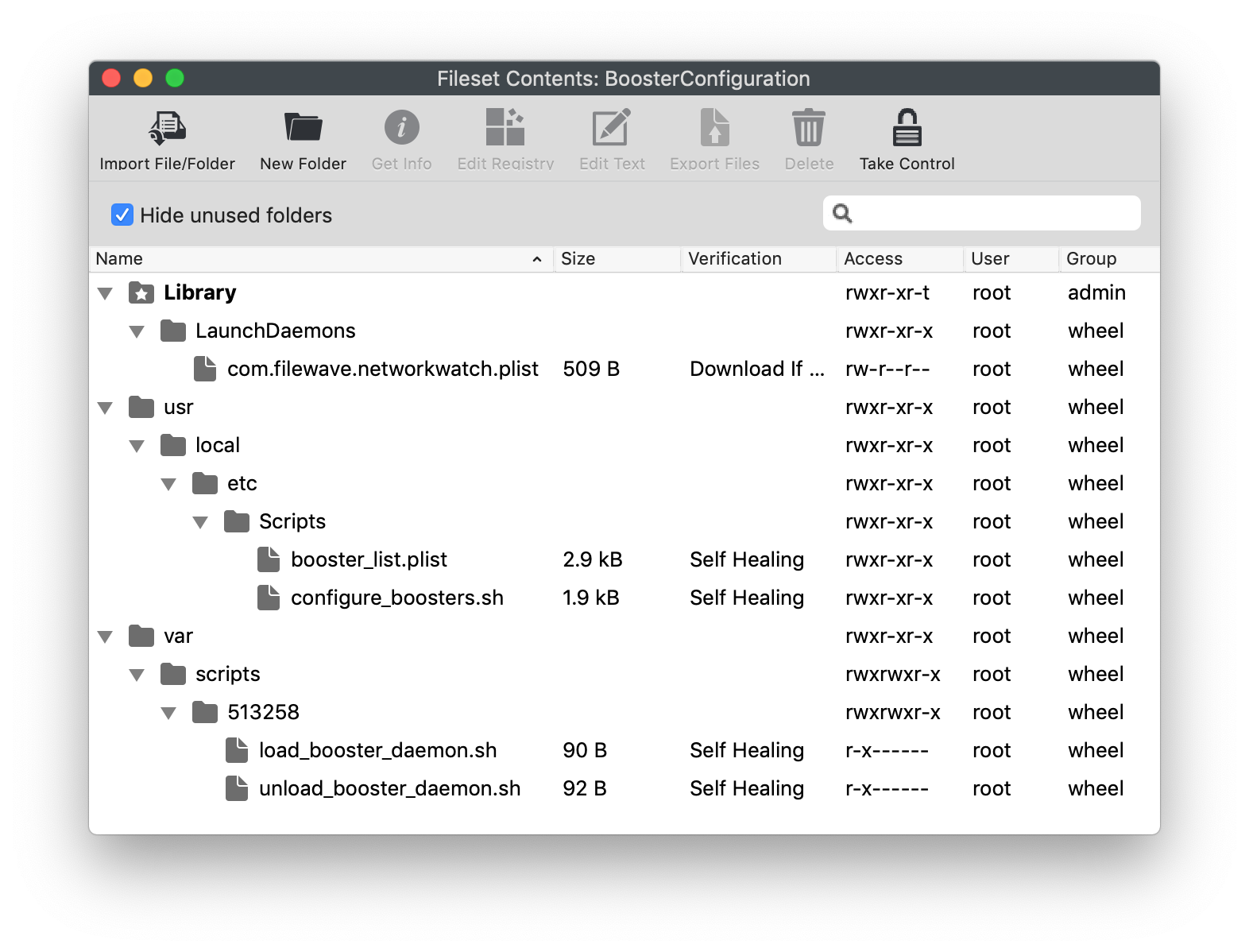
- Activation Script: load_booster_daemon.sh
- Pre-Uninstallation Script: unload_booster_daemon.sh
- LaunchDaemon: com.filewave.networkwatch.plist
- Script: configure_boosters.sh
- Plist file: booster_list.plist
The Fileset will place the LaunchDaemon which is set to be triggered on load and any network change. Where a network change has occurred, the provided script will run, reconfigure the Booster settings if required and then restart the FileWave client. By providing an additional plist file for booster settings per domain, the file may be updated without the requirement to reload the LaunchDaemon to react to the updated settings.
LaunchDaemon Verification
The verification settings of the LaunchDaemon are set to 'Download if missing'. The script triggered by the daemon will read and write to this file, preventing unnecessary re-runs. Therefore, the file should not be changed to Self-Healing.
As of FileWave 16, editing the client plist file will automatically cause the client to re-read the plist, without the need to restart the client. Although restarting the client is not necessary, it won't harm. The 'configure_boosters.sh' script contained within the Fileset restarts the client. ThisThe willbundled remainscript forstill now,restarts butthe mayclient; beleave removedit in place unless you have tested the nearbehavior future,in asyour more customers update to version 16.environment. Below is the line that couldcan be commented out,out if desired.
	# Restart the client to pick up the change
	/usr/local/bin/fwcontrol client restart
To comment out the restart, place a hash symbol at the beginning of the line, as per the line above.
If commenting out this line, the change will only be picked up once the LaunchDaemon is reloaded, after the client receives the newly updated script.
Directions
- Download and import the Fileset into FileWave
AdminCentral - Edit the 'booster_list.plist' file to meet requirements
The example provided utilises the domain name fromuses the device andhostname basedto uponidentify a domain. The script then reads the booster plist file, the relevantmatching dictionary offrom itemsbooster_list.plist, iswrites readthose intoBooster settings to the client settingspreferences, and thenrestarts the client is restarted. The LaunchDaemon script uses the 'hostname' command to achieve this.client.
For example, if the command returned the following:
hostname
$ hostname
ML1015.filewave.ch
The script would look in the booster_list.plist file for a dictionary called 'filewave.ch' and configure the client to match this dictionary. The example file has been provided with 3 dictionaries for the following domains:
- 'filewave.ch'
- 'local'
- 'home'
The example dictionary from the 'booster_list.plist' for 'filewave.ch' is:
booster_list.plist
	<key>filewave.ch</key>
	<dict>
		<key>booster1</key>
		<string>booster1.filewave.ch</string>
		<key>booster1Port</key>
		<integer>20013</integer>
		<key>booster1PublishPort</key>
		<integer>20003</integer>
		<key>booster2</key>
		<string>booster2.filewave.ch</string>
		<key>booster2Port</key>
		<integer>20013</integer>
		<key>booster2PublishPort</key>
		<integer>20003</integer>
		<key>booster3</key>
		<string>booster3.filewave.ch</string>
		<key>booster3Port</key>
		<integer>20013</integer>
		<key>booster3PublishPort</key>
		<integer>20003</integer>
		<key>booster4</key>
		<string>booster4.filewave.ch</string>
		<key>booster4Port</key>
		<integer>20013</integer>
		<key>booster4PublishPort</key>
		<integer>20003</integer>
		<key>booster5</key>
		<string>no.booster.set</string>
		<key>booster5Port</key>
		<integer>0</integer>
		<key>booster5PublishPort</key>
		<integer>0</integer>
		<key>boosterRouting</key>
		<false/>
	</dict>
Edit the namedomain ofname, theBooster domain, booster namesnames, and settings for each dictionary to meetmatch requirements.your Note,environment. ifIf no boosterBooster isshould requiredbe used for anyone of the five boosters,Booster 'slots, use no.booster.set'set as in the above exampleshown for booster5.
If the device reports a domain that is not in the list, a default domain will be used. Specify which default domain should be used within the 'booster_list.plist' file. The example provided is set to use 'local' as the default domain and if implemented, the values of the 'local' dictionary keys will be read from the 'booster_list.plist' file.
Default Domain
	<key>default</key>
	<string>local</string>
Once all domains have been set, with relevant criteria for each dictionary, the Fileset may be associated, tested and then implemented.
Windows
Windows has a similar option to LaunchDaemons, 'Task Scheduler'. Powershell may be used to import scheduled tasks:
AsA such, in theory a Scheduledscheduled task couldcan be createdtriggered based uponfrom network event IDs such as:
- Log: Microsoft-Windows-NetworkProfile/Operational
- Source: NetworkProfile
- Event ID 10000 Connection to a network
- Event ID 10001 Disconnection from a network
This task could trigger a script. Once created, it may then be exported, added to a Fileset with an appropriate script to be triggered by the task, designed to update the booster configuration of the client, and installed using an Activation script by the register-scheduledtask Powershell command.
Conclusion
The aboveThis is anone example of howautomatic boostersBooster could be configured automatically. Similar could be used to specify IP ranges, however it is more likely thatconfiguration. IP ranges can overlapalso be used, but overlapping ranges between networkslocations which couldcan cause unexpectedthe configurations.wrong Itsettings to apply. Some environments may therefore be necessary to adapt the script to allow forneed both domain and IPIP-range ranges, depending upon network topology.checks.
Each setupThere is uniqueno andone-size-fits-all asFileset suchfor itthis. is not possible to provideChoose a Filesetlocation signal that isreliably adistinguishes 'one-fit-for-all'.the Whichevernetworks methodwhere iseach chosen,Booster tryconfiguration toshould identify something that will distinguish device locations to ensure settings are delivered as intended.apply.
Incorrect Configuration
If devices receive configurationsa Booster configuration that dodoes not match thetheir locationlocation, ofmanagement the device, ittraffic may be possible that device management is lostfail until the mis-configurationmisconfiguration is addressed.corrected. ThoroughTest testingwith shoulda besmall appliedgroup before implementation.broad deployment.