
Let's Encrypt Setup for FileWave Server (Debian)
What
This Knowledge Base (KB) article discusses the use ofcovers a Debian-focused shell script tothat automate the process of setting upautomates Let's Encrypt SSL certificatescertificate setup for a FileWave server.server Let'son EncryptDebian is12/13.
The free,script automated,now supports two challenge methods:
Both paths handle certificate request, FileWave certificate injection, and openrenewal Certificate Authority (CA) that provides SSL certificates required for secure (HTTPS) connections.automation.
When/Why
FileWave administrators woulduse this when they need toa set up antrusted SSL certificate for the FileWave server to ensure secure communication.
Note that thisThis documented process is only for Debian systems.12/13. If you are a Hosted customercustomer, weFileWave can also handle Let'scertificate Encryptmanagement for hostedyou: serversSSL Certificate Management for Custom Domains (FileWave-Hosted Servers).
How
Let's
Prerequisites
Challenge method guidance
If TCP/80 is not available, select DNS-01 (Cloudflare) during install.
The script needs to be run on a FileWave server with root permissions. The server should be Debian 12+ or compatible.
Here are the
Install steps to use the script:
- Download the script
below.withwget:wget -O filewave-letsencrypt-debian.sh https://kb.filewave.com/attachments/413 - Make
theitscriptexecutable:executable by runningchmod +xscriptname.filewave-letsencrypt-debian.sh. - Run
theinstall:scriptsudoas root with./filewave-letsencrypt-debian.sh --installas
1 = HTTP-01
2 = DNS-01 (Cloudflare)
If DNS-01 chosen: Cloudflare API token
Confirm values when prompted.
Verify output for success messages and final summary.
What the argument.script
Example:does
sudo ./scriptname.sh --installusr/local/filewave/certs/backup-<timestamp>//etc/letsencrypt/secrets/cloudflare.ini automatically mdm_cert_trusted DB flag
sudo ./scriptname.sh --uninstallPlease replace scriptname.sh with the actual name of the script.
Download Script: linux-letsencrypt-v2.0.sh
linux-letsencrypt-v2.0.sh (Debian)
#!/bin/bash
#26-May-2022 - Removed the old update dep certs file that would break a 14.7.x server updating its dep profiles
#19-June-2020 - added parameter verification ; made DEP script injection conditional ; added firewall exceptions ; made sure certificate is injected at initial run ; added cronjob scheduling
#10-July-2023 - Updated the script to replace the oldCreates renewal hookdeploy ifhook:
it/etc/letsencrypt/renewal-hooks/deploy/filewave-server-cert.sh
/etc/cron.daily/letsencrypt-filewave
Uninstall
To remove certbot
echo "Uninstallation complete. The renewal hook script, daily cron job, and Certbot have been removed."
exit 0
fi
# Proceed with installation
if [ "$1" == '--install' ]; then
read -p "Enter your fully qualified domain name (hostname): " hostname
read -p "Enter your email address: " emailaddress
# verify whether this is a resolvable public hostname ; abort if not
if ! [ -x "$(command -v nslookup)" ]; then
echo "Installing 'dnsutils' for Debian."
apt install -y dnsutils
fi
nslookup $hostname 8.8.8.8
public=$?
if [ $public -ne 0 ] ; then echo "$hostname not resolvable by 8.8.8.8 (Google) ; exiting." ; exit 0 ; fi
# Confirm hostname and email address
echo "Hostname: $hostname"
echo "Email Address: $emailaddress"
read -p "Are these correct? (yes/no) " confirm
if [ "$confirm" != "yes" ]; then
echo "Aborting due to user confirmation."
exit 1
fi
#Backup existing certs
BACKUP_DATE=$(date +%Y-%m-%d-%H-%M)
mkdir /usr/local/filewave/certs/backup-$BACKUP_DATE
cp -p /usr/local/filewave/certs/server.* /usr/local/filewave/certs/backup-$BACKUP_DATE
# Update Debian system and Install Certbot if not already installed
apt update -y
DEBIAN_FRONTEND=noninteractive apt-get upgrade -y -o Dpkg::Options::="--force-confold"
if ! [ -x "$(command -v certbot)" ]; then
echo "Installing SNAP."
apt install -y snapd
snap install core
echo "Installing Certbot."
apt remove certbot python3-certbot-apache
snap install --classic certbot
ln -s /snap/bin/certbot /usr/bin/certbot
# Test again for the certbot command
if ! [ -x "$(command -v certbot)" ]; then
echo "Certbot installation failed. Exiting."
exit 1
fi
fi
#request certificate initially
# I've seen this fail and there is no harm in the command running 2x the first time to be sure it worked.
certbot -n --agree-tos --standalone certonly -d "$hostname" -m "$emailaddress"
echo "Certificate for $hostname should be created. If there was an error try running:"
echo 'certbot -n --agree-tos --standalone certonly -d "'$hostname'" -m "'$emailaddress'"'
# PostgreSQL command to update ios_preferences
echo "Updating iOS preferences in PostgreSQL..."
/usr/local/filewave/postgresql/bin/psql -d mdm -U django -c "INSERT INTO ios_preferences (key, value) VALUES ('mdm_cert_trusted', TRUE) ON CONFLICT (key) DO NOTHING; UPDATE ios_preferences SET value = 'true' WHERE key = 'mdm_cert_trusted';"
if [ $? -eq 0 ]; then
echo "iOS preferences updated successfully."
else
echo "Failed to update iOS preferences in the database."
fi
# Ensure renewal-hooks and deploy directories exist
mkdir -p /etc/letsencrypt/renewal-hooks/deploy
# Remove old renewal hook if exists
rm -f /etc/letsencrypt/renewal-hooks/deploy/filewave-server-cert.sh
# Create new renewal hook
cat>/etc/letsencrypt/renewal-hooks/deploy/filewave-server-cert.sh<<EOT
#!/bin/bash
cp /etc/letsencrypt/live/$hostname/fullchain.pem /usr/local/filewave/certs/server.crt
cp /etc/letsencrypt/live/$hostname/privkey.pem /usr/local/filewave/certs/server.key
chown apache:apache /usr/local/filewave/certs/server.*
echo "Restarting FileWave Server..."
/usr/local/bin/fwcontrol server restart
echo "Updating DEP profile certificates..."
(yes 2>/dev/null) | /usr/local/filewave/python/bin/python /usr/local/filewave/django/manage.pyc update_dep_profile_certs 2>/dev/null
echo "DEP profile certificates updated."
EOT
chmod a+x /etc/letsencrypt/renewal-hooks/deploy/filewave-server-cert.sh
echo "injecting certificate into filewave server"
/etc/letsencrypt/renewal-hooks/deploy/filewave-server-cert.sh
echo "injection done"
##Install firewalld for configuring port 80
# if ! [ -x "$(command -v firewalld)" ]; then
# echo "Installing firewalld."
# apt install -y firewalld
# systemctl enable --now firewalld
# # Test again for the firewalld command
# if ! [ -x "$(command -v firewalld)" ]; then
# echo "firewalld installation failed. Exiting."
# exit 1
# fi
# fi
# echo "making firewall opening for port 80 permanent to allow for automatic renewals"
# firewall-cmd --add-port 80/tcp --zone=public --permanent
# firewall-cmd --reload
# echo "firewall settings modified"
echo "scheduling automatic renewal of certificate"
cat>/etc/cron.daily/letsencrypt-filewave<<'EOT'
#!/bin/bash
sleep $[RANDOM % 7200]
/usr/bin/certbot renew --quiet
EOT
chmod a+x /etc/cron.daily/letsencrypt-filewave
echo "scheduling complete"
echo " "
echo "----------------"
echo "List ofintegration files created by thisthe script:"
sudo "./etc/letsencrypt/renewal-hooks/deploy/filewave-server-cert.sh"letsencrypt-debian.sh echo--uninstall
"/etc/cron.daily/letsencrypt-filewave"This "removes FileWave renewal hook + cron job and (if present) Cloudflare credentials file. The script intentionally leaves certbot installed.
Troubleshooting
1) Certificate forrequest $hostnamefailed should(HTTP-01)
Ensure created.inbound IfTCP/80 thereis wasreachable, anthen errorretry:
sudo certbot -n --agree-tos --standalone certonly -d "'$hostname'<FQDN>" -m "'$emailaddress'<EMAIL>"'
echo 'And upon success run:'
  echo "sudo certbot renew --force-renewal"renewal
echo "The main reason this process can fail is if the server is not reachable on TCP 80"
else
  echo "Invalid argument. Please run with --install or --uninstall."
fi
2)
Troubleshooting
Certificate request failed (DNS-01 Cloudflare)
IfEnsure youtoken see errors when it tries to do the below command that registers with Let's Encrypt or if you just see that there is no active cert you can run the command below again. Just replace $hostname with fwjoshlab.filewave.net if that is your server,permissions and $emailaddress with your email. Keep the " marks. It'll tell you if it is successful or already was previously successful.
Once you have success with reistering then running the renew will tell the FileWave Server that the cert is updated.retry:
 sudo certbot -n --agree-tos --standalonedns-cloudflare --dns-cloudflare-credentials /etc/letsencrypt/secrets/cloudflare.ini certonly -d "$hostname"<FQDN>" -m "$emailaddress"<EMAIL>"
sudo certbot renew --force-renewrenewal
3) FileWave UI shows old certificate behavior
If youolder havebehavior noticedpersists, thatverify on your https://server:20443 you see 2 options where 1mdm_cert_trusted is to download a certificate then you may have used an old version of this script. The current script handles this. The fix is to do the belowset in a Terminal session on the server:PostgreSQL:
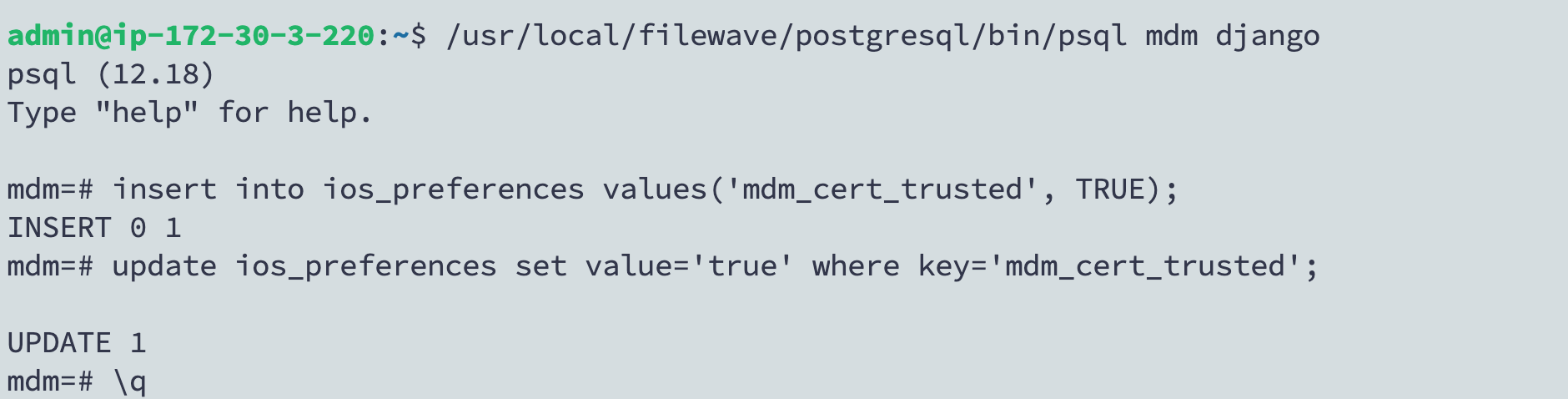
/usr/local/filewave/postgresql/bin/psql mdm djangoinsert into ios_preferences values('mdm_cert_trusted', TRUE);update ios_preferences set value='true' where key='mdm_cert_trusted';\q
An image of what this looks like: