
Let's Encrypt Setup for FileWave Server (macOS)
What this script manages
Thisfilewave-letsencrypt-macos.zsh Knowledge Base (KB) article covers the macOS FileWaveautomates Let’s Encrypt script:certificate setup and renewal for a self-managed FileWave Server on macOS.
Choose
filewave-letsencrypt-macos.zshThe script supports twothe challenge methods:method that matches how the server can be validated:
- HTTP-01 (standalone certbot) when the public server can receive validation traffic on TCP 80
- DNS-01 (Cloudflare API token) when validation must happen through DNS
Both pathsmethods handlerequest certificatethe request,certificate, FileWaveinject certificateit injection,into FileWave, and install the renewal automation.automation described below.
When/Why
Use this when your FileWave server runs on macOS and you need a trusted SSL certificate for secure communication.
- Use HTTP-01 when TCP/80 can be reached from the internet.
- Use DNS-01 (Cloudflare) when TCP/80 is blocked/unavailable, or you prefer DNS validation.
This documented process is for macOS 14 or newer. If you are a Hosted customer, FileWave can handle certificate management for you: SSL Certificate Management for Custom Domains (FileWave-Hosted Servers).
How
Prerequisites
- FileWave server on macOS 14 or newer
- Root/sudo access
- Public DNS name (FQDN) for the FileWave server
- Homebrew installed (
https://brew.sh) - If using DNS validation: Cloudflare API token with DNS edit permissions for the zone
- DNS utilities available (
nslookupordig)
If TCP/80 is not available, select DNS-01 (Cloudflare) during install.
Homebrew note
The script must be launched with sudo from a normal macOS admin account (so Homebrew actions can run as the invoking user).
- ✅ Expected: user shell →
sudo ./filewave-letsencrypt-macos.zsh --install - ❌ Not supported: direct root shell (
sudo su -then run script)
If Homebrew is missing, the script stops and prompts you to install Homebrew from https://brew.sh, then re-run.
Install steps
-
Download the script with
wget:brew install wget wget -O filewave-letsencrypt-macos.zsh https://kb.filewave.com/attachments/498 -
Make it executable:
chmod +x filewave-letsencrypt-macos.zsh -
Run install:
sudo ./filewave-letsencrypt-macos.zsh --install -
Follow prompts for:
- Hostname (FQDN)
- Validation method:
1= HTTP-012= DNS-01 (Cloudflare)
- If DNS-01 is selected: Cloudflare API token
-
Confirm values when prompted.
-
Verify output for success messages and final summary.
What the script does
- Validates macOS version (14+) and root execution
- Validates that FileWave server paths exist (
/usr/local/bin/fwcontrol,/usr/local/filewave/certs) - Validates hostname and email
- Validates DNS resolution (tries
8.8.8.8, then system resolver fallback) - Backs up existing certs under
/usr/local/filewave/certs/backup-<timestamp>/ - Installs/validates certbot
- Requests a new certificate using the selected challenge method
- For DNS-01 (Cloudflare): creates
/etc/letsencrypt/secrets/cloudflare.iniautomatically with secure permissions - Updates FileWave
mdm_cert_trustedDB flag (when FileWave PostgreSQL binary exists) - Creates renewal deploy hook:
/etc/letsencrypt/renewal-hooks/deploy/filewave-server-cert.sh
- Preserves existing cert file owner/group when replacing certificates
- Creates launchd renewal automation:
/Library/LaunchDaemons/com.filewave.letsencrypt.renew.plist/usr/local/filewave/sbin/filewave-letsencrypt-renew.zsh
- Immediately injects cert into FileWave and restarts server services
Uninstall
To remove integration files created by the script:
sudo ./filewave-letsencrypt-macos.zsh --uninstall
This removes FileWave renewal hook, launch daemon/runner files, legacy cron file (if present), and Cloudflare credentials file (if present). The script intentionally leaves certbot installed.
DNS-01 Cloudflare plugin details (macOS)
If the Cloudflare plugin is missing, the script attempts installation using Certbot’s Homebrew Python environment:
$(brew --prefix certbot)/libexec/bin/python3 -m pip install certbot-dns-cloudflare
Manual verification:
certbot plugins | grep -i cloudflare
Validation / test commands
Confirm launchd job is loaded
sudo launchctl print system/com.filewave.letsencrypt.renew
Optional forced renewal test
sudo certbot renew --force-renewal
Troubleshooting
1) FileWave server prerequisites failed
If script reports missing FileWave binaries/paths:
- Verify
/usr/local/bin/fwcontrolexists. - Verify
/usr/local/filewave/certsexists. - Re-run on the FileWave server host (not a non-FileWave Mac).
2) Certificate request failed (HTTP-01)
Ensure inbound TCP/80 is reachable, then retry:
sudo certbot -n --agree-tos --standalone certonly -d "<FQDN>" -m "<EMAIL>"
sudo certbot renew --force-renewal
3) Certificate request failed (DNS-01 Cloudflare)
Ensure token permissions and retry:
sudo certbot -n --agree-tos --dns-cloudflare --dns-cloudflare-credentials /etc/letsencrypt/secrets/cloudflare.ini certonly -d "<FQDN>" -m "<EMAIL>"
sudo certbot renew --force-renewal
4) FileWave UI shows old certificate behavior
If older behavior persists, verify mdm_cert_trusted is set in PostgreSQL:
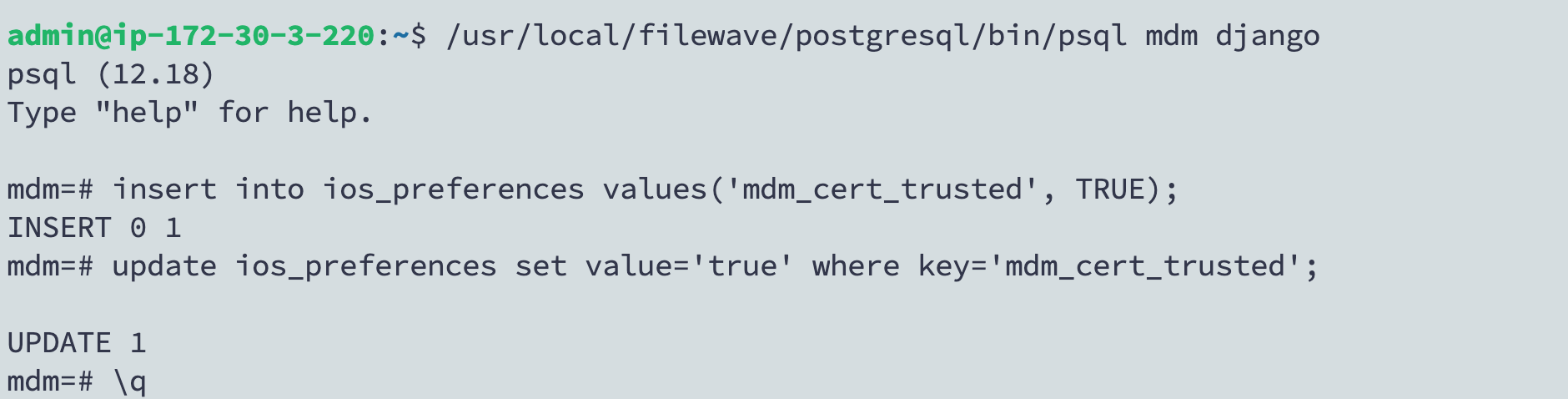
/usr/local/filewave/postgresql/bin/psql -d mdm -U django

insert into ios_preferences values('mdm_cert_trusted', TRUE) on conflict (key) do nothing;

update ios_preferences set value='true' where key='mdm_cert_trusted';

\q
5) launchd renewal not running
-
Verify daemon loaded:
sudo launchctl print system/com.filewave.letsencrypt.renew -
Inspect renewal log:
sudo tail -n 200 /var/log/filewave-letsencrypt-renew.log