
Let's Encrypt Setup for FileWave Server (macOS)
This article is in beta. Please reach out to josh.levitsky@filewave.com to use this together while this banner is here so that we can just validate that everything works well for you. I'll remove this banner once I'm aware of several positive outcomes.
Feb 24, 2026 - Initial Version published for macOS.
What
This Knowledge Base (KB) article covers athe Debian-focusedmacOS shellFileWave script that automates Let'Let’s Encrypt SSLscript:
filewave-letsencrypt-macos.zsh
The script now supports two challenge methods:
- HTTP-01 (standalone certbot)
- DNS-01 (
Cloudflare)Cloudflare API token)
Both paths handle certificate request, FileWave certificate injection, and renewal automation.
When/Why
FileWave administrators useUse this when theyyour FileWave server runs on macOS and you need a trusted SSL certificate for secure communication.
- Use HTTP-01 when
portTCP/80 can be reached from the internet. - Use DNS-01 (Cloudflare) when
portTCP/80 is blocked/unavailableunavailable, or you prefer DNS validation.
This documented process is for DebianmacOS 12/13.14 or newer. If you are a Hosted customer, FileWave can handle certificate management for you: SSL Certificate Management for Custom Domains (FileWave-Hosted Servers).
How
Prerequisites
- FileWave server on
DebianmacOS1214 or13newer - Root/sudo access
- Public DNS name (FQDN) for the FileWave server
https://brew.sh)
If using DNS validation: Cloudflare API token with DNS edit permissions for the zone
DNS Challengeutilities method guidance
nslookup dig)
If TCP/80 is not available, select DNS-01 (Cloudflare) during install.
If Homebrew is missing, the script stops and prompts you to install Homebrew from https://brew.sh, then re-run the script.
Install steps
-
Download the script with
wget:wget -O filewave-letsencrypt-debian.shmacos.zsh https://kb.filewave.com/attachments/413498 -
Make it executable:
chmod +x filewave-letsencrypt-debian.shmacos.zsh -
Run install:
sudo ./filewave-letsencrypt-debian.shmacos.zsh --install -
Follow prompts for:
- Hostname (FQDN)
- Validation method:
1= HTTP-012= DNS-01 (Cloudflare)
- If DNS-01
chosen:is selected: Cloudflare API token
-
Confirm values when prompted.
-
Verify output for success messages and final summary.
What the script does
- Validates
DebianmacOS+version (14+) and root execution - Validates hostname and email
- Backs up existing certs under
/usr/local/filewave/certs/backup-<timestamp>/ - Installs/validates certbot
- Requests a new certificate using the selected challenge method
- For DNS-01 (Cloudflare): creates
/etc/letsencrypt/secrets/cloudflare.iniautomatically(nowithmanualsecurepre-creation required)permissions - Updates FileWave
mdm_cert_trustedDB flag (when FileWave PostgreSQL binary exists) - Creates renewal deploy hook:
/etc/letsencrypt/renewal-hooks/deploy/filewave-server-cert.sh
- Creates
dailylaunchd renewalcron:automation:/etc/cron.daily/Library/LaunchDaemons/com.filewave.letsencrypt.renew.plist
/usr/local/filewave/sbin/filewave-letsencrypt-filewaverenew.zsh
Uninstall
To remove integration files created by the script:
sudo ./filewave-letsencrypt-debian.shmacos.zsh --uninstall
This removes FileWave renewal hookhook, +launch daemon/runner files, legacy cron job andfile (if present), and Cloudflare credentials file.file (if present). The script intentionally leaves certbot installed.
DNS-01 Cloudflare plugin details (macOS)
If the Cloudflare plugin is missing, the script attempts installation using Certbot’s Homebrew Python environment:
$(brew --prefix certbot)/libexec/bin/python3 -m pip install certbot-dns-cloudflare
Manual verification:
certbot plugins | grep -i cloudflare
Validation / test commands
Confirm launchd job is loaded
sudo launchctl print system/com.filewave.letsencrypt.renew
Optional forced renewal test
sudo certbot renew --force-renewal
Troubleshooting
1) Certificate request failed (HTTP-01)
Ensure inbound TCP/80 is reachable, then retry:
sudo certbot -n --agree-tos --standalone certonly -d "<FQDN>" -m "<EMAIL>"
sudo certbot renew --force-renewal
2) Certificate request failed (DNS-01 Cloudflare)
Ensure token permissions and retry:
sudo certbot -n --agree-tos --dns-cloudflare --dns-cloudflare-credentials /etc/letsencrypt/secrets/cloudflare.ini certonly -d "<FQDN>" -m "<EMAIL>"
sudo certbot renew --force-renewal
3) FileWave UI shows old certificate behavior
If older behavior persists, verify mdm_cert_trusted is set in PostgreSQL:
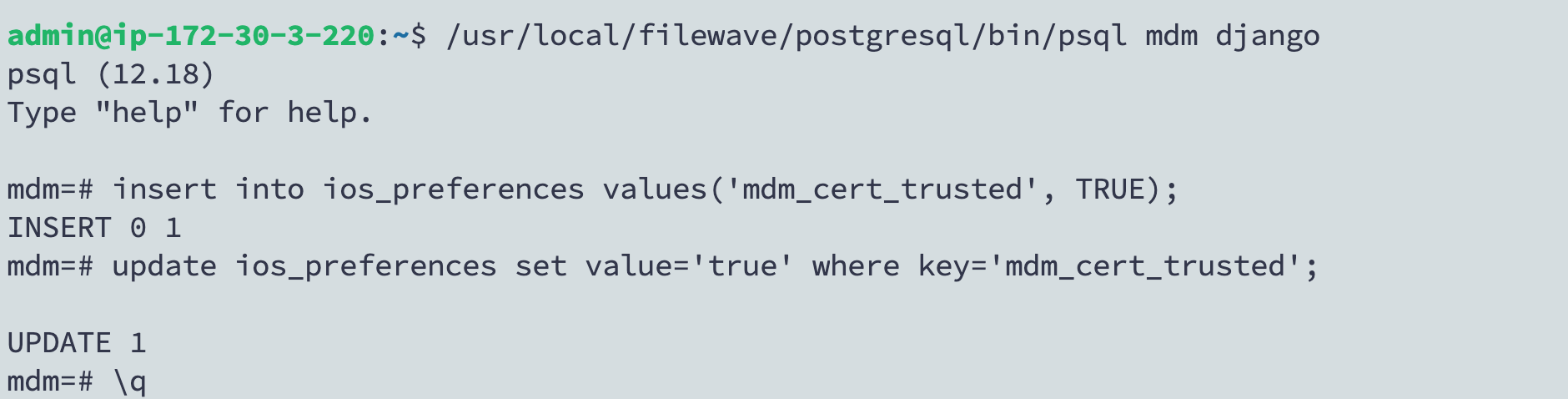
/usr/local/filewave/postgresql/bin/psql -d mdm -U django

insert into ios_preferences values('mdm_cert_trusted', TRUE); on conflict (key) do nothing;

update ios_preferences set value='true' where key='mdm_cert_trusted';

\q
4) launchd renewal not running
Verify daemon loaded:
sudo launchctl print system/com.filewave.letsencrypt.renew
Inspect renewal log:
sudo tail -n 200 /var/log/filewave-letsencrypt-renew.log