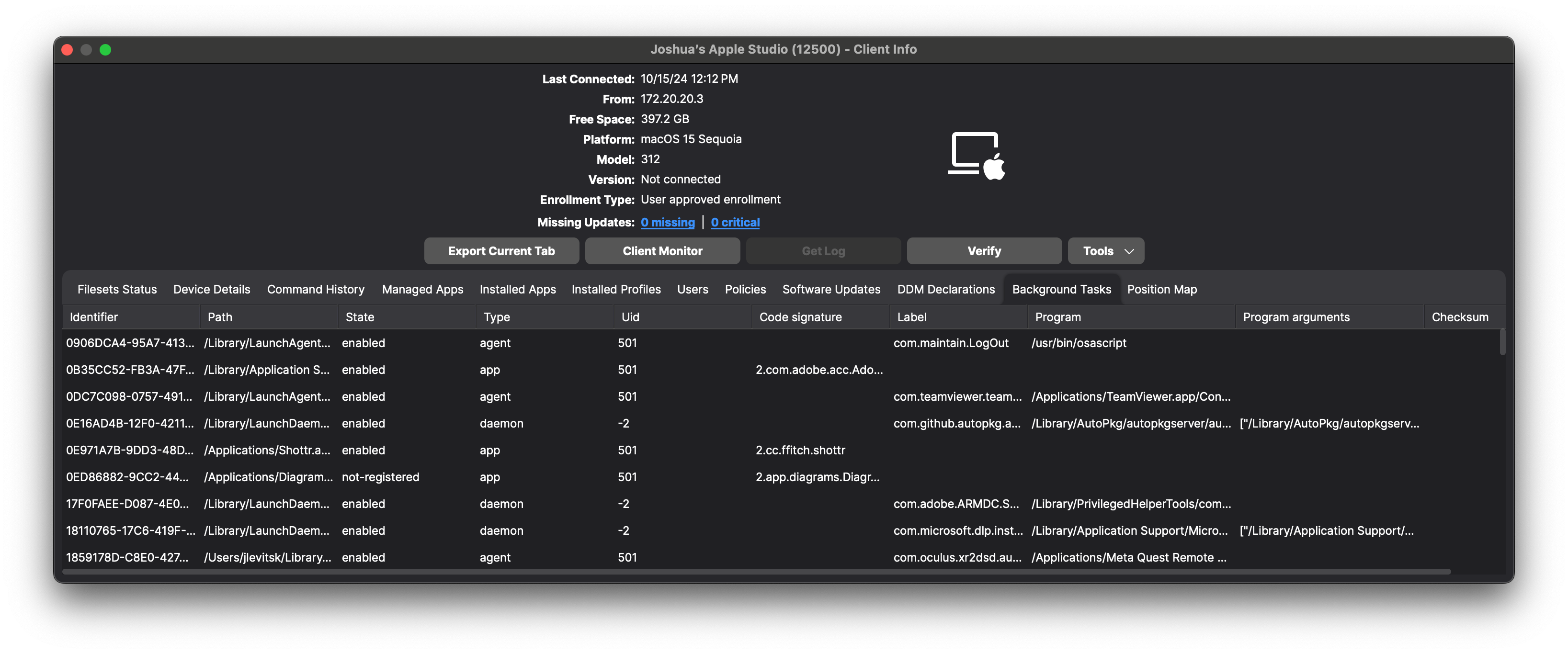
View macOS Background Tasks with DDM
What
FileWave hascan integratedinventory Apple’sthe launch agents, launch daemons, and other background tasks that a managed Mac reports through Apple Declarative Device Management (DDM). capabilitiesThe report can include the task type, state, bundle ID, user ID, label, and team identifier.
When to enhanceuse theit
Use ofbackground-task backgroundinventory taskswhen you need to answer questions such as:
- Which launch agents or daemons are present on
macOSadevices.Mac? - Is
Thisannewexpectedfeaturesecurityallowsoradministratorsmanagementtocomponentreceiverunning? - Which
detaileddevicesreportsreportonantheunfamiliarbackgroundtasktaskslabelthatorareteampresent.identifier?
The informationvalues providedcome includes the service identifier, the application path (e.g., /Applications/1Password.app),from the status ofdata reported by the servicedevice. (suchAvailable asfields enabledcan orvary notby registered),task.
Requirements and results
Apple supports the type of service (application or login item), the user ID (UID) under which the service is running, and the code signature details.
By leveraging DDM, macOS devices can autonomously report this information without the need for constant server queries. This enhancement improves the visibility of background processes across your device fleet, aiding in compliance, security auditing, and troubleshooting efforts.
When/Why
This feature is particularly useful when there is a need to:
Why This Feature Matters
Understanding which background tasks are running on your macOS devices is crucial for maintaining a secure and efficient computing environment.DDM Background tasks canstatus have significant impactsreport on devicemacOS performance, battery life,14 and security.later. UnauthorizedOn taskssupported, mightenrolled accessMacs, sensitiveFileWave datareceives orthe providestatus anand entrymakes pointthe forreturned threats.values By receiving detailed reports on these tasks, administrators can take proactive measuresavailable to manage and secure their device fleet effectively.
The integration of DDM enhances this process by allowing devices to report their status autonomously. This reduces the need for frequent server polling, decreases network traffic, and provides up-to-date information without delays.
How
Enabling Background Tasks Reporting
To utilize this feature, ensure that your macOS devices are enrolled in FileWave and running macOS 12 Monterey or later, that DDM is supported on these versions and ensure the FileWave Client is at least v15.5.0.
Accessing Background Tasks Data
Background tasks based on a launch daemon are now reported in Inventory for macOS devices supporting DDM, once the FileWave Client is up to date on a supported version of macOS. The below image shows an example of this inventory data.Reports.