
Enable Early Access (Beta) Package URLs
Description
Early Access, also shown as Beta in FileWave Central, allows a FileWave Server to use Early Access package URLs. After the flag is enabled, package sources that use the server runtime environment can access Beta packages, including Integrated Custom Package and Integrated Client Upgrade package sources.
Use this only for FileWave Early Access/Beta testing when directed by FileWave. Early Access packages are intended for validation before general availability.
This setting is changed on the FileWave Server. Self-managed customers need shell access to the server. Hosted FileWave customers should work with FileWave Technical Support or FileWave Operations because they do not have direct server file access.
Enable Early Access package URLs
- On the FileWave Server, edit the environment file:
/usr/local/etc/filewave/.env- Add this line on its own line:
RUNTIME_ENVIRONMENT=beta- Save the file.
- Restart FileWave Server so the runtime environment is loaded:
sudo fwcontrol server restartConfirm FileWave Central is using Beta
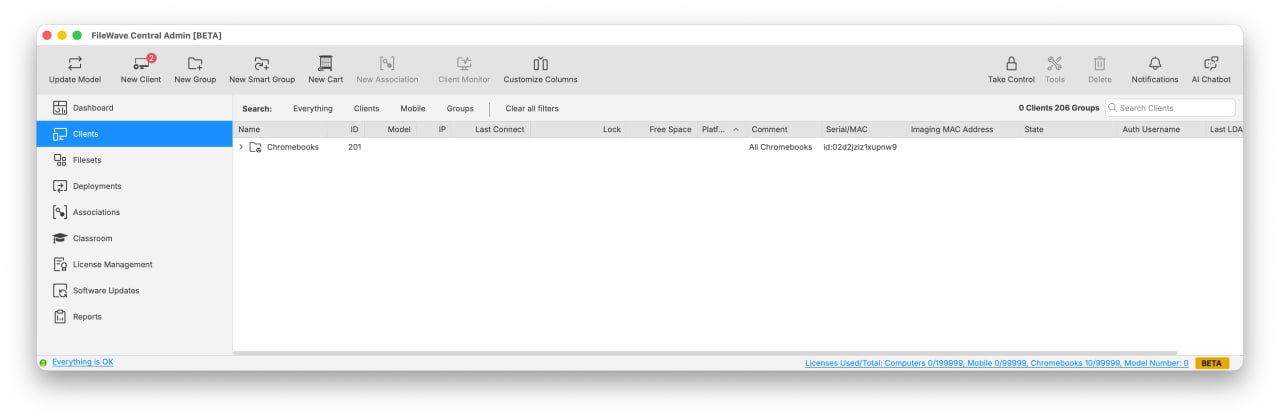
When Central connects to a server using the Beta runtime environment, FileWave Central shows BETA in the window title and in the bottom-right status area. Clicking the BETA indicator opens this article.
Disable Early Access package URLs
- Remove this line from
/usr/local/etc/filewave/.env:
RUNTIME_ENVIRONMENT=beta- Save the file.
- Restart FileWave Server again:
sudo fwcontrol server restartNotes
- Early Access and Beta refer to the same testing channel in this context.
- The server restart is required after enabling or disabling the flag because FileWave Server reads the runtime environment during startup.
- The short link for this article is https://go.filewave.com/beta.