
Add Silent Install Arguments to Windows EXE Filesets
When deploying Windows applicationsEXE usinginstallers theiroften nativeneed installers, command command-line parametersswitches mustfor typicallysilent bedeployment. passedAdd those switches as launchLaunch argumentsArguments toon the installer executable forin athe silentFileWave installation.Fileset. If the vendor provides an MSIMSI, installerprefer isit availablewhen it'sit bestsupports tothe useinstall thatand touninstall deploybehavior youryou applicationneed, becausebut 1)test its required properties and msiexec options rather than assuming no launch arguments are needednecessary.
EXE switches are vendor-specific. Common examples include /s, /silent, /q, and 2)/quiet, MSIbut filesets can be rolled back silently in FileWave should you ever need to uninstall that application.
Legacy Windows installers have traditionally been distributed as a Setup.exe or AppInstaller.exe, which can be deployed silently with command line parameters like /s, /silent, /q, or /quiet. Once you have worked outconfirm the correctexact command line parameters for your installer in a CMDlocal window,Command clickPrompt first. In FileWave Central, open Get Info for the maininstaller, installerselect executable,Executable, pickenable the Executable tab, and check Execute once when activated., Inthen the Launch Arguments tab clickuse the plus signbutton inunder theLaunch lower leftArguments to add launcheach arguments.argument.

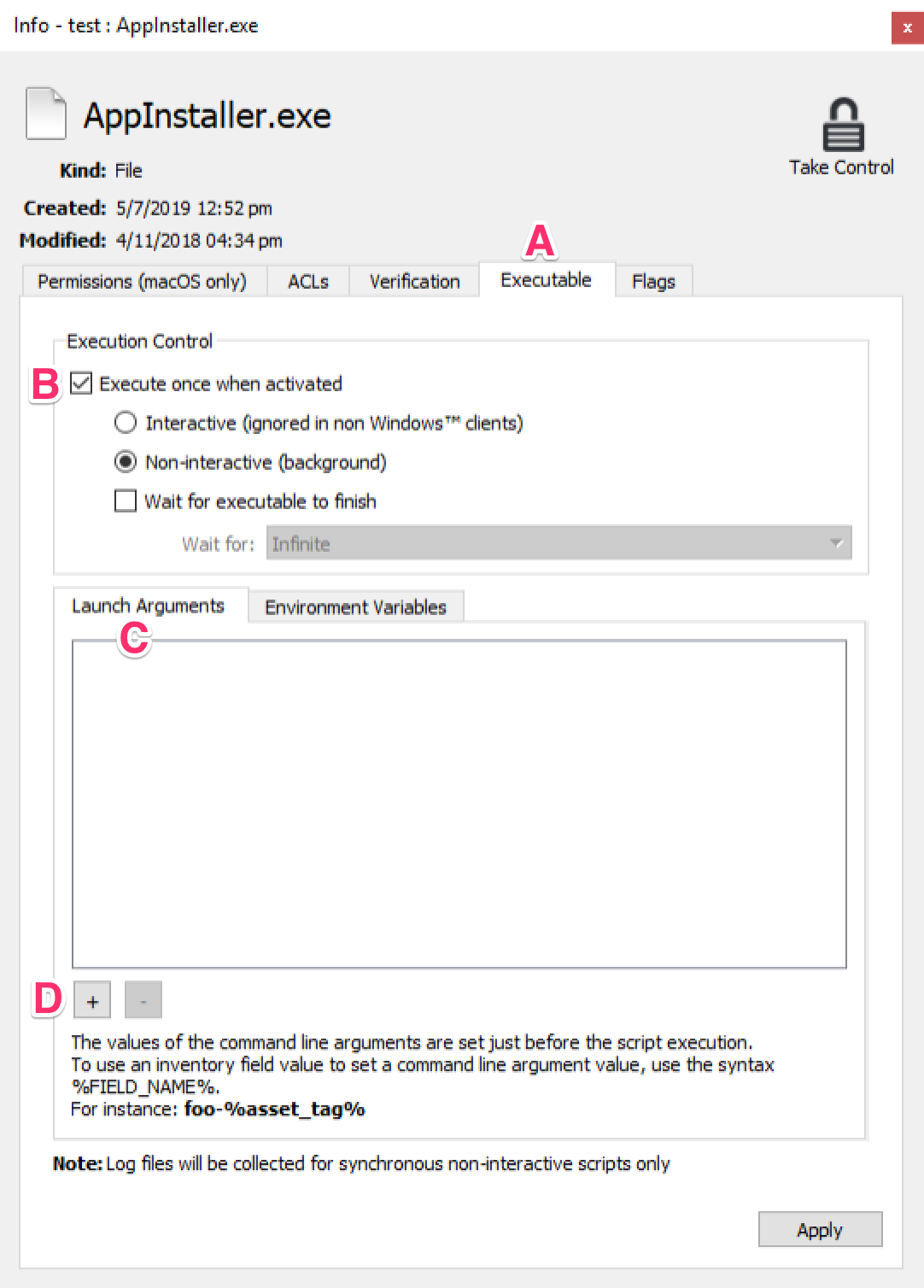
Follow this general rule for entering launch arguments -Enter each space-delimited item after the installer executable name separated by a space needs to be entered as a separate launchLaunch argument.Argument, Inin the same order used by the working command. This example below,has therefour are 4 launch arguments.arguments:
AppInstaller.exe /s /name=MyOrg /reg ABC123
|
Count |
Argument |
|
1 |
/s |
|
2 |
/name=MyOrg |
|
3 |
/reg |
|
4 |
ABC123 |
If there are spaces inWhen a commandvalue linecontains parameterspaces, it must typically be surrounded by quotes. Note that spaces in a command line parameter may result in a single command line parameter needing to be entered as multiple launch arguments in FileWave. Inkeep the quotation marks from the tested command. The Launch Arguments UI stores the quoted value across separate rows, so preserve the opening quote on the first piece and the closing quote on the last piece. This example below,has thereeight are 8 launch arguments.arguments:
AppInstaller.exe /s /name="My Org" /reg ABC123 /l "c:\windows\temp\My App\install.log"
|
Count |
Argument |
|
1 |
/s |
|
2 |
/name="My |
|
3 |
Org" |
|
4 |
/reg |
|
5 |
ABC123 |
|
6 |
/l |
|
7 |
"c:\windows\temp\My |
|
8 |
App\install.log" |
Once you understandAssign the general rules for howFileset to adda launchpilot argumentsdevice you'llfirst. beConfirm ablethat tothe easilyinstaller takecompletes advantagesilently, ofthe yourapplication existingis nativepresent, installersand tothe deployFileset Windowsreports applicationsthe silentlyexpected tostatus clientbefore PCs.broad deployment.