
Desktop File Level Filesets
Contents of aA file level Fileset willdelivers befiles deliveredand folders to devices,devices withwhile matchingpreserving the ownership and permissions andstored ownership.in the TheFileset. entireFileWave copies the full directory structure ofand creates missing directories on the Filesettarget willdevice bewhen copied, with any directories created if not yet existing.needed.
Example 1
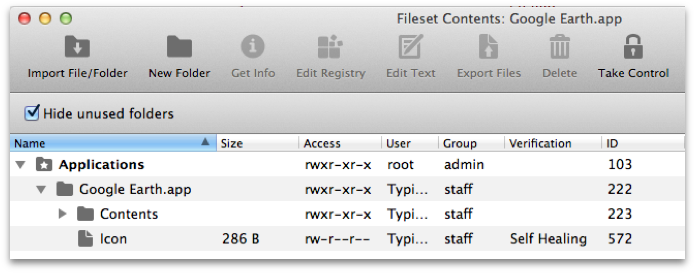
Example 2
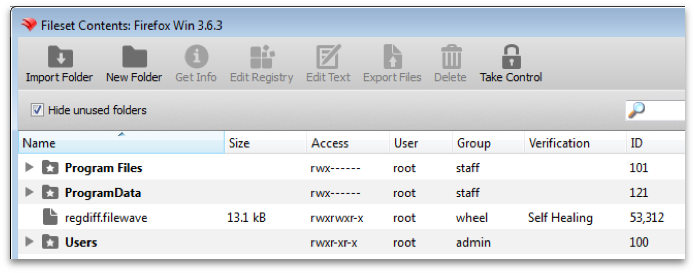
AdditionalYou itemscan mayadd bemore includedcontent bywith way of either the New Folder, or Import Folder, buttons. Files and folders may also be added by way ofor drag and drop. Other attributes may be observed and altered through the Get Info button, whenSelect an item isand selected.
Get Info to review or change its attributes.
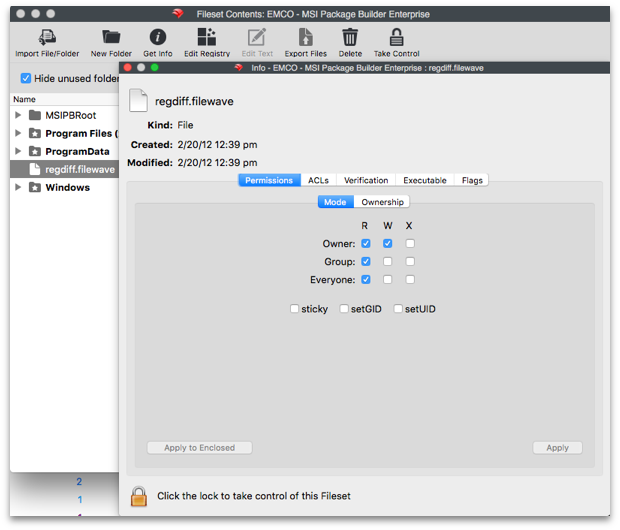
BeyondFile ownershiplevel andFilesets permissions,can furtheralso options are available also, for example,carry ACLs, Verification settings, and executable content such as scripts or EXE files. Review the Verification behavior before relying on a file executioncheck (scriptsor and EXE files). Verification has its own page in this chapter and is importantscript to understand.repair drift.
AUse Edit Text when you need to edit a selected file’sfile contentsdirectly may be altered usinginside the EditFileset. Text option. This is particularlymost usefulcommon for scripts, but it can apply to manyany file types,type asconfigured setunder within the Preferences > Editor tab..
FilesYou maycan beselect selectedfiles in a Fileset and exportedexport fromthem the Filesetback to theyour local device.
Common admin searches for this workflow include "copy files with a Fileset", "deploy a folder to devices", "set file permissions in a Fileset", and "edit a script inside a Fileset".