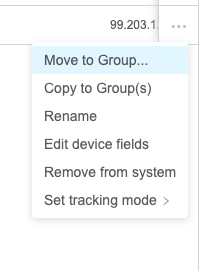
Move to Group
What
The Move to Group command ismoves similara selected device or group to theanother group. It is related to Copy to Group command,, but Moveit to Group will movechanges the object's current objectgroup ratherplacement thaninstead copyof it.adding another Thismembership. also meansObjects that thecome selectedfrom objectSmart must be capable of being moved. For instance, a copy in a smart groupGroups can be copied, but itnot can'tmoved, bebecause moved.Smart Group membership is controlled by criteria.
When/Why
ThisUse this command when you are reorganizing static groups or moving device records into a different location. Check assignments first: moving a device can bechange usedwhich withFilesets, bothprofiles, Groupsor anddeployments devicesit andreceives allowswhen those items are assigned through group membership.
Quick answer: Move to Group changes the moveselected ofobject's objectsgroup (andlocation. their children). It is a very useful command, especially when reorganizing. Always remember though thatIf you haveonly need the device to beappear veryin carefulan aboutadditional unintendedgroup deploymentwhile relatedkeeping complicationsits fromcurrent usingplacement, move.use Copy (Thatto is,Group devices could lose or gain software inadvertently.)instead.
How
Use the ellipsis (
 ) to the right of the device in
 the View - Devices, andthen select "Move to Group..." and choose the destination group.