Permanently Remove a Device from FileWave Anywhere
What it does
The "Remove from System"System commandin FileWave Anywhere is whatthe youpermanent mightdevice-removal action. Administrators familiar with older FileWave interfaces may remember it as Delete. FileWave Anywhere separates removal from the native FileWave admin as "Delete", and it has the same consequences. But, in the native admin Delete was the same for the original object and the copies, even though the result was different. The WebAdmin has split this into two commands to help clarify.
When/Why
The "Removesystem from System"removal command entirely (and destructively) removesof a device andcopy allor ofgroup membership so the destructive action is clearer.
Before you remove a device
Remove from System permanently removes the device, its copiescopies, inventory history, and payload and deployment assignments from theFileWave. system. Any payloads through deployments will be lost, and all inventory from this object will be removed from the system. In the case ofFor an MDM-enrolled device, removal also initiates unenrollment when the deletionpreference actsbelow asis anenabled. unenrollYou andmust canupdate not be reversed. Thethe model has to be updated in order to fully removebefore the deviceremoval fromis completed.
MDM unenrollment is preference-controlled. FileWave sends the system.
An un-enrol will be triggered,command only ifwhen the followingthis FileWave Central preference is enabled: Preferences > Mobile > 'Remove MDM profile from devices removed from FileWave model'modelThis preference will send aThe command tois removesent through MDM, including for devices whose Automated Device Enrollment (DEP) profile prevents local user removal.
A device with the enrolmentFileWave profile,Client whichstill shouldinstalled be honored by devices, even if the enrolment profile is configured to be non-removable in DEP settings.
For client devices, they willcan check in again asafter long as a client remains installedremoval, but hasit tomust be onboarded again.again before normal management resumes.
Note;This Remove from Systemaction is adestructive. destructiveConfirm command,that the device, its inventory, and shouldits onlydeployment be done when youassignments are certain.no longer needed before continuing.
How
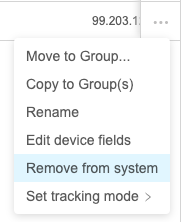
ToIn performFileWave thisAnywhere, action, choose "Remove from System" fromopen the Devicedevice action menu (...…), choose Remove from System, and then perform an Update Model whento finished.complete the removal.