Rename
What
The "Rename" command asUse the nameRename impliesdevice isaction when you need to update a commanddevice forname renamingfrom aFileWave device. Anywhere. The behaviorresult of this command varies widely baseddepends on the OSdevice ofplatform, MDM restrictions, and whether FileWave can rename the device anditself otheror factors.only the FileWave record.
When/Why
InFor itssupported simplestiOS/iPadOS form,devices, thisFileWave command (<iOS 12 with no naming restrictions or iOS 13+ with or without restrictions) will sendsends an MDM command to rename the device itself, and renamealso updates the FileWave device record. If the target is a computer client or an iOS/iPadOS device where renaming is restricted, FileWave updates only the record forname. Use that record-only path carefully because a FileWave name that differs from the devicedevice's withinactual FileWave.name can Ifconfuse troubleshooting.
Plan bulk rename work before you run it. Test with a computersmall client,set first, especially when device names are used for groups, reporting, certificates, or ansupport iOS device with renaming restrictions, is the recipient of the command then the device itself will NOT be renamed, but the record within FileWave will have the name updated to reflect the chosen name. (This isn't highly recommended though as it can become confusing to support)
Renaming devices in FileWave can be complex and have unintended consequences. Before any mass-updating of device names, we suggest you check your plan with our Service Desk folks to ensure the plan is solid.workflows.
How
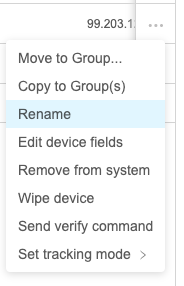
To send the Rename command, choose "Rename"Rename from the Devicedevice Actionaction menu (...):

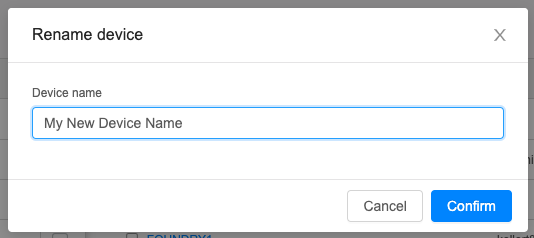
NoteFileWave thatthen thereprompts isyou a followup prompt to choosefor the device name youto would like:apply: