
Review a Deployment Summary in FileWave Anywhere
What
The DeploymentsDeployment Summary tab shows the final target scope before you publish a deployment. It lists included devices and groups, standalone targets, exclusions, payloads, and the effectiveestimated actiondata thatsize yourper deployment will perform.device.
When/Why
ItReview isthe verysummary importantbefore toupdating reviewthe thisModel. tab to make sureConfirm that atthe minimumdevice count, target groups, exclusions, payload list, and download size match the number of devices being impacted makes sense. This is your opportunity to sanity-check your settings beforedeployment you update the model and commit your changes.intended.
How
NoteThe thatsummary nois actionsread-only. canIf beanything takenlooks directlywrong, onreturn to the summaryTargets, tab,Payloads, butor itOptions givesstep youand tocorrect overviewthe todeployment evaluatebefore yourpublishing deployment:it.

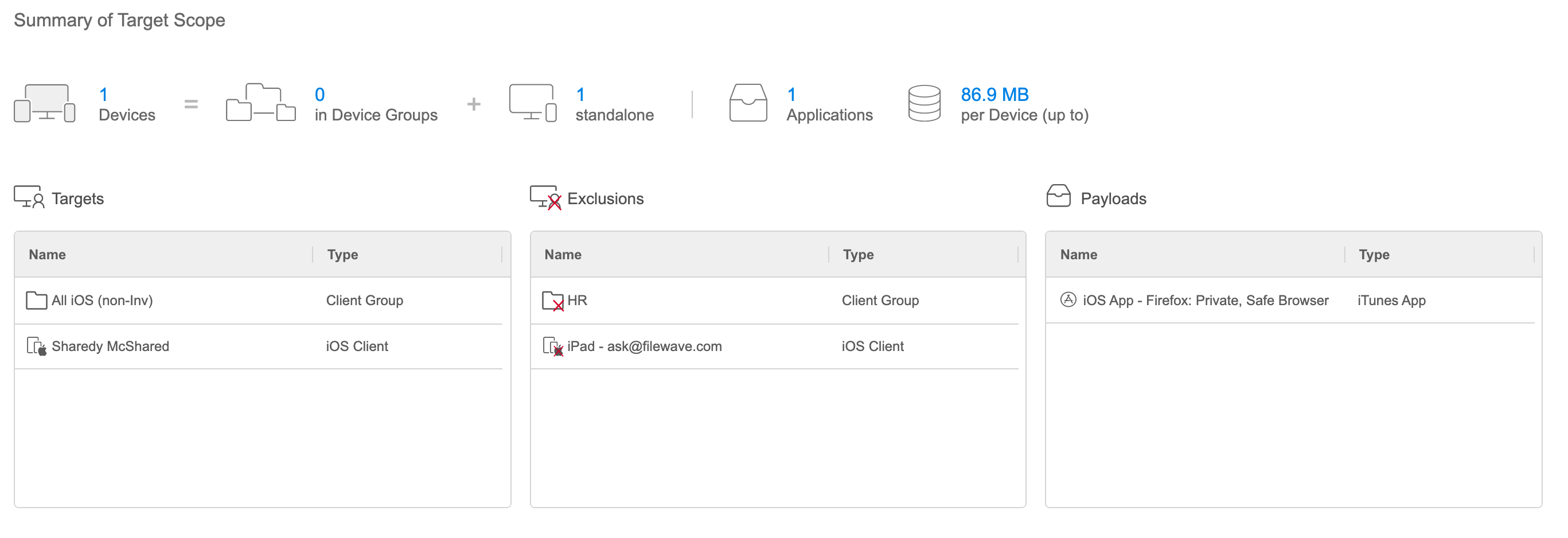
The tab shows the number of endpoints impacted, and the overall size of the deployment. Note that anAn explicit exclusion wins overoverrides an inclusion. (e.g.For example, a device isincluded inthrough a target group will not receive the payload when that has a payload assigned, but thatsame device is also explicitly exluded means that that endpoint will NOT have the payload(s) installed.)excluded.