
Brute Force Protection
What
Beginning with FileWave 16.3.0, brute force protection is available for FileWave Central and FileWave Anywhere to reduce password-guessing and dictionary-attack risk.
When this protection is enabled, FileWave temporarily locks a user account after repeated failed sign-in attempts. The lockout is username-based, not IP-based, and the delay increases with additional failed attempts.
A lockout affects only the user account that triggered it. It does not lock out other users, and it automatically clears when the timer expires.
By default, the feature is enabled.
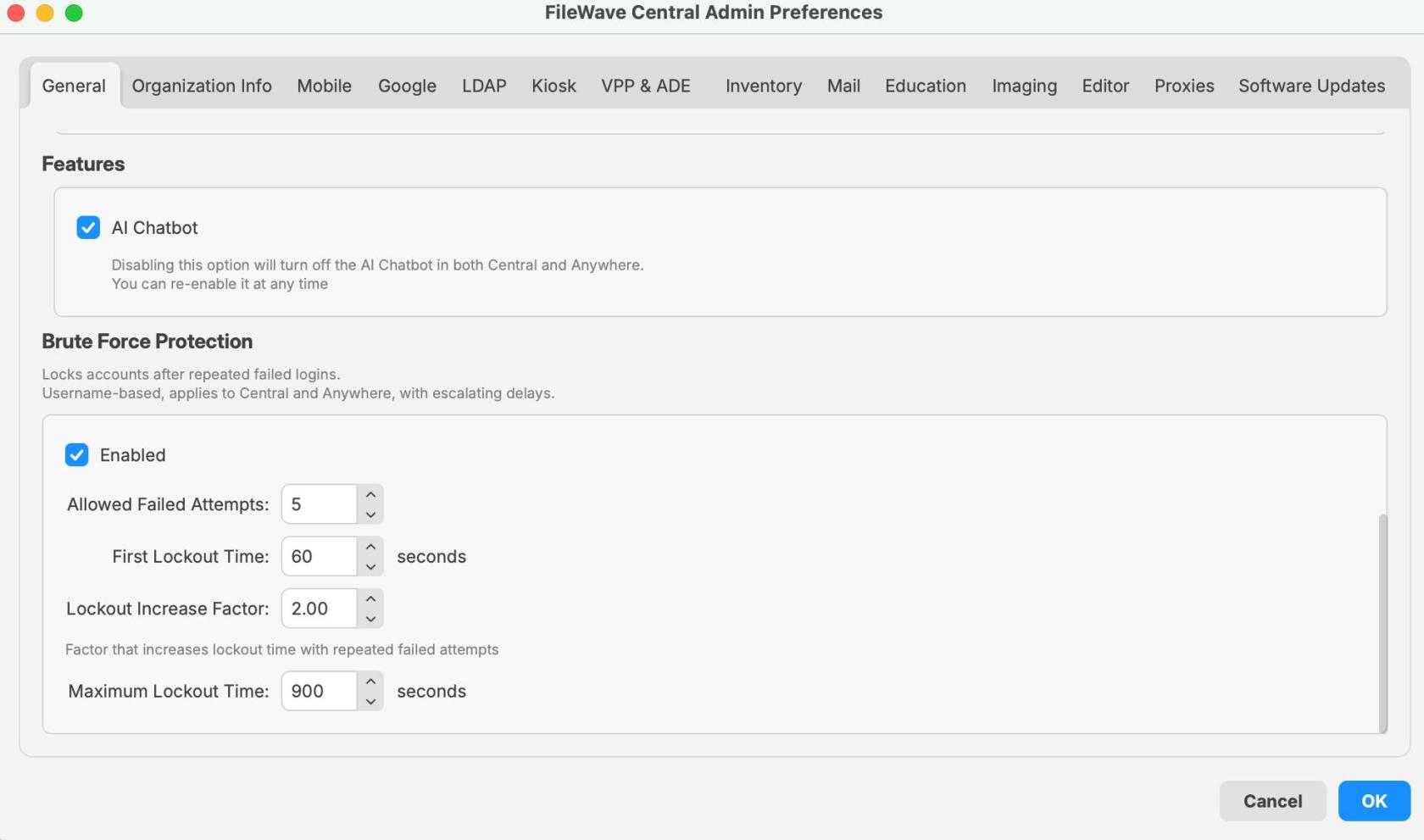
The setting is configured in FileWave Central > Preferences > General and applies to sign-in attempts for Central and Anywhere.
When/Why
This feature should generally remain enabled.
It is especially useful if FileWave Central or FileWave Anywhere can be reached from public or otherwise untrusted networks, including the Internet. In that kind of exposure, it helps protect accounts against repeated password-guessing, brute-force, and dictionary-style login attempts without requiring additional manual intervention.
You may also see this behavior during testing or troubleshooting if the wrong password is entered repeatedly. In that case, the lockout is expected behavior, not necessarily a system fault.
With the default settings shown in FileWave 16.3.0:
- Allowed failed attempts: 5
- First lockout time: 60 seconds
- Lockout increase factor: 2.00
- Maximum lockout time: 900 seconds
That means the first lockout begins at 1 minute by default and escalates with additional incorrect login attempts until it reaches the configured maximum.
Note: The feature can be disabled, but this is not recommended except for a deliberate, temporary troubleshooting need.
How
Configure brute force protection
- Open FileWave Central.
- Go to Preferences.
- Stay on the General tab.
- Scroll to the Brute Force Protection section.
- Confirm the feature is enabled and review the configured values.
- Click OK to save any changes.
Available options
The Brute Force Protection section includes the following settings:
-
Enabled
- Turns brute force protection on or off.
- Default in 16.3.0: enabled.
-
Allowed Failed Attempts
- Defines how many failed logins are allowed before a lockout begins.
- Value shown in the 16.3.0 UI example: 5.
-
First Lockout Time
- Defines the initial lockout duration.
- Value shown in the 16.3.0 UI example: 60 seconds.
-
Lockout Increase Factor
- Multiplies the lockout duration for repeated failed attempts after the first lockout.
- Value shown in the 16.3.0 UI example: 2.00.
-
Maximum Lockout Time
- Caps the longest lockout duration that can be reached.
- Value shown in the 16.3.0 UI example: 900 seconds.
What users see when a lockout occurs
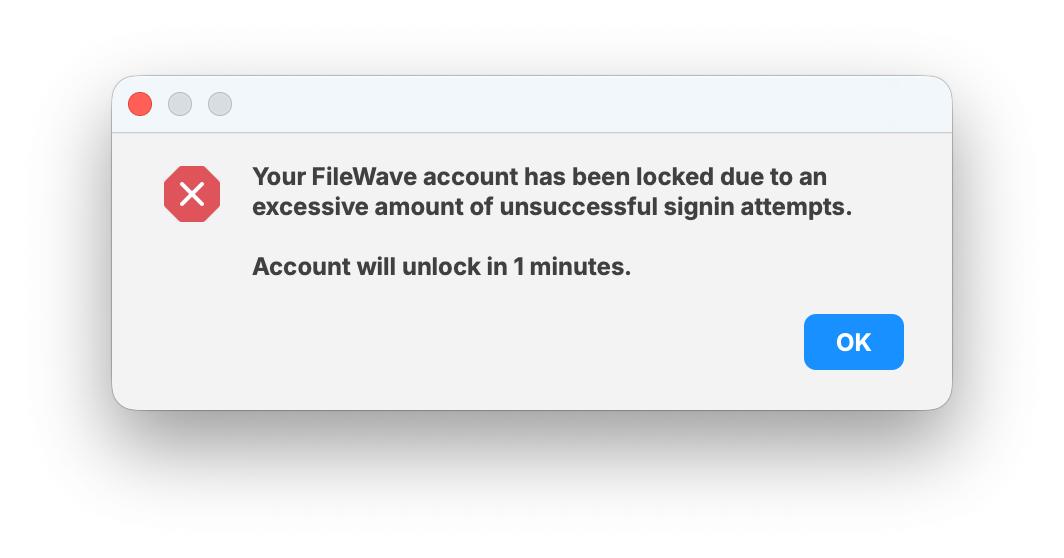
When the failed-attempt threshold is exceeded, the user sees a lockout message showing that the account has been locked due to too many unsuccessful sign-in attempts.
The dialog also shows how long the account will remain locked. In the example below, the account unlocks in 1 minute, which matches the default first lockout time.
This lockout applies only to that user account for the duration of the timer. Other users are not locked out unless they separately trigger their own failed-attempt threshold.
Recommended guidance
- Leave brute force protection enabled unless you have a specific, temporary reason to disable it.
- If a user reports being locked out, first confirm whether repeated failed password attempts occurred for that specific account.
- Remember that this is a per-user timer-based lockout, not an IP-based lockout affecting all users.
- If you change the defaults, document the new values so support and administrators know what to expect.
- When testing login behavior, account for escalating lockout delays after repeated failures.
Related Content
- FileWave 16.3.0 release notes and upgrade documentation
- FileWave Central administration and preferences documentation
- FileWave Anywhere access and authentication documentation
Digging Deeper
This feature is a straightforward hardening control, but it matters because it changes the default login behavior for both administrators and users after repeated failures.
Its main security value is simple: if a FileWave server is reachable over public networks, this adds a default control that makes repeated login attempts materially harder and slower for an attacker. It should be described as a protective hardening feature, not as a guarantee that an exposed system cannot be compromised.
For support and internal documentation, it helps to call out four things clearly:
- This is enabled by default in 16.3.0.
- The lockout is per user and timer-based, not IP-based.
- The lockout starts at 1 minute with default settings.
- The delay escalates with additional failed attempts up to the configured maximum.
That keeps the article useful for admins configuring the setting, support teams responding to lockout questions, and anyone reviewing the security intent behind the feature.