
Last Connect vs. Last Connected
What
OK,The we'llsimilarly cutnamed rightLast Connect and Last Connected fields track different device activity. This article explains what each field means and when to theuse chase, the naming of these fields is silly and confusing. We'll try to untangle that a bit in this document.it.
When/Why
TheUse two versions of the Last Connectedthese fields canwhen beyou quite confusing, and they mean two different things. Generally we will use the fields whenever we are tryingneed to understand the last timewhen a device talkedlast tocommunicated with the FileWave server.Server or last submitted inventory data.
How
The confusionvalues herecan comeslook inconsistent at first because they come from the fact that thedifferent data seemssources. inconsistent. It is not actually inconsistent, but it is certainly confusing. We'll use theThe following image toshows helpboth explain:fields:
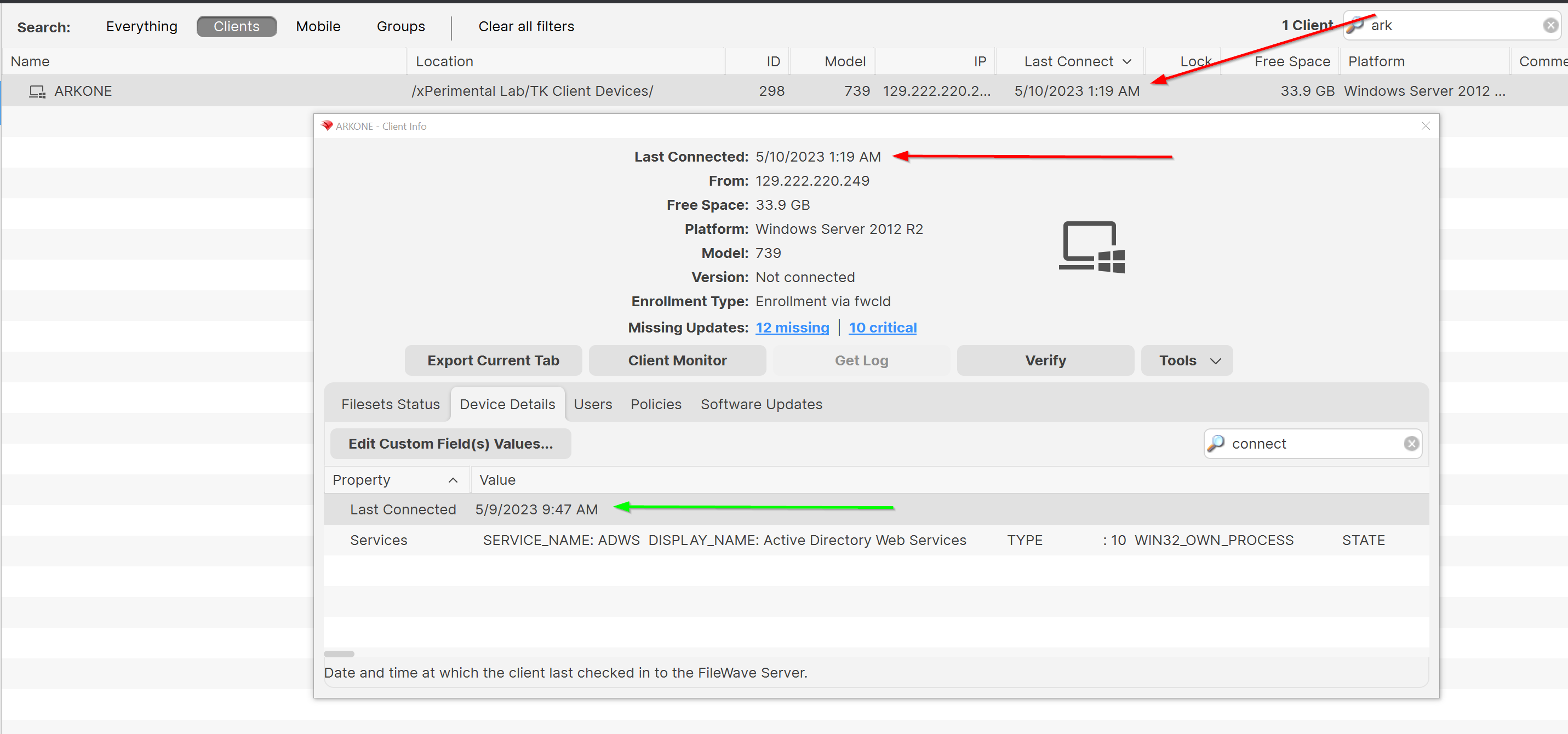
In the above diagram, the "Last Connect" you see highlighted by the red arrows is the last time the device spoke to the server at all. Devices reach out to the server differently depending on the operating system. The red arrowed fields are NOT included in inventory and are only meant to show "pings" from a client device. Basically, this value means that we "heard something" from the device. On macOS and Windows, the client will "tickle" every two minutes and update this value. No other platforms modify this field, so for iOS, Android, and Chrome, the only "Last Connected" time is the field that is in inventory.
For ALL platforms though, the field highlighted by the green arrow is the inventory field that is updated whenever the device sends inventory information to the server. That is, this date indicates the last time the device sent information about hardware, software, and custom fields. For macOS and Windows, this value will ALWAYS be different from the last tickle time. And the data in this field is important, because it tells you how old the "data" is about this client.
This field is very useful for troubleshooting (lookingdevices that may not be reporting inventory and for excluding stale inventory from Reports. For example, if you build a Report for devices that maybehave aren'tnot reporting inventory), and also for EXCLUDING data from reports. For instance, if I want to look for devices that don't haveupdated virus definitions updated in the last 3 days, I also want to add a criteria to look for therequiring inventory data to be updated infrom that same time frame. That This avoids havingprevents devices with stale inventory from appearing in mya reportReport thatwhere couldn'tthey possiblycould havenot yet show updated definitions, and would just clutter the report unnecessarily.definitions.