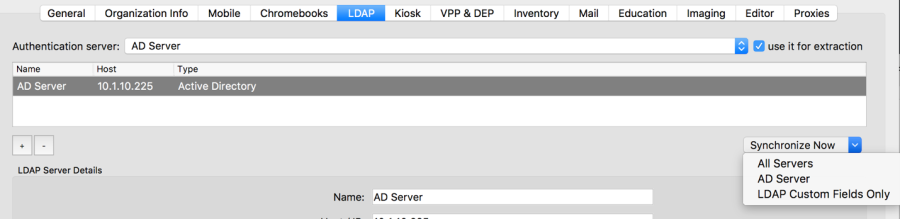
LDAP Preferences
FileWave supports connecting youran LDAP networkdirectory, directorysuch –as Active Directory, Open Directory, or eDirectory –eDirectory, to your FileWave Server. ThisFileWave capabilitycan providesuse access tothat directory information for use in Smart Groups and parameterized profiles. YouLDAP can also usebe LDAPused for enrollment authentication.authentication, Usingwhich LDAP to authenticate your devices giveslets you atrack way to know who (which LDAP user)user enrolled whata device.
Creating an LDAP server entry in Preferences
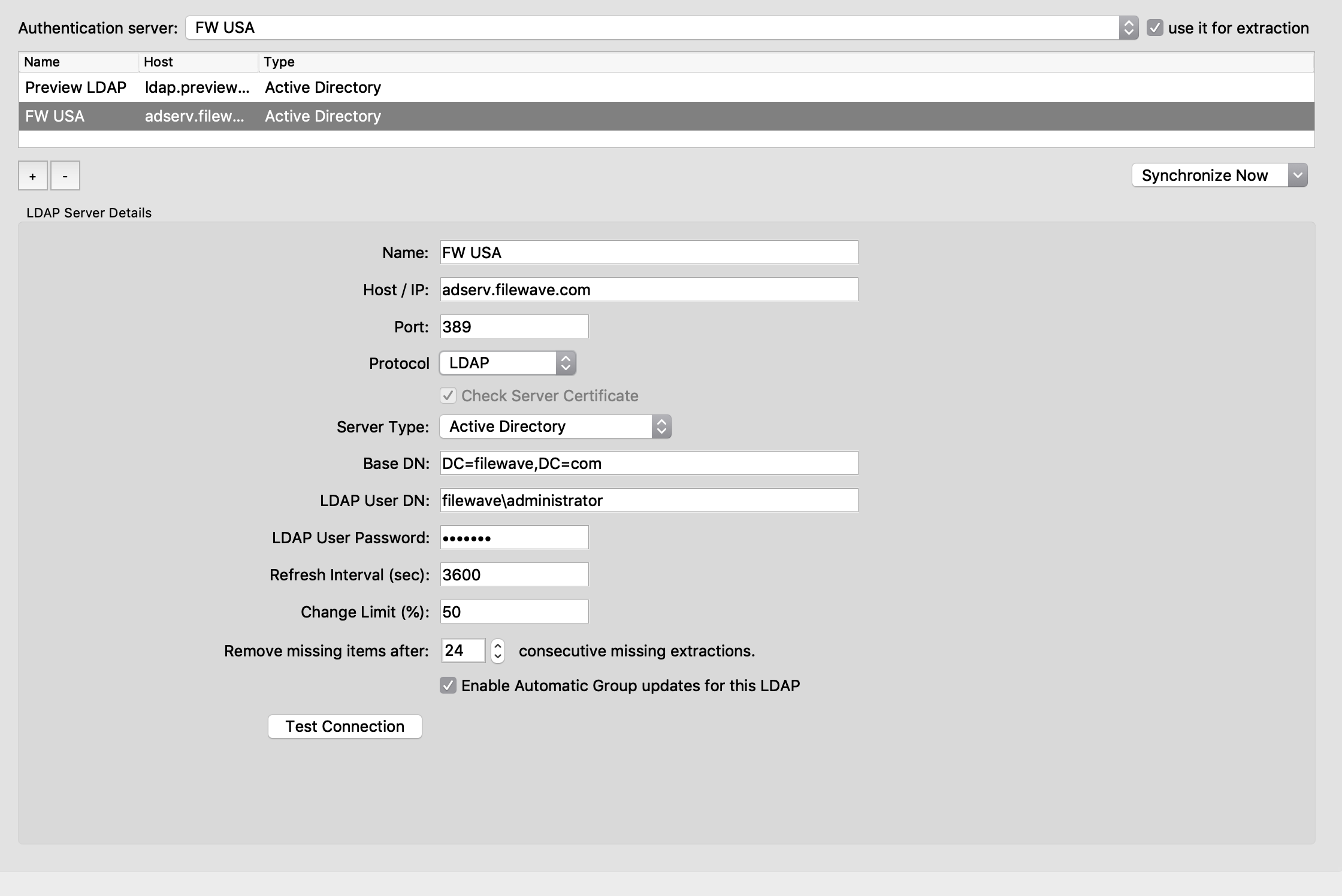
- Name - a reference name
usedyouby youuse todifferentiate yourtell LDAP servers apart - Host / IP -
enter either athe FQDN or IP addressforofyourthe LDAP server - Port -
enterthe TCP portrequiredFileWave should use toaccessreachyourthe LDAPserver (you may need toserver; check with your networksupport)team if you are not sure - Protocol – select LDAP, LDAPS, or STARTSSL.
- For LDAPS and
STARTSSL you have a checkbox that you can potentially uncheck so thatSTARTSSL, the Check Server Certificate option controls whether FileWave checks the LDAP server certificateis not checkedagainst themachine'computer's trust store.
- For LDAPS and
|
|
- Server Type - choose Active Directory, Open Directory, or eDirectory
- Base DN -
enterthe primary distinguishednamesname (DN) foryourthe LDAPserverserver, usingthedomain components separated by commas.For example, ifIf the LDAP server isrunningon the sameboxsystem as the FileWaveserver,Server,yourthebaseBase DN may be as simple as"dc=home,dc=local";local.but ifIf the LDAP server isrunningona differentanother system,the value of the base DNit maybe involve usinguse a moreextendedspecificvalue,value such as"dc=tanner,dc=filewave,dc=net"net. - LDAP User DN -
if you are doingfor authenticatedbinds to your LDAP server, you will need tobinds, enter avaliduser account thathasisbeenalloweddesignatedto bind to the LDAP server. Leave this blank forbinding. If you are doinganonymousbinding, this entry is left blank.binds. - LDAP User Password -
enter athe passwordto completefor theauthenticatedLDAPbind;bind account; not needed for anonymous binds - Refresh Interval (sec) -
enterhowa valueoften, inseconds forseconds, the FileWave Serverto contactcontacts the LDAP server to refreshtheavailable data.IfDuringyousetupareandjust setting uptesting, aFileWaveshortserverintervalonsuch as 120 seconds can be useful. In production, anetwork with an established LDAP server, you should set the24-hour intervalrelativelyisshortusually(~120safer:seconds) while you are testing and making changes. Once you go into production mode, you should change the interval to 24 hr. (86,400seconds).seconds. - Change Limit (%) -
LDAPprevents LDAP-related itemswillfromnot bebeing removedifwhen more than thegivenspecified percentageof the items disappeardisappears after a sync. ThisisprotectstoFileWaveavoidfromlosslargeofunintendeddataremovalsifcausedsomethingbygoesawrong with thebad LDAP configuration.
|
|
- Remove Missing items after - 0 means records that
recordsarenotno longer found inthe LDAP server,LDAP, but are still present inFileWaveFileWave,will beare removed immediately.
|
|
Enable Automatic Group updates for this LDAP creates a visible set of entries (Smart Groups)Groups in the Clients pane under an LDAP designator. TheseFileWave updates these Smart Groups will be updated by FileWave at the designatedconfigured refresh intervalinterval.
The LDAP information providedshown in the Clients pane for LDAP is a one-way view of yourthe directory server. While changesChanges made aton the LDAP server are automatically reflected in FileWave;FileWave, but changes made in FileWave AdminCentral do not affectchange the LDAP directory information.directory.
|
|
The Test Connection button pingschecks whether the server tois seeonline, ifbut it is online; but does not verify allevery connectionLDAP settings.setting. You should always useUse an LDAP browser tool to verify the linkdirectory topath yourand server.bind account before relying on the configuration.
You can create entries for multiple LDAP servers,servers. and anAn LDAP server can bealso runningrun on the same device or VM as the FileWave Server.
An LDAP server can be chosen as the Authentication server. which,In in thisthat case, meansFileWave uses that the directory for that server will be used for profiles that support parameterized settings. Selecting the use it for extraction setting adds the directory information to the FileWave database. You can view the LDAP settings in theAssistants Assistants/> LDAP Browser in FileWave Admin.Central.
|
|