
Opening FileWave Central (Admin) in a Specific Language (macOS)
What
FileWave Admin will automatically use the language, if supported, set on the workstation at installation (default English). It is however possible to run FileWave Admin in a different language, as shown below, through an Apple Shortcut Menu Bar item.
When/Why
FileWave Central (Admin) doesn’t currently have the option to change Language preference in the application itself. Only some languages are supported with this method.
How
The following command may be used to both open and specify a chosen language at runtime. Apple Shortcuts app allows running scripts via a Menu Bar item.
/Applications/FileWave/FileWave\ Admin.app/Contents/MacOS/FileWave\ Admin --lang en_GB &In FileWave 15.4.0, the above line will fail to launch the chosen language as is. See below shortcut example for alternate script.
Available Language Options:
|
Language |
|
|---|
Notes
English (US)
en_US
Use for American English.
German
de_DE
Standard locale for German in Germany.
French
fr_FR
Standard locale for French in France.
Korean
ko_KR
Korean for South Korea.
Japanese
ja_JP
Japanese for Japan.
Chinese (TraditionalSimplified)
zh_CN
For Mainland China.
Chinese (Traditional)
zh_TW
For Taiwan.
Dutch
nl_NL
New in FileWave 16.1+ — Dutch for Netherlands.
Turkish
tr_TR
New in FileWave 16.1+ — Turkish for Turkey.
Swedish
sv_SE
New in FileWave 16.1+ — Swedish for Sweden.
Spanish (International)
es_ES
New in FileWave 16.1+ — Spanish for Spain (Castilian).
Requirements:
-
macOS Monterey or newer
-
Shortcuts Application (System Application)
-
FileWave Central Admin Application
Creating the Shortcut
Open the Shortcuts Application on a macOS machine running Monterey or newer (macOS 12).
-
In the Menu, under File, select New Shortcut.
-
Name the Shortcut. For example: “FW Admin (EN)”.
-
Select Run Shell Script as the action.
-
Insert the command below, setting the preferred language. Below example showing US English.
/Applications/FileWave/FileWave\ Admin.app/Contents/MacOS/FileWave\ Admin --lang en_US &
exit 0
In, 15.4.0 try the following script instead. Example using German, but alter the temp_locale parameter as required:
#!/bin/zsh temp_locale="de_DE" current_user=$(stat -f%Su /dev/console) current_locale=$(defaults read /Users/${current_user}/Library/Preferences/.GlobalPreferences.plist AppleLocale) /usr/libexec/PlistBuddy -c 'Set AppleLocale '$temp_locale'' /Users/${current_user}/Library/Preferences/.GlobalPreferences.plist /Applications/FileWave/FileWave\ Admin.app/Contents/MacOS/FileWave\ Admin & /usr/libexec/PlistBuddy -c 'Set AppleLocale '$current_locale'' /Users/${current_user}/Library/Preferences/.GlobalPreferences.plist exit 0 -
Shortcut Details tab (ℹ️), offers options for launching the Shortcut. As an example: pin to Menu Bar and create a keyboard shortcut for quick access to the FileWave Central App.
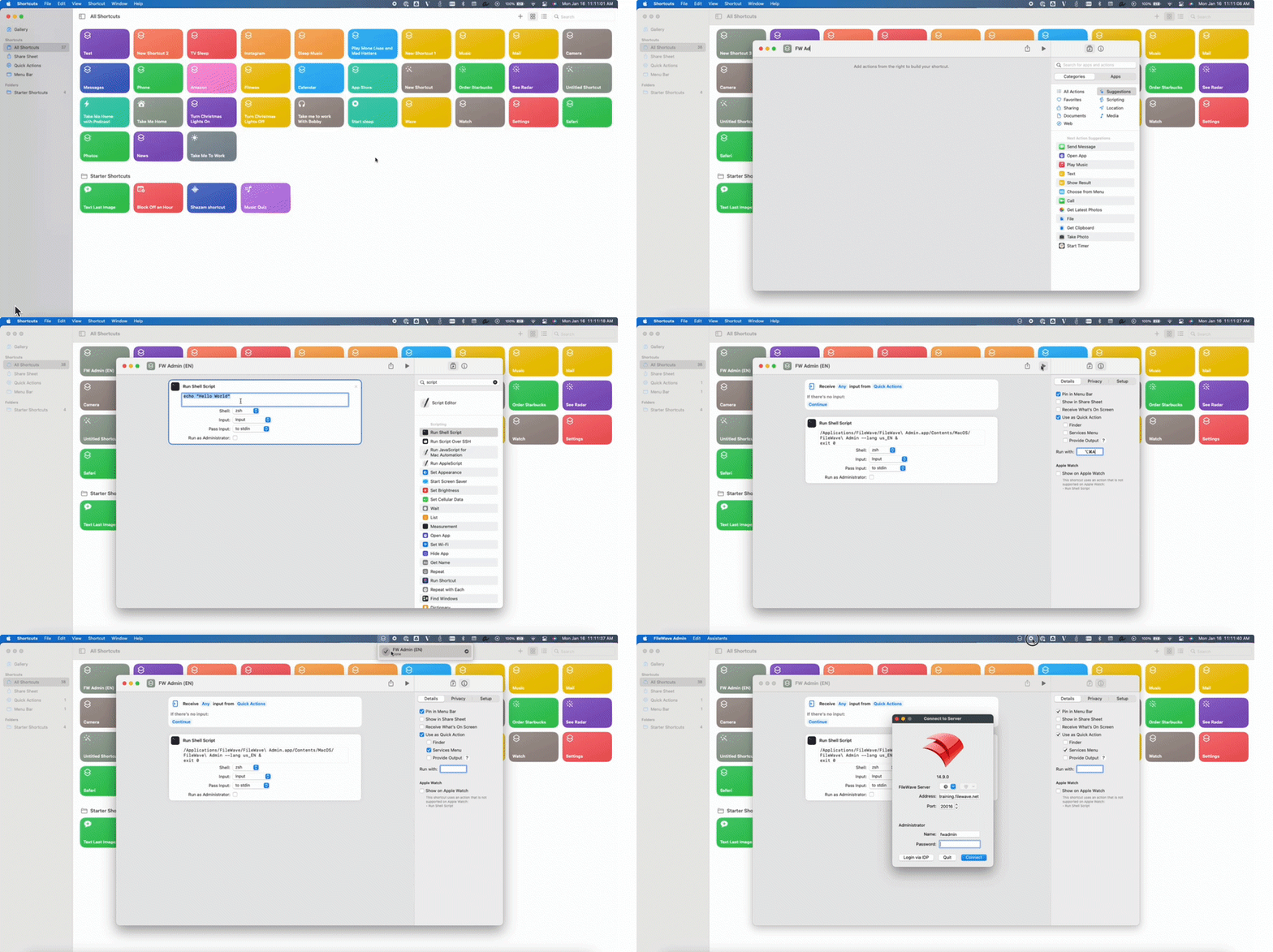
All done!