macOS MDM Enrolment State
DESCRIPTION
macOS devices are unique, in as much as they may be managed by both the FileWave Client and Apple's MDM process. The MDM Enrolment State is an inventory item which shows the current state of MDM enrolment.
FileWave requires the FileWave Client for basic management of macOS devices. MDM is an additional extra to expand the management options, as provided by Apple. There is no MDM only option for macOS devices.
INFORMATION
MDM Enrolment State
The state is a live report of the current status of the device's enrolment; imagine if a device was initially MDM enrolled, but the enrolment profile has been subsequently removed from the device. Status values include:
- Full Enrolled – Device was MDM enrolled and all is good. This would be usual for DEP or OTA
- Server only – Devices was MDM enrolled, but the device no longer has an enrolment profile installed
- Device only – Device has an MDM enrolment profile installed, yet the database has no reference of this
- Undefined – Device is running a version of FileWave older than 14.3.0 or has not yet reported back its state
- Not Enrolled – Device has never been MDM enrolled and is managed purely by the FileWave Client
Search note: The inventory field name on this page uses Enrolment. Customers may also search for Enrollment; both spellings refer to the same macOS MDM enrollment state.
Preliminary troubleshooting
Before contacting FileWave Support, use the state value to narrow where the mismatch is happening:
- Server only: FileWave has a server-side MDM record, but the Mac no longer has the FileWave MDM enrollment profile. Check Profiles/System Settings on the Mac for the FileWave MDM profile and note whether the device was recently archived, retired, wiped, migrated, or manually modified. Removing the MDM profile normally requires an MDM command, such as when a device is archived.
- Device only: The Mac still has an MDM enrollment profile, but FileWave does not have the matching server-side record. This usually means enrollment did not complete or the server record no longer matches the device. Check the profile install date, APNs topic, and the custom fields below, then re-enroll the device if the server cannot match it.
- Logs: On the FileWave Server,
/usr/local/filewave/log/filewave_django.logincludes MDM communication that can help explain enrollment and profile-removal behavior. DEBUG logging only helps for future actions after it is enabled, so collect the existing server log, the profile install time from the Mac, and any recent archive/re-enrollment actions before escalating.
DIRECTIONS
A query may be used to identify devices that are not in an expected state, for example, identify devices that no longer have an Enrolment Profile installed
An example query could look something like:
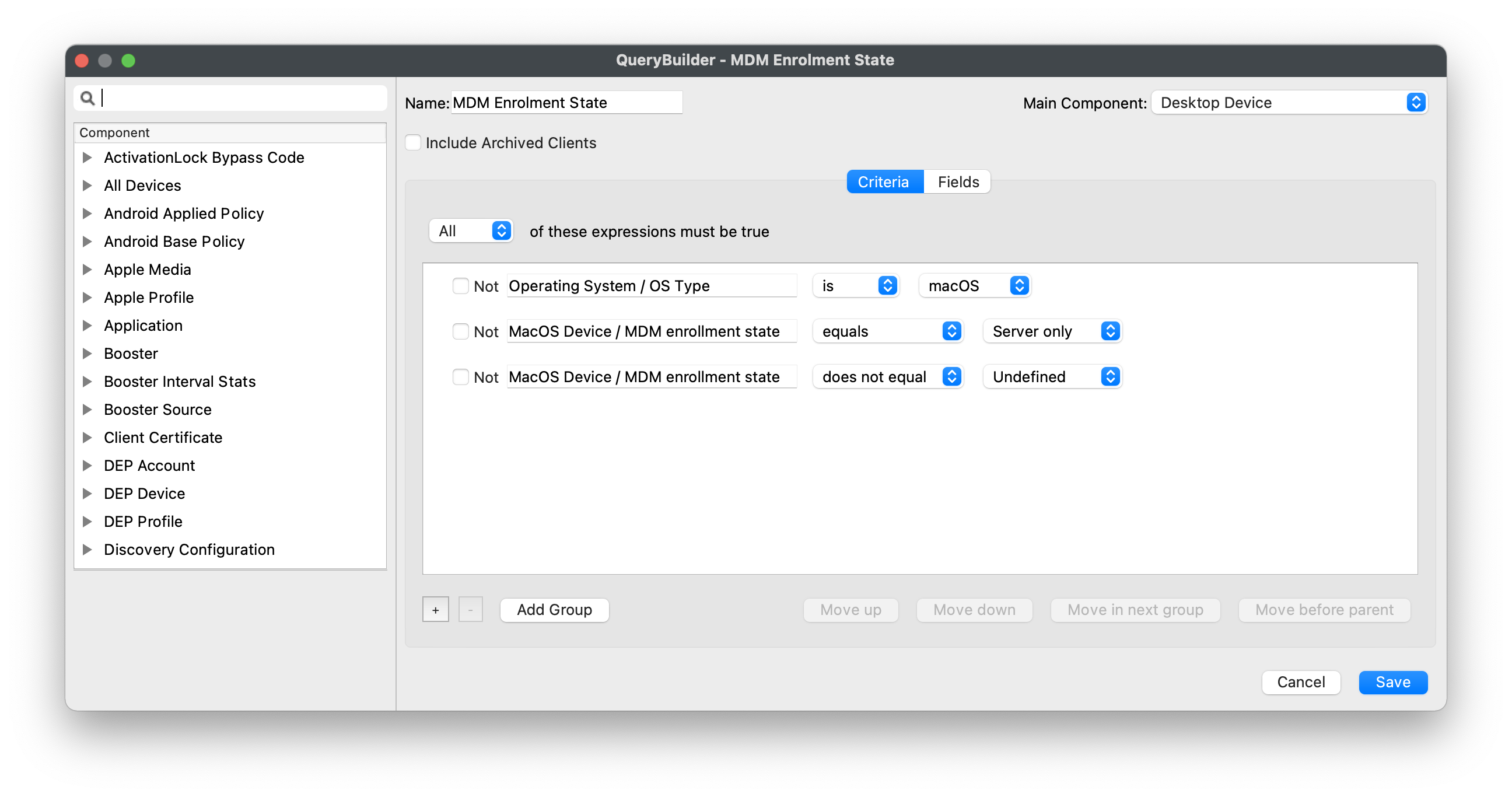
Add, edit or remove criteria to meet desired reporting.
ADDITIONAL INFORMATION
To assist identifying why a device may show as 'Device Only', the following Custom Fields may be added, reporting the Server Root Cert Name and the APNs of the enrolment profile:
MDM Server Root Certificate Name
|
↓ macOS |
|
|

Enrolment Profile APNs Topic
|
↓ macOS |
|
|