
Scripting Languages and File Extensions in FileWave
DescriptionSupported script types
FileWave providesFilesets thecan abilityrun to leverage certain scripting languagesscripts on macOS and Windows.Windows Thiswhen includes:the required interpreter is installed on the device. The table below shows the script types available in the Fileset editor.
| macOS | Windows | |
| Perl |  |
|
| Python | |
|
| Shell | |
|
| Bat | |
|
| PowerShell | |
FileWave does not includeinstall thesethe languages,scripting theyruntimes. areUse eitherthe installedversion supplied by the OSoperating vendorsystem or willdeploy needand tomaintain bethe installedrequired runtime separately.
Apple indicated they would be deprecating pre-installation of certain runtimes, for example:
https://developer.apple.com/documentation/macos-release-notes/macos-catalina-10_15-release-notes
When testing anyTest scripts locally prior to deployment through FileWave, it is imperative that they are tested in the same context/account, architecture, working-directory, and environment ascontext ifthat theyFileWave werewill beinguse. ran by FileWave, as indicated in ourSee Script Best Practices KB.before production deployment.
Script Extensionsextensions
Add Fileset scripts are best added usingwith the Script button fromin the Fileset view. DoingFileWave so,then ensures thecaptures script willoutput alsoin its Fileset script log alland outputadds automatically, as well as setting athe default shebang for a new macOS shell scripts.script.
Additionally, when definingName the namescript of the script,with the extension isthat requiredmatches to match theits language.
OnlyThe oneextensions ofin the following extensionstable will allowenable the editingExecutable oftab. theOther Executablefilename tab,extensions regardlessdo ofnot howexpose theythose the scripts are added.settings.
| Language | Extension |
| Perl | .pl |
| Python |
.py |
| Shell | .sh |
| Batch | .bat or .cmd |
| PowerShell | .ps1 |
EXE files may also benefit from the Executables tab
Specify the type of Shell script, by way of the shebang. To keep in line with Apple, FileWave will automatically add ZSH as the default shebang: #!/bin/zsh
Example
The examples below provides examples of how to instal Python on endpoints. This isshow one way to achieveinstall thisPython goal,on butmanaged byendpoints. noChoose meansand themaintain onlya way.runtime version that matches your scripts and operating-system support requirements. FileWave Professional Services requests can behelp raiseddesign fordeployment itemsworkflows beyondthat fall outside standard FileWave Support if desired.Support.
Ingredients
- FileWave Central
- Windows EXE
Installers available from either:
Directions
macOS Python Installer
macOS Python
Apple used to provide a version of Python pre-installed, however as noted, this was an old version and is now deprecated. It is possible to download Python installers, however Apple provide Python in the Xcode Command Line Tools. The following method demonstrates how the softwareupdate mechanism may be used to list (and therefore instal) the command line tools:
# touch /tmp/.com.apple.dt.CommandLineTools.installondemand.in-progress
# softwareupdate -l
Software Update Tool

Finding available software
Software Update found the following new or updated software:
* Label: Command Line Tools for Xcode-12.4
    Title: Command Line Tools for Xcode, Version: 12.4, Size: 440392K, Recommended: YES,
* Label: Command Line Tools for Xcode-13.2
    Title: Command Line Tools for Xcode, Version: 13.2, Size: 577329K, Recommended: YES,
* Label: Command Line Tools for Xcode-12.5
    Title: Command Line Tools for Xcode, Version: 12.5, Size: 470966K, Recommended: YES,
* Label: Command Line Tools for Xcode-12.5
    Title: Command Line Tools for Xcode, Version: 12.5, Size: 470820K, Recommended: YES,
* Label: macOS Big Sur 11.6.2-20G314
Note that more than one version may be returned. If Xcode is installed a version may already be in place, so care should be taken if Xcode is already installed. After installing the chosen version, the temporary file created may then be removed.
Instal Python Packages
Python scripts import packages, not all of which will be installed by default. Any additional packages will require installation. PIP may achieve this and may be used in a Fileset script; PIP is also installed when installing the Command Line tools (or Xcode)
It is possible to check pip with the following command, note it may require upgrading, but again take careful consideration if Xcode is installed:
# pip3 list
Package    Version
---------- -------
pip        20.2.3
setuptools 49.2.1
six        1.15.0
wheel      0.33.1
WARNING: You are using pip version 20.2.3; however, version 23.1.2 is available.
You should consider upgrading via the '/Library/Developer/CommandLineTools/usr/bin/python3 -m pip install --upgrade pip' command.
For example, to instal pyobjc:
# Instal pyobjc
pip3 install pyobjc-core
pip3 install pyobjc-framework-Cocoa
pip3 install pyobjc-framework-Quartz
pip3 install pyobjc-framework-SystemConfiguration
In some instances, pip3 may fail. This can be due to the link created in:
/Library/Developer/CommandLineTools/SDKs
Remove and recreate the link to the correct installed version if need be.
The above could be packaged into a single script which could:
- Touch the temporary file
- Run Software Update
- Obtain the desired version from the list
- Instal that version
- Remove the temporary file
- Remove the link if incorrect
- Use PIP to instal other desired packages
- Recreate the link if removed above
Windows Python Installer
Windows Python
- Download the appropriate python installer EXE
- Create a new empty Fileset
- Choose a location to store the installer and drag the EXE into this location
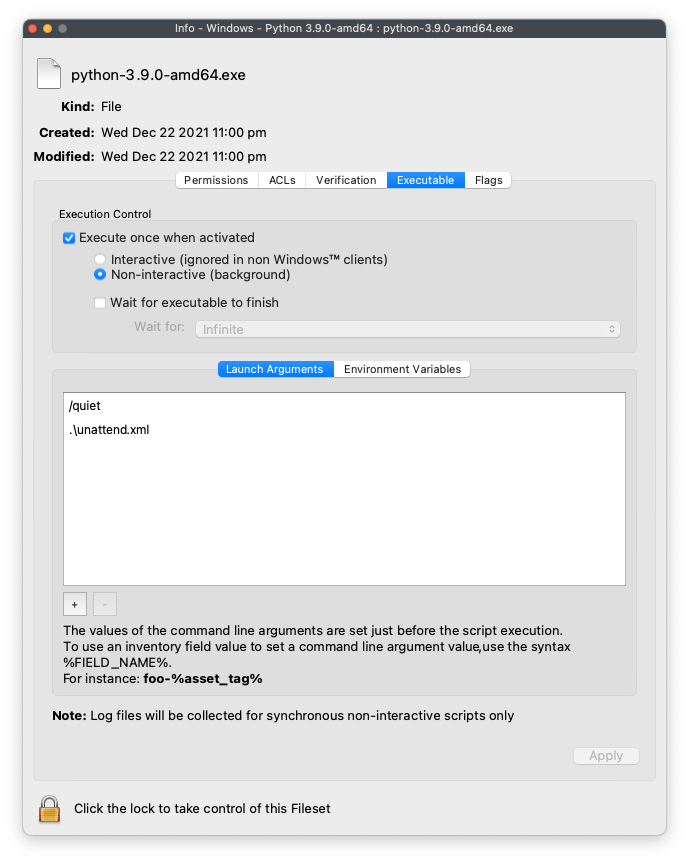
- Highlight this EXE and from the Get Info window choose Executable
- Tick the option to 'Execute once when activated'
- Set two Launch Arguments as per the screen shot: /quiet and .\unattend.xml
Supporting File
An unattend.xml file may be used to pre-determine aspects of the installation, e.g. instal PIP during installation or set Paths
- Use an editor to create a file called unattend.xml
- Edit this file with the below details, editing to meet desired needs
- Place this file in the Fileset within the same folder location as the EXE installer
An example could look as follows (see the Python documentation for a list and description of available options):
<Options>
<Option Name="InstallAllUsers" Value="1" />
<Option Name="TargetDir" Value="C:\Program Files\Python39" />
<Option Name="DefaultAllUsersTargetDir" Value="C:\Program Files\Python39" />
<Option Name="DefaultJustForMeTargetDir" Value="C:\Program Files\Python39" />
<Option Name="DefaultCustomTargetDir" Value="C:\Program Files\Python39" />
<Option Name="AssociateFiles" Value="1" />
<Option Name="CompileAll" Value="1" />
<Option Name="PrependPath" Value="1" />
<Option Name="Shortcuts" Value="1" />
<Option Name="Include_doc" Value="1" />
<Option Name="Include_debug" Value="1" />
<Option Name="Include_dev" Value="1" />
<Option Name="Include_exe" Value="1" />
<Option Name="Include_launcher" Value="1" />
<Option Name="InstallLauncherAllUsers" Value="1" />
<Option Name="Include_lib" Value="1" />
<Option Name="Include_pip" Value="1" />
<Option Name="Include_symbols" Value="1" />
<Option Name="Include_tcltk" Value="1" />
<Option Name="Include_test" Value="1" />
<Option Name="Include_tools" Value="1" />
<Option Name="LauncherOnly" Value="0" />
<Option Name="SimpleInstall" Value="0" />
<Option Name="SimpleInstallDescription"></Option>
</Options>
Edit the above example as desired, for example, set the target directory paths as desired.
Instal Python Packages
Python scripts import packages, not all of which will be installed by default. Any additional packages will require installation. PIP may achieve this and may be used in a post flight script, if the option above to include pip at installation was configured.
- Create a PostFlight script within the Fileset
- Edit the script to include any desired packages, e.g. to instal the 'requests' package:
python -m pip install requestsThe command 'pip list' may be used to list ALL additional packages installed.
The command 'pip freeze' may be used to list packages installed by PIP.
The final Fileset will may look something like:
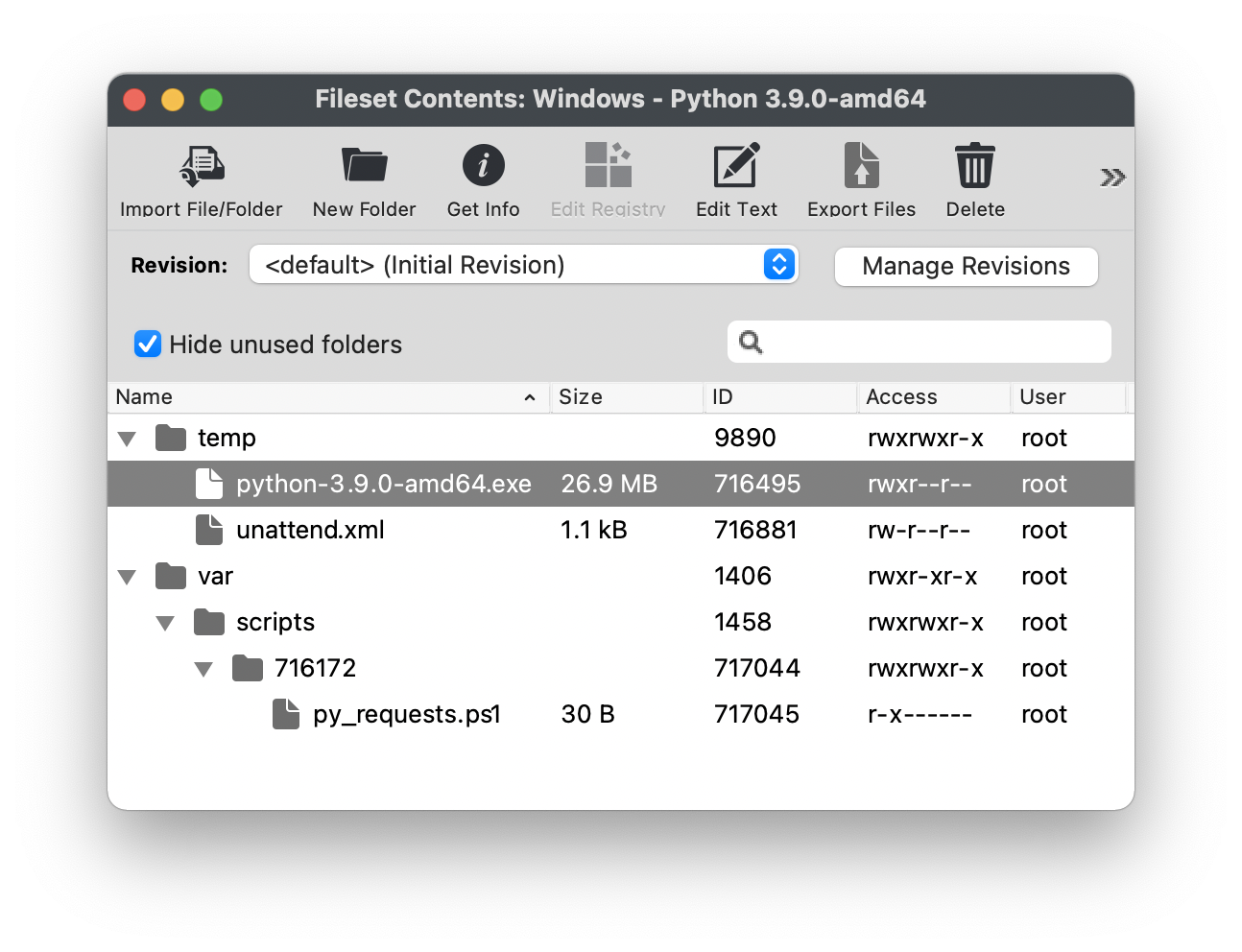
Packages, including PIP itself, may require updating over time.
Testing
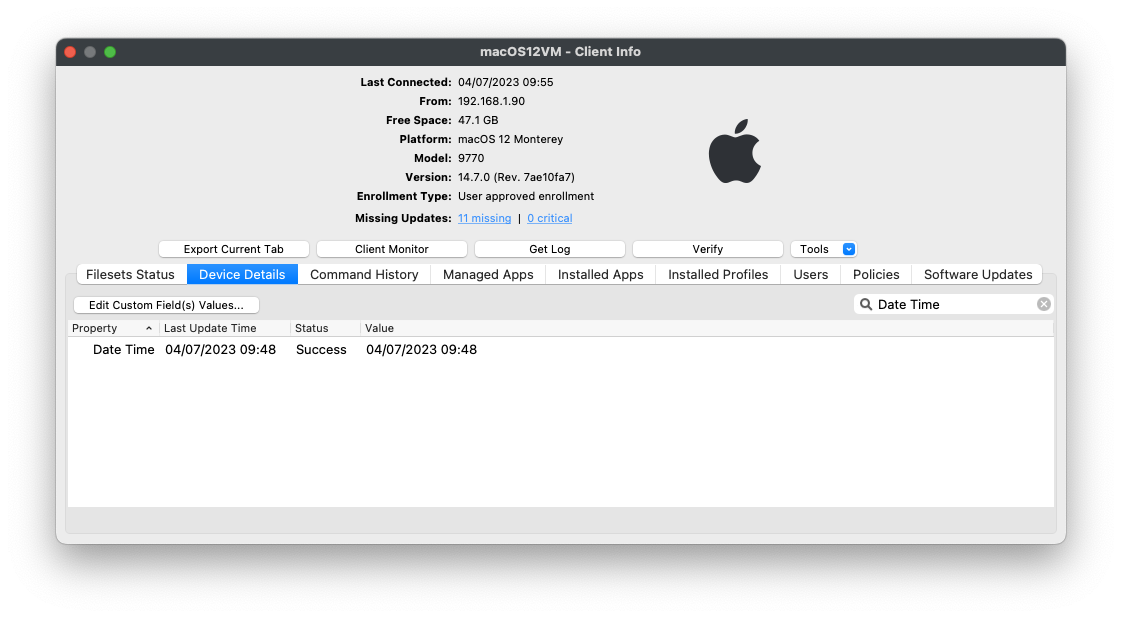
The following download is a simple Python Custom Field for both macOS and Windows. It should report the date when ran.
| ↓ macOS/Windows |
 |
If desired, use the Custom Field Assistant window to Import this unzipped, Custom Field example, called 'Date Time'