IdP Custom Fields
What
FileWave 16.2 introduces IdP Custom Fields, allowing administrators to pull user and device-specific data directly from an Identity Provider (IdP) such as Okta, Google, Entra (Azure AD), or Keycloak into FileWave. These fields work just like other Custom Fields but are powered by your IdP attributes, enabling automation and personalization across devices.
When/Why
You would use IdP Custom Fields when you want to:
-
Dynamically populate user-specific values (e.g., email address, username, department).
-
Create Smart Groups based on IdP-sourced information.
-
Use variables in configuration profiles (e.g., pre-fill email profiles with the user’s email address).
-
Simplify large-scale deployments by automatically binding devices to users through IdP attributes.
This feature reduces manual data entry and ensures consistency between your IdP and FileWave.
⚠️ Platform Support: IdP Custom Fields are supported on macOS, iOS, and iPadOS. Windows devices currently do not leverage usernames for IdP-based fields in the same way they do with LDAP.
How
-
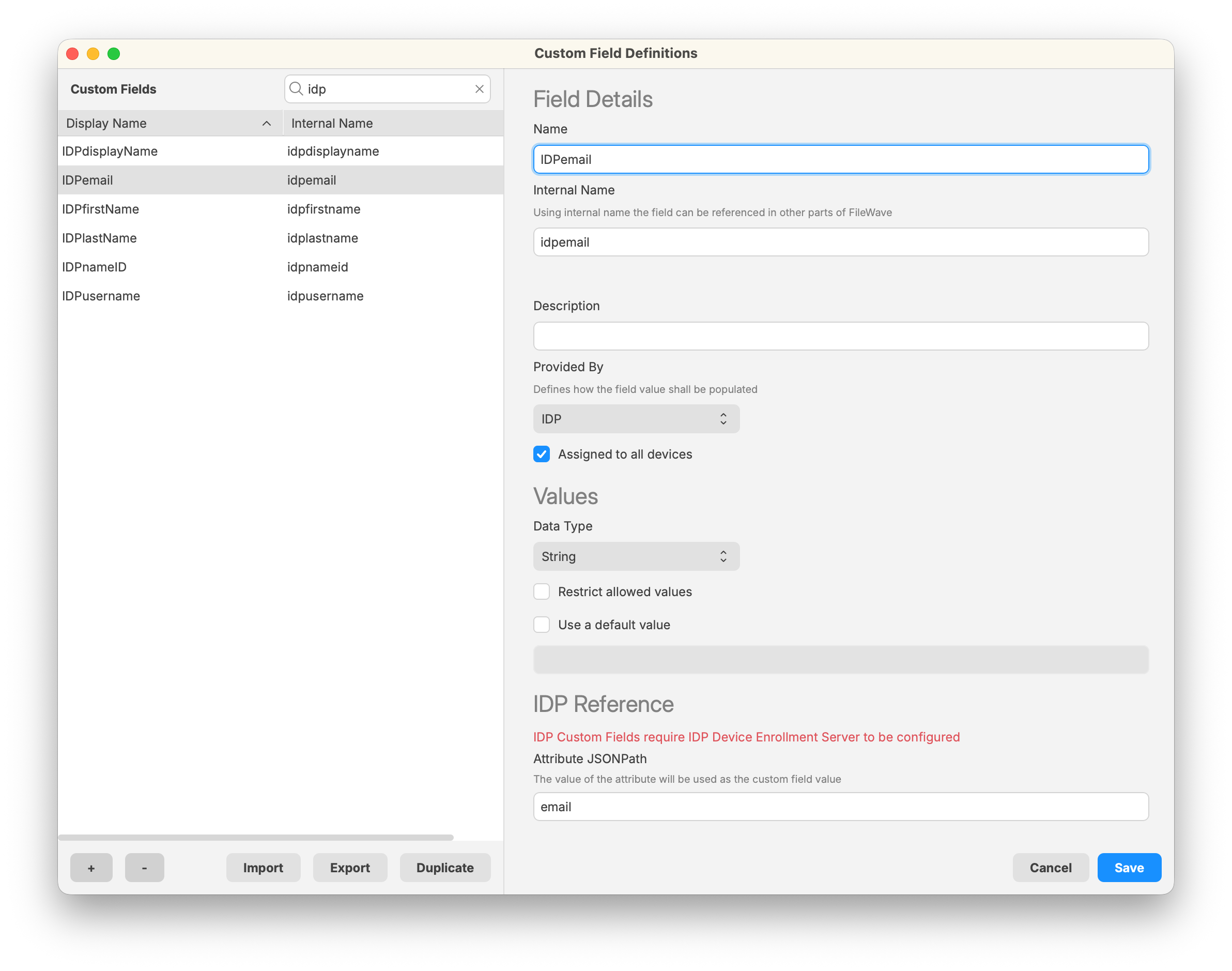
Navigate to Assistants > Custom Fields > Edit Custom Field Definitions in FileWave Central.
-
Create a new field:
-
Name/Internal Name: Define as with any other custom field.
-
Provided By: Select IdP.
-
Assigned to all devices: Usually check this to ensure the field applies across your environment.
-
-
Set the Data Type (commonly String).
-
In the IdP Reference section, specify the Attribute JSONPath — this should match the attribute name from your IdP (e.g., email, displayName, department).

-
Save the Custom Field.
-
Ensure that devices are linked to users:
-
FileWave uses the Enrollment Username field to associate IdP data with a device.
-
This can be set manually (right-click device > Set Enrollment Username), automatically via ADE enrollment, or through API/import methods.
-
Related Content