
Microsoft Enterprise Platform Single Sign-on for macOS
What
With Platform Single Sign-on (Platform SSO),SSO weor canPSSO) utilizeextends Apple's Extensible SSO extensions that extendframework to the macOS login window,and allowingaccount usersexperience. toFor Microsoft Entra ID deployments, the Microsoft Enterprise SSO plug-in and Company Portal app provide the SSO extension used by this workflow.
With password authentication, Platform SSO can synchronize the user's local macOS account credentialspassword with antheir Microsoft Entra ID password. Depending on the operating system version, identity provider (IdP). In this case, we are combining what is provided here: Microsoft Enterprise S... | FileWave KB with Platform Single Sign-on for macOS - Apple Support. The local account password is automatically kept in sync after this configuration, so the cloud passwordsupport, and localpayload passwordssettings, willPlatform match.SSO Users willcan also stillsupport beother ableauthentication unlockmethods theirsuch Macas withSecure TouchEnclave-backed IDplatform and Apple Watch. The end result will allow the user to login with their Entra ID and passwordcredentials or theirsmart local account username with their synced Entra ID's password.
When/Why
AnUse AdministratorPlatform whoSSO iswhen managingyou amanage fleetMac ofcomputers MacBookswith mayFileWave and want users to usesign thisin forwith anothertheir levelMicrosoft ofEntra securityID oridentity forwhile takingreducing advantagelocal ofpassword drift. This builds on the full integration that macOS now offers with SSO. You are offered the same benefits as listed in: Microsoft Enterprise S...SSO |plug-in FileWaveby KB except withextending the addedSSO layerexperience ofcloser further syncingto the local Mac account withand yourlogin identity provider account.workflow.
How
Below are the followingmain requirements and configuration creationdeployment steps forto deployment.review before using the example profile.
Platform SSO Requirements:requirements
A
Mac running macOS 13 or later. Microsoft currently recommends macOS 14 Sonoma or later for the best Entra Platform SSO experience, and some newer Apple Platform SSO features require later macOS versions.
A mobile device management (MDM) solution that supports the Extensible Single Sign-on payload
which includes support forwith Platform SSO(settings. In FileWave, this means an MDM-enrolledinMac,FileWavesuchviaasDEPAutomated Device Enrollment or UserapprovedApprovedenrollmentMDMin our case)enrollment.An
SupportidentityfromprovidertheandIdPSSOforextension that support the Platform SSO authenticationprotocolmethod you plan to use.For Microsoft Entra ID Platform SSO, Microsoft lists the Company Portal app version 5.2404.0 or later, Microsoft Authenticator, and user permissions to register or join devices to Microsoft Entra ID as requirements.
One of twothe supported authentication methods:
Authenticationdeployment. withThis aexample Securefocuses Enclave–backedon key:password Withauthentication, this method, a user who logs in to their Mac can use a Secure Enclave–backed key to authenticate withwhere the IdP without a password. The Secure Enclave key is set up with the IdP during the user registration process
Password authentication: With this method, a user authenticates with auser's local password orand anEntra IdPID password are synchronized.
Note: If the Mac is unenrolled from MDM, Apple notes that the MDMMac solution, it’sis also unregistered from the IdP.identity provider.
WS-Trust federation
WS-Trust federation is supported in macOS 13.3 or later. This allows Platform SSO to successfully authenticate users when their account is managed by an IdPidentity provider federated with Microsoft Entra ID.
Deployment:Deployment
Here is anThe example below uses a Profile Fileset ready to deploy in your environment with thea default password-authentication Platform SSO configuration:
- Profile - Entra ID Platform SSO.fileset.zip
Install
Thethe Microsoft Company Portal appmustbeforebe installed on the device. It can be installed manually bytargeting usersorfordeployedPlatformover FileWave.SSO. You candownloaddeploy it through FileWave or have users install it manually. Microsoft provides the current Company Portal app here: Company Portal app
.

Please Note: On macOS devices, Apple requires thenote: Company Portal appis berequired installed.for Microsoft's Platform SSO implementation because it contains the Microsoft SSO extension. Users don'tgenerally do not need to use or configure the Company Portal app,directly, itbut justthe needsapp must be present and current enough before Platform SSO registration is expected to be installed on the device.work.
End-user Interactioninteraction required:required
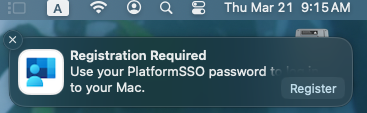
After successful deployment, in the notifications area of the user's device, theyuser should be presented withsee a message:Registration Required notification in macOS:
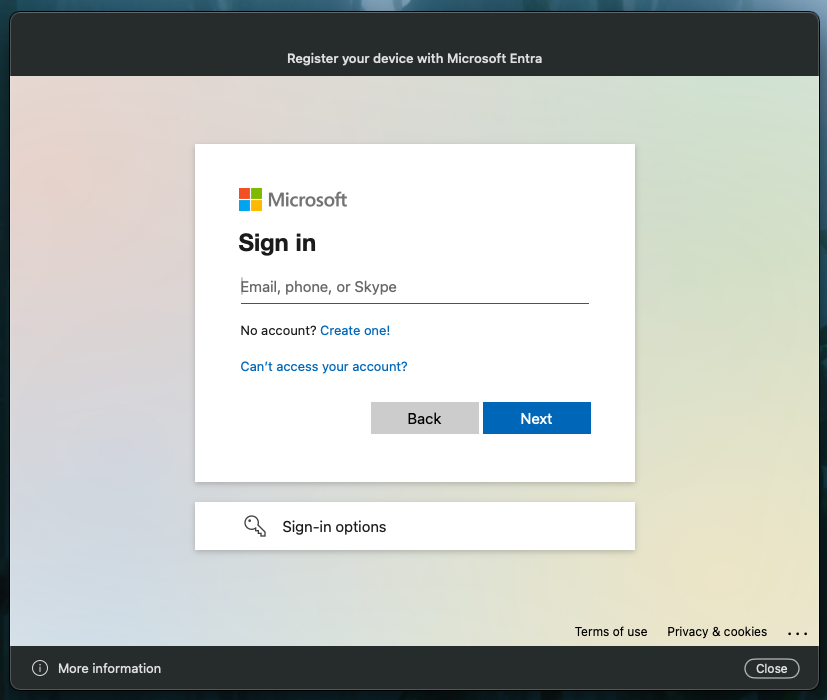
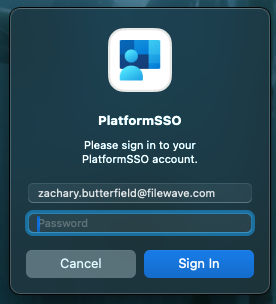
starts registration, macOS and Microsoft Entra ID may prompt the user to authenticate and complete device registration:
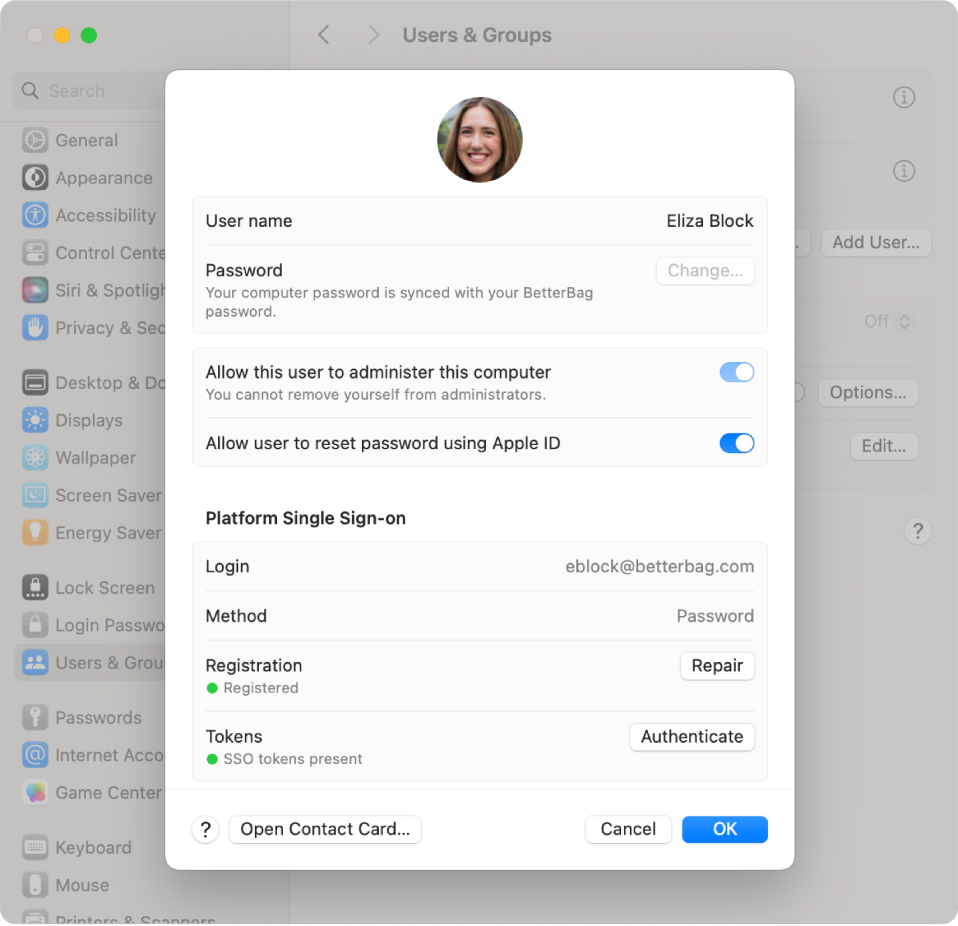
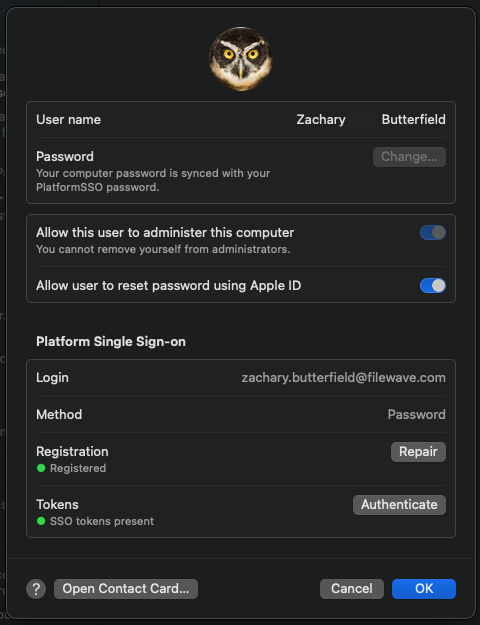
After signingregistration, the user can confirm status in and registering, when you go to System Settings > Users & Groups >by clickclicking the 'i'information button next to yourtheir Username,account. youThe Platform Single Sign-on section should be able to confirm everything went successfully withshow the newconfigured settingsmethod, here:
Notes and Observations
- If
two-multi-factor authentication is enabled in your environment,wheneverMicrosoft app sign-in prompts depend on yourendMicrosoftuserEntraopensID and Conditional Access/security settings.