
Nudge for macOS Software Updates
What
Nudge is a multilingual notification tool for macOS Big Sur 11 and later. It gives users configurable deferral choices while repeatedly prompting them to install the macOS version required by the administrator.
Nudge evaluates the installed macOS version against a configured minimum version and deadline, then adjusts the user-notification experience as that deadline approaches or passes. Nudge prompts the user; it does not install the macOS update itself.
Nudge can be downloaded from the following link, however this KB includes a Fileset to handle the installation of Nudge:
GitHub - macadmins/nudge: A tool for encouraging the installation of macOS security updates.
When/Why
Use Nudge when users are expected to start macOS updates themselves but need a visible deadline, controlled deferrals, and increasingly persistent reminders. It is useful for reducing version drift without surprising users with an immediate update.
Nudge complements FileWave deployment and reporting: FileWave installs and maintains the Nudge components, while the Nudge configuration defines the required macOS version, installation date, and notification behavior.
Note, for major software updates, an Administrator password may be required. In this case, an alternate approach to upgrade devices could be considered, as highlighted in the KB: macOS Upgrades or Erasing
Prior to macOS 11, Software Updates could be installed either through Apple's legacy Software Update catalogues or using MDM. Consider using the legacy updates for these devices; Nudge should not be required in this instance.
How
Nudge has two main components for installation;
- Installation PKG
- Configuration file
In this example, configuration will be defined using a JSON file.
The provided Fileset includes:
- Example Configuration
- Scripted method of installation
- Scripted removal when disassociated
Nudge Notifications.fileset.zip

Scripts
This example Fileset does not contain the installer. Instead, a script pulls the latest version from GitHub and instals that version. If a new version exists, the Fileset could be re-triggered with a reinstall Fileset, causing the software to update.
The uninstaller contains the necessary lines of code to remove each item installed when disassociated
Configuration
As suggested above, in this example Fileset is a JSON for Nudge configuration. There are two lines to immediately consider:
            "requiredInstallationDate": "2023-12-28T00:00:00Z",
"requiredMinimumOSVersion": "12.7.1",| requiredInstallationDate | When reached the conditions of user notification are altered |
| requiredMinimumOSversion | If OS version is below this set value, the user will begin to receive notifications |
The frequency and handling of notifications both before and after the requiredInstallationDate are handled elsewhere within the JSON file. Unless otherwise noted, all other values are set as default.
Below is the contents of the included example JSON file:
JSON File metadata
{
    "optionalFeatures": {
        "acceptableApplicationBundleIDs": [],
        "acceptableAssertionUsage": false,
        "acceptableCameraUsage": false,
        "acceptableScreenSharingUsage": false,
        "aggressiveUserExperience": true,
        "aggressiveUserFullScreenExperience": true,
        "asynchronousSoftwareUpdate": true,
        "attemptToBlockApplicationLaunches": false,
        "attemptToFetchMajorUpgrade": true,
        "blockedApplicationBundleIDs": [],
        "enforceMinorUpdates": true,
        "terminateApplicationsOnLaunch": false
    },
    "osVersionRequirements": [
        {
            "aboutUpdateURL_disabled": "https://support.apple.com/en-us/HT211896#macos1121",
            "aboutUpdateURLs": [
                {
                    "_language": "en",
                    "aboutUpdateURL": "https://support.apple.com/en-us/HT211896#macos1121"
                },
                {
                    "_language": "es",
                    "aboutUpdateURL": "https://support.apple.com/es-es/HT211896"
                },
                {
                    "_language": "fr",
                    "aboutUpdateURL": "https://support.apple.com/fr-fr/HT211896"
                },
                {
                    "_language": "de",
                    "aboutUpdateURL": "https://support.apple.com/de-de/HT211896"
                }
            ],
            "actionButtonPath": "/System/Library/CoreServices/Software Update.app",
            "majorUpgradeAppPath": "/Applications/Install macOS Big Sur.app",
            "requiredInstallationDate": "2023-12-28T00:00:00Z",
            "requiredMinimumOSVersion": "12.7.1",
            "targetedOSVersionsRule": "default"
        }
    ],
    "userExperience": {
        "allowGracePeriods": false,
        "allowLaterDeferralButton": true,
        "allowUserQuitDeferrals": true,
        "allowedDeferrals": 1000000,
        "allowedDeferralsUntilForcedSecondaryQuitButton": 14,
        "approachingRefreshCycle": 6000,
        "approachingWindowTime": 72,
        "calendarDeferralUnit": "imminentWindowTime",
        "elapsedRefreshCycle": 300,
        "gracePeriodInstallDelay": 23,
        "gracePeriodLaunchDelay": 1,
        "gracePeriodPath": "/private/var/db/.AppleSetupDone",
        "imminentRefreshCycle": 600,
        "imminentWindowTime": 24,
        "initialRefreshCycle": 18000,
        "launchAgentIdentifier": "com.github.macadmins.Nudge",
        "loadLaunchAgent": false,
        "maxRandomDelayInSeconds": 1200,
        "noTimers": false,
        "nudgeRefreshCycle": 60,
        "randomDelay": false
    },
    "userInterface": {
        "actionButtonPath": "/System/Library/CoreServices/Software Update.app",
        "fallbackLanguage": "en",
        "forceFallbackLanguage": false,
        "forceScreenShotIcon": false,
        "iconDarkPath": "/usr/local/etc/Nudge.logo.png",
        "iconLightPath": "/usr/local/etc/Nudge.logo.png",
        "screenShotDarkPath": "/somewhere/screenShotDark.png",
        "screenShotLightPath": "/somewhere/screenShotLight.png",
        "showDeferralCount": true,
        "simpleMode": false,
        "singleQuitButton": false,
        "updateElements": [
            {
                "_language": "en",
                "actionButtonText": "Update Device",
                "customDeferralButtonText": "Custom",
                "customDeferralDropdownText": "Defer",
                "informationButtonText": "More Info",
                "mainContentHeader": "Your device will restart during this update",
                "mainContentNote": "Important Notes",
                "mainContentSubHeader": "Updates can take around 30 minutes to complete",
                "mainContentText": "A fully up-to-date device is required to ensure that IT can accurately protect your device.\n\nIf you do not update your device, you may lose access to some items necessary for your day-to-day tasks.\n\nTo begin the update, simply click on the Update Device button and follow the provided steps.",
                "mainHeader": "Your device requires a security update",
                "oneDayDeferralButtonText": "One Day",
                "oneHourDeferralButtonText": "One Hour",
                "primaryQuitButtonText": "Later",
                "secondaryQuitButtonText": "I understand",
                "subHeader": "A friendly reminder from your local IT team"
            },
            {
                "_language": "es",
                "actionButtonText": "Actualizar dispositivo",
                "informationButtonText": "Más información",
                "mainContentHeader": "Su dispositivo se reiniciará durante esta actualización",
                "mainContentNote": "Notas importantes",
                "mainContentSubHeader": "Las actualizaciones pueden tardar unos 30 minutos en completarse",
                "mainContentText": "Se requiere un dispositivo completamente actualizado para garantizar que IT pueda proteger su dispositivo con precisión.\n\nSi no actualiza su dispositivo, es posible que pierda el acceso a algunos elementos necesarios para sus tareas diarias.\n\nPara comenzar la actualización, simplemente haga clic en el botón Actualizar dispositivo y siga los pasos proporcionados.",
                "mainHeader": "Tu dispositivo requiere una actualización de seguridad",
                "primaryQuitButtonText": "Más tarde",
                "secondaryQuitButtonText": "Entiendo",
                "subHeader": "Un recordatorio amistoso de su equipo de IT local"
            },
            {
                "_language": "fr",
                "actionButtonText": "Mettre à jour l'appareil",
                "informationButtonText": "Plus d'informations",
                "mainContentHeader": "Votre appareil redémarrera pendant cette mise à jour",
                "mainContentNote": "Notes Importantes",
                "mainContentSubHeader": "Les mises à jour peuvent prendre environ 30 minutes.",
                "mainContentText": "Un appareil entièrement à jour est nécessaire pour garantir que le service informatique puisse protéger votre appareil efficacement.\n\n Si vous ne mettez pas à jour votre appareil, vous risquez de perdre l'accès à certains outils nécessaires à vos tâches quotidiennes.\n\nPour commencer la mise à jour, cliquez simplement sur le bouton Mettre à jour le périphérique et suivez les étapes fournies.",
                "mainHeader": "Votre appareil nécessite une mise à jour de sécurité.",
                "primaryQuitButtonText": "Plus tard",
                "secondaryQuitButtonText": "Je comprends",
                "subHeader": "Un rappel amical de votre équipe informatique locale"
            },
            {
                "_language": "de",
                "actionButtonText": "Gerät aktualisieren",
                "informationButtonText": "Mehr Informationen",
                "mainContentHeader": "Ihr Gerät wird während dieses Updates neu gestartet",
                "mainContentNote": "Wichtige Hinweise",
                "mainContentSubHeader": "Aktualisierungen können ca. 30 Minuten dauern.",
                "mainContentText": "Ein vollständig aktualisiertes Gerät ist erforderlich, um sicherzustellen, dass die IT-Abteilung Ihr Gerät effektiv schützen kann.\n\nWenn Sie Ihr Gerät nicht aktualisieren, verlieren Sie möglicherweise den Zugriff auf einige Werkzeuge, die Sie für Ihre täglichen Aufgaben benötigen.\n\nUm das Update zu starten, klicken Sie auf die Schaltfläche Gerät aktualisieren und befolgen Sie die angegebenen Schritte.",
                "mainHeader": "Ihr Gerät benötigt ein Sicherheitsupdate",
                "primaryQuitButtonText": "Später",
                "secondaryQuitButtonText": "Ich verstehe",
                "subHeader": "Eine freundliche Erinnerung von Ihrem IT-Team"
            }
        ]
    }
}
Logo
Additionally with the Fileset is a logo file: logo.png. This file is also being referenced by the above JSON and will be seen by the user when prompted. The logo included in the example Fileset is the FileWave Logo (updated screenshot of Nudge v2.0):
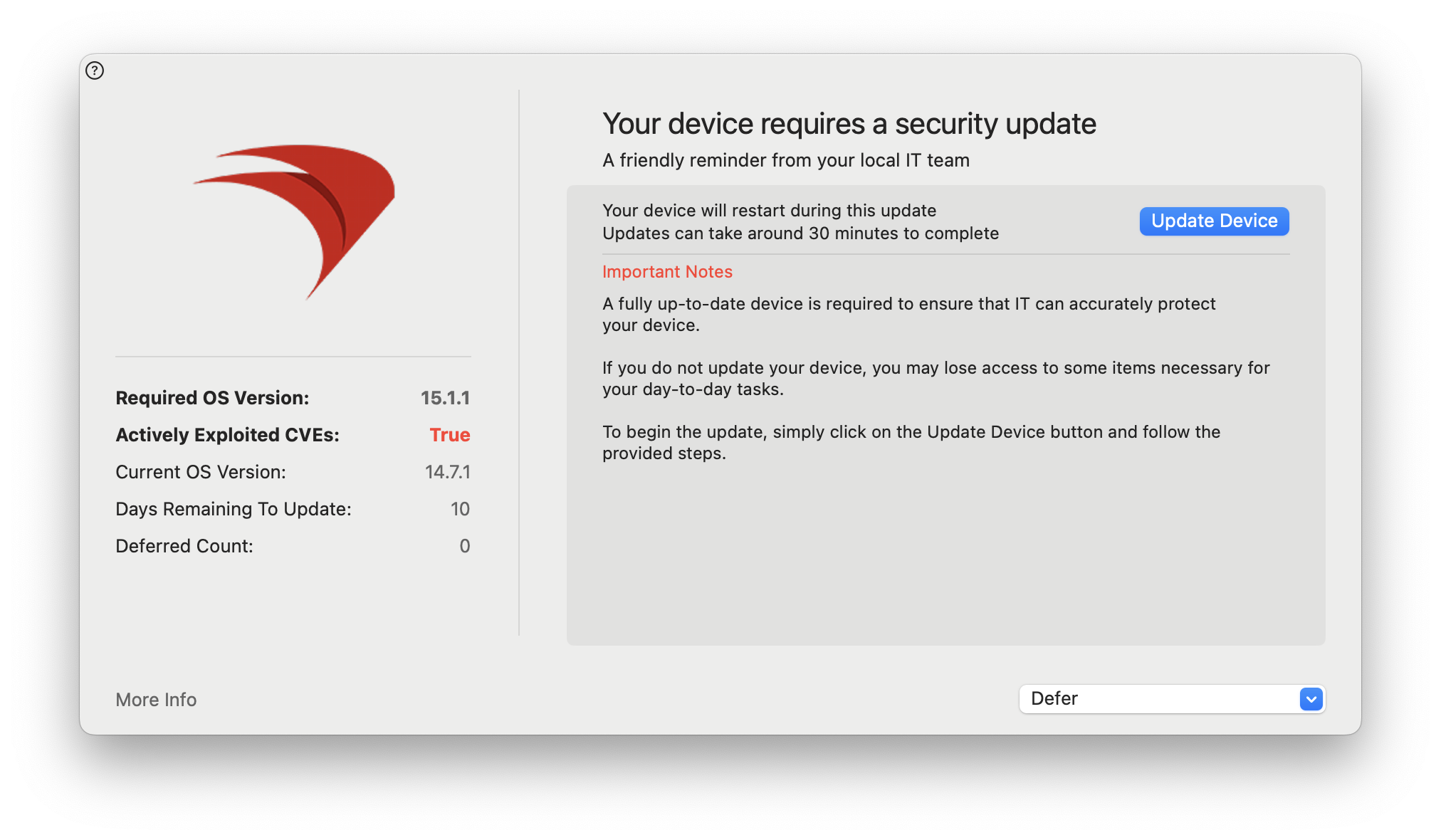
The lines defining the sourced logo are:
        "iconDarkPath": "/usr/local/etc/Nudge/logo.png",
        "iconLightPath": "/usr/local/etc/Nudge/logo.png",
For a great understanding of the user experience and configuration, consider viewing the following:
MacAdmins Nudge by Neil Martin
There are more resources shown below in the Related Content and Digger Deeper section.
Deployment
After importing the Fileset, deploy it to a test Mac whose installed version is lower than requiredMinimumOSVersion. With a user signed in, confirm that Nudge opens with the expected update and deferral choices.
Validate the deadline, localization, logo, deferral limits, and update path before expanding the deployment.
Reconfiguring
Over time it will become necessary to alter the configuration file, such that new macOS versions are set as the minimum level, with new required installation dates. Due to self-healing, this is easily handled within FileWave. Simply change those lines inside the JSON file as desired and Update Model.
Removal
If Nudge is no longer considered a requirement, disassociation of the Fileset will action the uninstaller script, which should remove all elements of Nudge from the device.
Nudge Version
The installed Nudge version is returnedappears in standard application inventory. BuildIn FileWave 16.3 and later, create an Inventory Report to compare deployed versions;versions. In FileWave 16.2.5 and earlier, use an Inventory Query for the same task.
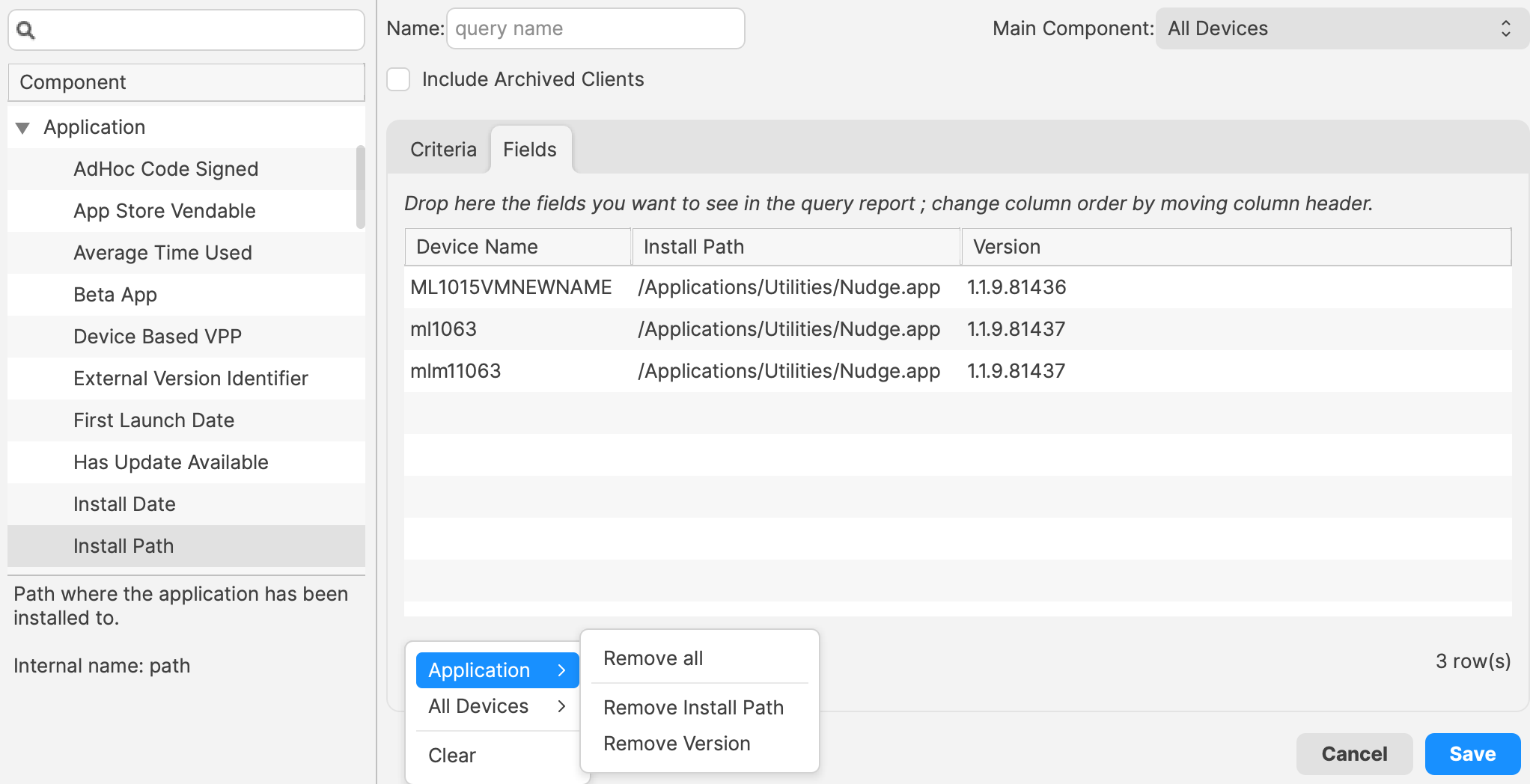
Legacy Inventory Query interface — FileWave 16.2.5 and earlier call this an Inventory Query:
Related Content
- Home · macadmins/nudge Wiki · GitHub
- Getting Started · macadmins/nudge Wiki · GitHub
- Nudge version 2.0 features
Digging Deeper
Customizing Nudge to meet your needs:
With Nudge, there are many more optional features and configurations that may be applied to meet your production environment. You may review these features here: optionalFeatures · macadmins/nudge Wiki · GitHub.
Apple’s Rapid Security Responses:
Nudge has placed a feature-request to be added. For more information regarding, you may review the progress here: Add support for Rapid Security Response updates.