
Un-install Filesets
What
There will likely come a time whenWhen software installed is no longer needed, the removal method depends on how it was originally deployed. This article outlines the common FileWave uninstall paths and where a custom uninstaller is still required. What options are there for removing installed software.
Options
Self-Healing
TheIf verificationa settingsFileset ‘uses Self Healing’Healing and ‘Download if Missing’Missing ensurefor thattracked anyfiles, files included withindisassociating the Fileset are removed on disassociation fromremoves the devices, so naturally files willthat beare removed.part of that Fileset.
MSI
Windows MSI Filesets are unique.different because TheyMSI providepackages can expose an un-installuninstall optionaction. forWhen developersthe andFileset FileWaveis benefitsconfigured fromto thisuse that feature, ifdisassociating enabledthe perFileset Fileset.can On disassociation,trigger the MSI un-installer feature may be triggered.uninstaller.

PKG/EXE
Unlike MSI installers, PKG and EXE installers havedo nonot provide the same built-in un-installeruninstall andbehavior as MSI packages. In many cases the filesFileset installedonly aretracks the installer itself, not partevery offile created by the Fileset,installation. just the PKG or EXE itself can be set with verification settings. In this instance, if the developer ofIf the software vendor does not offerprovide ana additionalseparate PKG/EXEuninstall PKG, EXE, or scriptscript, designedyou will usually need to remove the software, it is usual to self-build outyour someown kindremoval of script to remove those items installed.script.
Apple VPP & Android Play Store
Disassociation ofDisassociating these Filesets triggerssends a command to remove the Applicationapplication.
Other Files
WhenApplications softwareoften iscreate opened by the user, additionalsupporting files canafter befirst created,launch, whichsuch areas notpreferences, part of the original softwarecaches, or includeduser indata. any of the above installer types. If desiredyou need to remove these,those thenitems againtoo, someyou kindwill ofnormally self-buildneed methoda wouldseparate becleanup required.method.
Why
Removing unused software helps keep devices clean, reduces confusion for users, and supportingcan filessupport keeps devices cleansecurity and helpslicense-management ensure the users are productive, using chosen software and making the sharing of files is simplified; along with other reasons, like security, etc.goals.
When
IdentifyingKnowing andhow buildingto un-installersuninstall software is oneonly parthalf of thisthe process,job. butYou also need to decide when the un-installer runs is key. It may seem obvious that the un-installeruninstall should run when Filesets are no longer associated, but it is not quite that clear cut.run.
ForAt example,first considerglance the idea of writing a script to remove an application. Typically, a pre or post un-installer script could be set within a Fileset. Itit may seem natural to addplace thisa pre- or post-uninstaller script withininside the same Fileset as the installerinstaller. ofThat can work against you when the software.application is However, this can raise concerns.updated.
OverAs time,vendors developersrelease willupdates, provideyou updatesmay toreplace software.the installer Wherewith autoupdating of software is prevented,a new FilesetsFileset or a new Fileset Revisionsrevision. will be built to push out these updates. Self-Healing handles swappingmatching betweenfiles cleanly during that swap, but any uninstall script inside the installer Fileset orcan Revisions,also sincerun any files that match betweenduring the two differing Filesets remain untouched. However, any containing pre or post un-installer scripts will run at this time,change, which is likelyusually undesirable.not what you want.
How
ThereA common way to control this is anto installerseparate Fileset,installation and removal logic by using a methodFileset toGroup.
In the Fileset,example so how to make sure these run only when desired. One such method isbelow, the use of Fileset Groups.
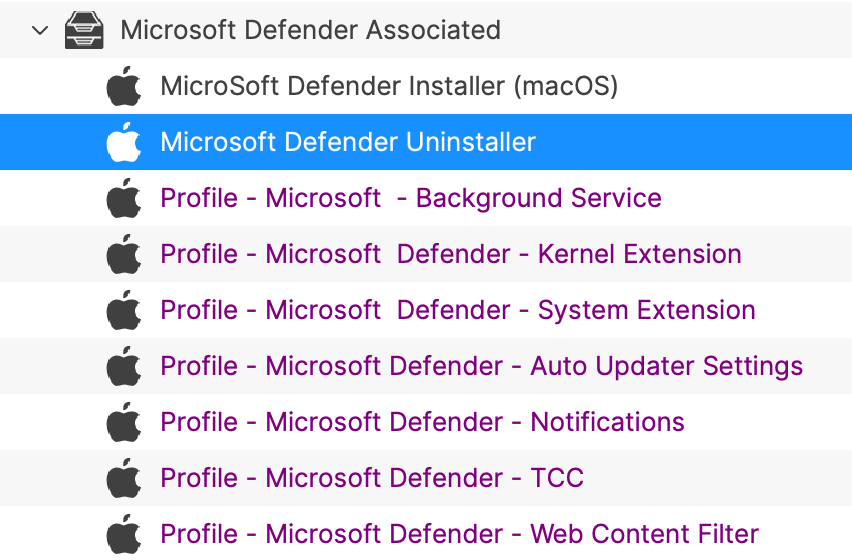
Using an example, the following diagram shows a Fileset Group for Microsoft Defender, whichDefender includes anthe Installerinstaller Fileset, somerelated necessary Profilesprofiles, and ana Un-installerseparate uninstaller Fileset. Devices Associationare will beassociated with thisthe Fileset Group.
not directly with the uninstaller.
The un-installeruninstaller isFileset scripted:
a pre-uninstallation script:
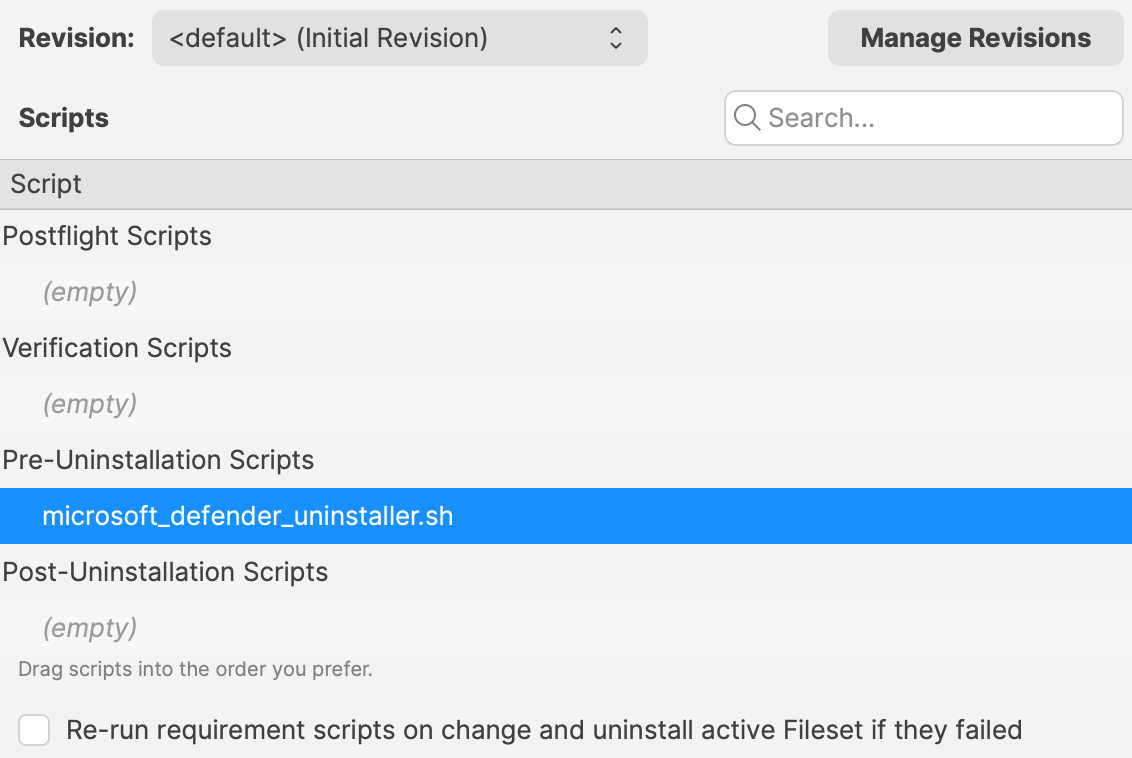
Sincemakes installer updates straightforward. You can replace the installer Fileset or swap revisions inside the group without firing the uninstall. The uninstall runs only when the Fileset Group itself is associateddisassociated with devices,from the installer can easily be updated. Either a new Fileset can be dropped into this group and the current Installer Fileset removed or the Installer could have an alternate Revision added and swapped over. However, when removing the Fileset Group association with devices, this will trigger this Pre-Uninstaller Script and only at this point in time will the software be removed.
device.
PKG/EXE Un-installers
WhereIf developersa supplyvendor un-installers,supplies pre-packagedan uninstall PKG, it is usually cleaner to place that PKG in an installerotherwise PKG,empty buildingFileset outand autotrigger runningit from an uninstall script, similar to the Microsoft Defender example above.
Trying to auto-associate a separate uninstall PKG Filesetsexactly would requirewhen the associationoriginal installer is disassociated quickly becomes hard to thismanage.
EXE-based onlyuninstallers be assigned when disassociation occurs fromhave the installer.same issue. PlanningA thispractical becomespattern veryis complex.to Instead,upload the PKGuninstall can be addedEXE to an empty Fileset and ancall un-installer script can be used to trigger the PKG file, akin to the above Microsoft Defender example.
Similarly, EXE installers are usually triggeredit from thea Filesetpre- Executableor options:post-uninstallation script.
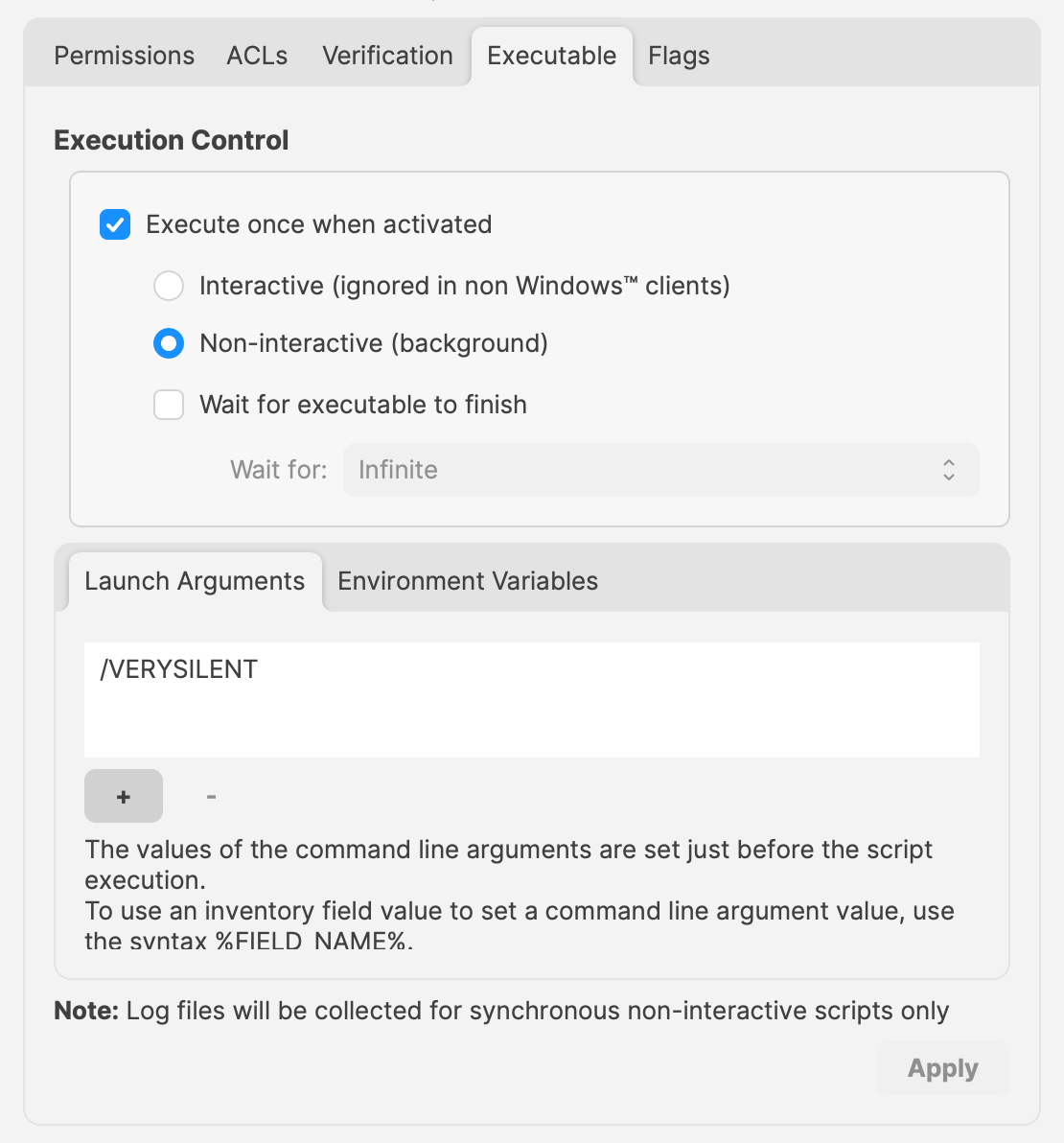
EXEsgives built to un-install software however have the same issue as PKG Filesets. Pre or Post Un-installer Scripts yet can be used instead though. Again, upload the un-installer EXE into an Empty Fileset and add an un-installer script inside this same Fileset to trigger this EXE; creatingyou a separatededicated un-installeruninstaller Fileset that can be usedadded into a Fileset Group asand demonstratedtriggered above.only when you actually want removal to occur.