
Command Line API (v1)
Command Line RESTful API
ItFileWave isCentral probablycalls easiestthese todefinitions considerInventory thisReports; older FileWave versions and the version 1 API ascall anthem interaction with Inventory Queries,Queries. allowingThe forCommand example:Line RESTful API retains /query/ in its endpoint names and can:
Ad-Run ad-hocqueriesreporttodefinitionsbe run toand return resultsNewCreate InventoryQueriesReportstofrombeJSONcreateddefinitionsTheReturnreturningcurrentof Current Queryreport resultsDeletingDeletequeriesreports
There is even the ability to read or alter Custom Field values for devices.
Examples:
Returning an Inventory Query request
FileWave GUI example
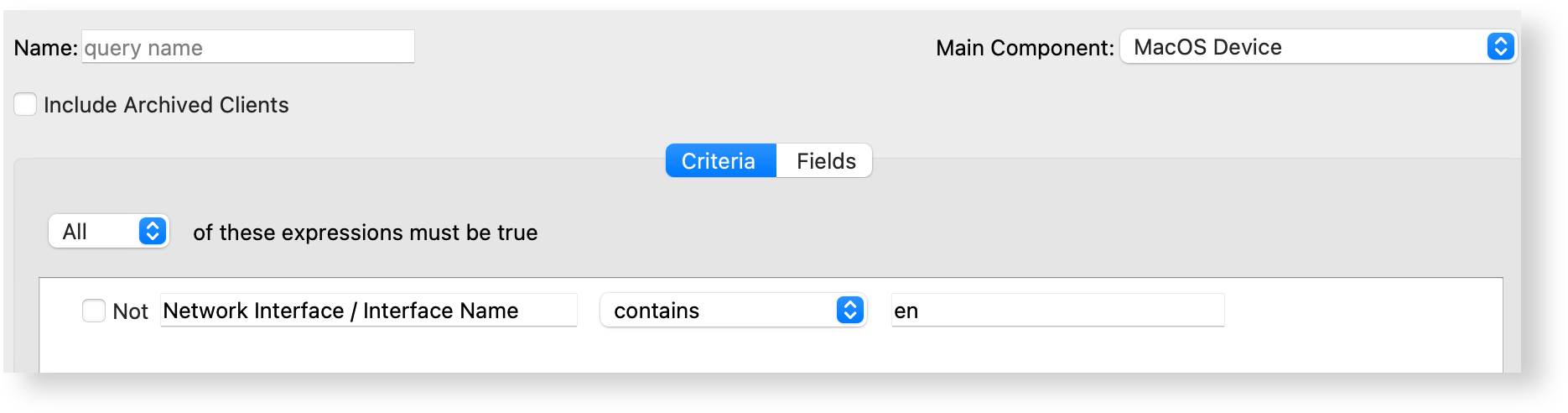
Imagine it is desirable to return a list of macOS devices which have a network interface name that contains 'en', the Field to be returned is the Device Name and the Main Component is 'MacOS Device'. The criteria would appear as below:
JSON Data Example
A RESTful API query, to return the same set of results, would have a JSON structure set out as:
{
    “criteria”: {
        “column":"interface_name",
        “component":"NetworkInterface",
        “operator”:”contains",
        “qualifier":"en"
    },
    “fields":[
        {
            “column”:"device_name",
            “component":"Client"
        }
    ],
    “main_component":"MacOSClient"
}
It can be seen that theThe JSON block ismirrors just mimicking thea FileWave Central Inventory Query.Report definition. The API and exported files may still use the older query terminology internally.
CreatingImport an Inventory QueryReport definition from JSON
OnFor a one-time manual import, use the KBcontrols pagein explainingFileWave whatCentral andescribed in Exporting & Importing Inventory Reports. Use the API is,method when report deployment needs to be automated or repeated across FileWave Servers.
FileWave Central uses the followingterm examplesInventory wereReport. shown:The version 1 API retains the older Inventory Query terminology, so report creation uses the /inv/api/v1/query/ endpoint.
Requirements
endpoints below.
Endpoints
curl -s -H "Authorization: e2M2sssYjIwLTxxx1hMzdiLTFmyyyGIwYTdjOH0=" https://myserver.filewave.net/SERVER_FQDN:20445/inv/api/v1/query/https://SERVER_FQDN/api/inv/api/v1/query/
Use the endpoint that is enabled and reachable in your environment. The examples below use the direct Command Line API endpoint on TCP 20445.
macOS or Linux shell
SERVER_FQDN="filewave-server.example"
REPORT_FILE="report-definition.json"
: "${FILEWAVE_TOKEN:?Set FILEWAVE_TOKEN before running this command}"

curl --fail --silent --show-error \
  --request POST \
  --header "Authorization: ${FILEWAVE_TOKEN}" \
  --header "Content-Type: application/json" -X POST\
  -d @ios16_incompatible.json
Command Line API:
curl -s -Hdata-binary "Authorization: e2M2sssYjIwLTxxx1hMzdiLTFmyyyGIwYTdjOH0=@${REPORT_FILE}" \
"https://myserver.filewave.net:${SERVER_FQDN}:20445/inv/api/v1/query/"Windows PowerShell
$ServerFqdn = "filewave-server.example"
$ReportFile = "report-definition.json"

if (-not $env:FILEWAVE_TOKEN) {
    throw "Set FILEWAVE_TOKEN before running this command."
}

Invoke-RestMethod `
  -Method Post `
  -headerUri "Content-Type:https://${ServerFqdn}:20445/inv/api/v1/query/" `
  -Headers @{ Authorization = $env:FILEWAVE_TOKEN } `
  -ContentType "application/json" -X POST`
-dInFile @ios16_incompatible.json$ReportFileTheseRun demonstratethe acommand methodonce offor creatingeach JSON definition. A successful POST creates a new Inventory QueryReport; byconfirm providingit theappears JSONunder as a file, rather than textReports in theFileWave actualCentral scriptand line,review usingits thecriteria POSTand option.result Alsocolumns notebefore therelying subtleon differenceit.
Keep TLS certificate verification enabled. Do not add -k or otherwise disable certificate validation in URLproduction path.automation.
Interacting with Custom Fields
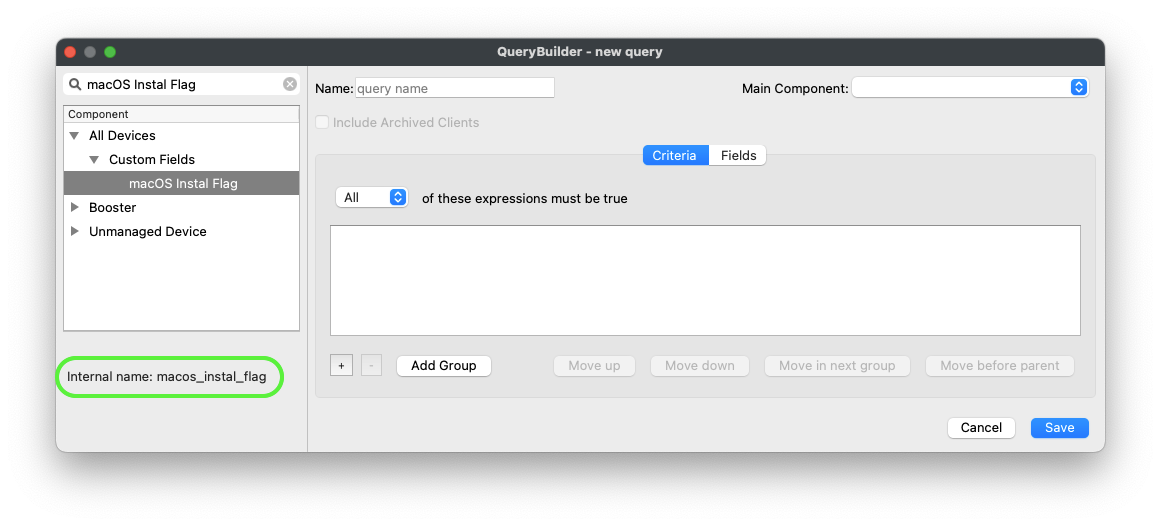
The first thing to appreciate, is all Inventory items have an 'Internal Name'. This is unique to each item and of course Custom Fields also therefore have their own Internal Name.
Internal Names may be viewed in FileWave Central when in the Inventory Query viewer. Select any item in the left hand sidebar and the bottom of the window will report the Internal Name.
Reading Values
Perhaps it would be desirable to read the Custom Field value of the above 'macOS Instal Flag' Custom Field for a device, for example, based upon its serial number. The JSON data block might look something like:
{
  "criteria":
    {
      "column":"serial_number",
      "component":"Client",
      "operator":"is",
      "qualifier":'\"$serial_number\"'
  },
  "fields":
    [
       {
        "column":"macos_instal_flag",
        "component":"CustomFields"
      }
  ],
  "main_component":"Client"
}
Using this method, it is possible to provide the Serial Number as a variable value; as such the same script could be ran on all devices, without the need to edit the script. Note the internal name used for the Custom Field as well as the single quotes around the $serial_number variable.
Editing Values
When referencing devices using the Command Line API, the endpoint refers to the device_id. This may differ from V2 API used by Anywhere.
As an alteration of a current value, the command would then use the PATCH option.
Example call:
curl -X PATCH https://$server_dns:20445/inv/api/v1/client/5e968b7947d74f064eb47ee2bcbbb67cb87eb122 -d $data -H "Content-Type: application/json" -H "Authorization: $auth"The data variable would contain the desired payload to amend, in a JSON data block. In the below example, the Custom Field to alter has an 'internal name' of 'admin_test', is a Boolean entry and the JSON data block could look like:
{
  "CustomFields":
    {
      "admin_test":
      {
          "exitCode":null,
          "status":0,
          "updateTime":"'$current_time'",
          "value":true
      }
    }
}
When Custom Fields are updated, a time stamp of when the update occurred is shown. When altering the value from the Command Line API, the time should be supplied, along with the value and a couple of other key/value pairs. There should be no reason to provide other values than those shown for 'exitCode' and 'status', when adjusting using the API.
Date is important and should be of the format "2018-09-10T15:48:08Z":
macOS example:
current_time=$(date -u +"%FT%TZ")Windows PowerShell:
$current_time = $(Get-Date -UFormat "%Y-%m-%d %R:%S")The code would look something like the following, where $query would be set as the content of the JSON:
macOS shell
curl -s -H "Authorization: $auth" \
    https://$server_dns:20445/inv/api/v1/query_result/ \
    -X PATCH \
    -data $query \
    -H "Content-Type: application/json"
Windows PowerShell
$header = @{Authorization=“$auth"}

Invoke-RestMethod -Method PATCH \
    -Headers $header \
    -ContentType application/json \
    -Uri https://$server_dns:20445/inv/api/v1/query_result/ \
    -Body $query
As with any Inventory Query, the criteria can be based upon any inventory item. This makes the Command Line API very powerful.