
Export .p12 SSL Certificate from Windows
When managing mobile devices, it is considered best practice to install a root trusted SSL certificate on the FileWave Server. ThisThe server SSL certificate is locatedconfigured in the FileWave AdminCentral > Preferences > Mobile tab.. If you generated the Certificate Signing Request (CSR) for your SSL certificate on a Windows Windows-based system and have completed the certificate generation process, Windows can export the SSL certificate and intermediatesintermediate bundle can be exported as a .pfx filefile. directly from Windows. ThisThat bundle wouldshould containinclude allthe components (private key, public certificate, Root CA certificate, and intermediate certificate bundle).bundle. ThisRename the .pfx file (after renaming the extension to .p12) canp12, then beupload uploadedit to thein FileWave AdminCentral > Preferences > Mobile tab without anymodifying modification.the certificate contents.
Step-by-step guide
- Open a Run dialog and enter "mmc".
- Go to File > Add/Remove Snap-in.
- Add the Certificates snap-in and click the Add > button in the middle.
Add for theChoose Computer account.- Pick Local computer and click Finish.
- Click the OK button.
- In the MMC console browse to Certificates (Local Computer) > Personal > Certificates on the left. If your certificate is not there, browse the rest of the Certificates (Local Computer) tree until you find it.

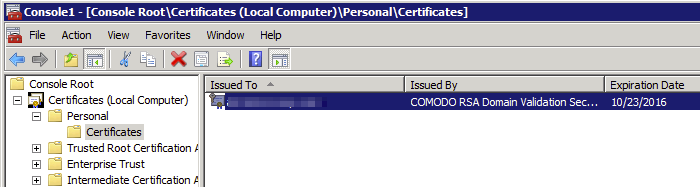
- Select your certificate in the middle pane, right-click, and pick All Tasks > Export.
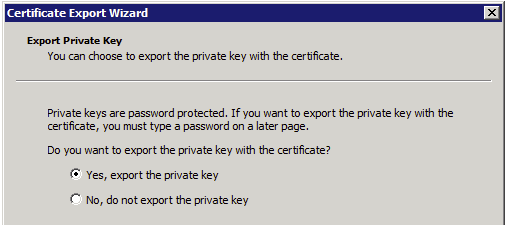
- When
promptedprompted, pick Yes, export the private key.

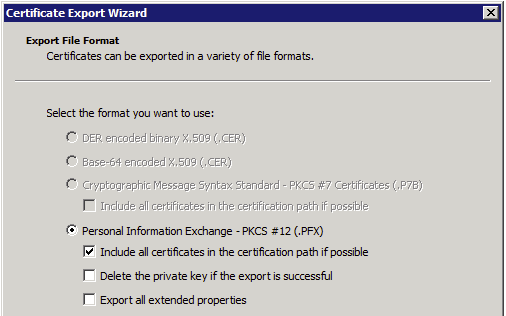
- Under Personal Information Exchange - PKCS #12 (.PFX), check Include all certificates in the certification path if possible. Leave the other
2two checkboxes unchecked.

- Click the Next button and specify an export password.
TheFileWaveAdminCentral will promptyoufor this password when youattempt toupload the SSL certificate inthePreferencesPreferences> Mobiletab.. - Save the file to your desktop.
- Change the file extension from .pfx to .p12.
- Upload the .p12 file in the Mobile preferences tab of
theFileWaveAdmin.Central.