
Custom Fields in Client View
StartingCurrent inFileWave FileWave13.3.0versions let you can add any inventory fieldfields, including custom fields, to theClient client view.View.
Steps to add new fields
- From
theClientclient viewView, pressthe "CustomizeColumns" buttonColumns. - Press
"Add InventoryField"Field for advanced inventoryoptionsoptions. - Select
anyanInventoryinventory field, including a custom field(includingifcustom fields)needed.

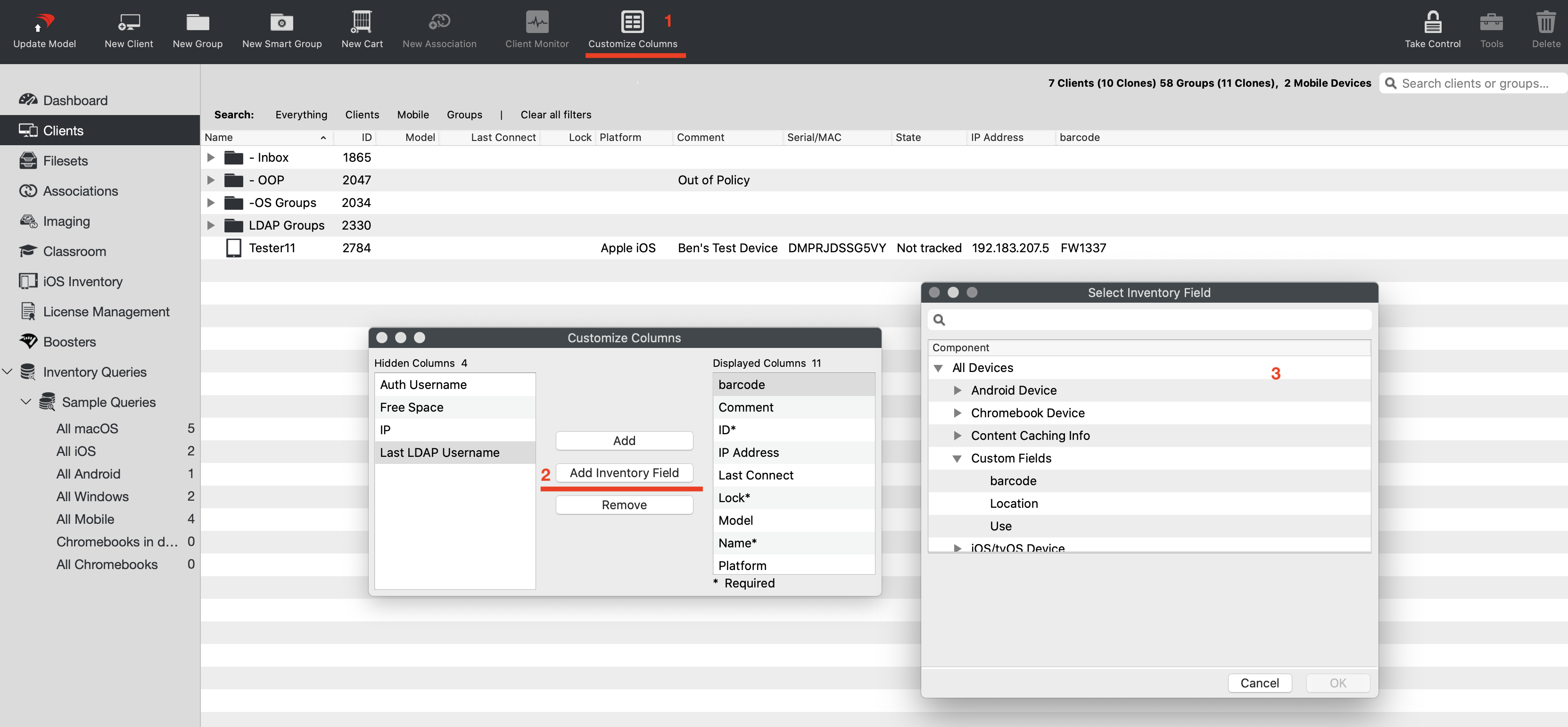
WhenAfter you selectadd an Inventoryinventory Fieldfield, it isstill not hiddenappears the next time you open the 'Select Inventory UI'UI.SelectingIf you select a field that is already addedin willClient justView, closeFileWave closes the UI,selector. you can then openOpen it again and selectchoose a field that ishas not already been added.
YouThe will notice the fields are limited in the "Select Inventory Fields"Fields UI ashas comparedfewer tofields thethan QueryBuilder UI. This is because weClient areView only showingsupports direct 1:1 inventory fields.
Hiding the built-in "IP"IP column,column and adding the Inventory: All Devices / "IP Address Column"Column does not change thatwhich IP clientaddress monitorClient Monitor uses.
Related Content
- See Custom Fields for more.