
Fileset Scripts Overview
FileWave 11+ provides the ability tocan run a scriptscripts at any of seven stages of Fileset deploymentdeployment, (called Activationactivation States)states:
- Requirements
- Preflight
- Activation
- Postflight
- Verification
- Pre-Uninstallation
- Post-Uninstallation
In FileWave Admin, while inopen the Filesets view, select the Fileset you want to edit, and click the Scripts toolbar nowicon. contains a Scripts icon.
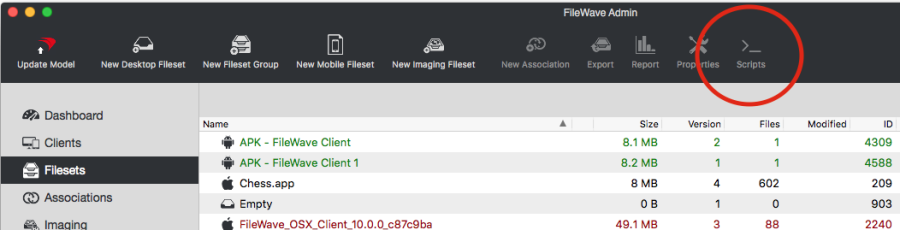
When you select a given Fileset, then click on the Scripts icon, theThe Scripts dialog opens
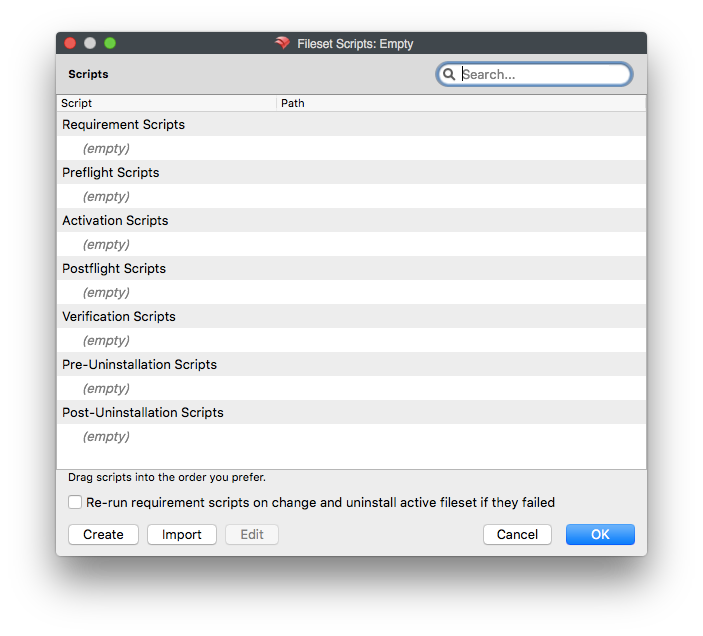
The dialog shows theeach scripts that will be executed for the given Filesetscript and the activation state inwhere which theyit will berun.
Scripts in which scripts of the same activation state and Fileset are executed is the same as they appear in the list (i.e.run from top to bottom).bottom as shown in the list. Drag scripts to change their execution order.
Use the create or import buttons to add scripts. You can dragalso & drop scripts in order to change the execution order.
You can create and import scripts by clicking the corresponding buttons. Editingedit a scriptscript, isor also possible, so is dragging and droppingdrag a script from Finder ininto orderthe dialog to import it.
AnyClick OK to save changes to the FilesetFileset. willClick beCancel appliedto when you click OK. If you click Cancel,discard the currentchanges.
Double-clicking willa bescript lost andopens the Filesetfile willproperties notdialog. beMost modified.
Scripts in the listattributes can be double-clicked, which causes the file property dialog to appear. You can change most of the attributes of the scriptchanged in the same way as files in an open Fileset, but some settings are locked because the open Fileset dialog.workflow Theredepends are,on however, certain attributes you cannot change.them. For instance, you cannot unsetexample, the Execute flag;flag therefore,cannot itbe iscleared. disabled.Requirement Forscripts requirementalso scripts,cannot itbe ischanged notbetween possibleinteractive and non-interactive execution because the client must be able to change the interactive/non-interactive option, since the exit code ofuse the script isexit requiredcode to decide whether the Fileset should be downloaded. Therefore, this field is also disabled.
download.
The checkbox "Re-run requirement scripts on change and uninstall active Fileset if they failed"failed controls the same internal setting as the checkbox "Evaluate requirements on change and uninstall active Fileset if they failed"failed in the Requirements tab of the Fileset properties. IfWhen checked,this whenoption ais Filesetenabled needs to be updated, the Client checks the requirements ofand the Fileset again.changes, Thisthe includesclient executingre-evaluates the Fileset requirements, including requirement scripts. If any of the requirementsrequirement or requirement scriptsscript fail,fails, the Fileset will beis uninstalled.
Fileset Scriptsscript Typestypes
- Requirements Scripts –
ARunrequirements script checks the requirement onbefore the Filesetbeforeoranyits dependencies are downloaded. If any requirement scriptfailsreturns(returna non-zero),zerothenexit code, the Fileset and its dependencieswillare notbedownloadednoror installed. - Preflight Scripts –
ARunpreflightafterscriptdependencieschecksaretheinstalled,needs of the Filesetbut before the Filesetdownloads, but after dependencies have been installed.downloads. If any preflight scriptfails (returns a non-zero),zerothenexit code, the Filesetwon'tisbenot downloaded or installed. - Activation Scripts –
AnRunactivationwhenscriptthe Fileset isexecuted upon activation of the Fileset.activated. - Postflight Scripts –
A postflight script is executedRun after the Fileset installationof the Filesethas completed. - Verification Scripts –
A verification script is executedRun after postflight scripts anduponduringeveryeach"verification of the Fileset." - Pre-Uninstallation Scripts –
ARunpre-uninstallation script is executed on inactivation of a Fileset and right beforewhen a Fileset is inactivated, immediately before the Fileset is uninstalled.(UsefulUseifthis state when the script needs access toreference a filefiles that self-healing willsubsequentlyremovebeduringremoved due to self-healing).uninstall. - Post-Uninstallation Scripts –
ARunpost-uninstallation script is executed rightimmediately afteruninstalling/removingthe Filesetfrom a clientand itsdependencies.dependencies have been uninstalled or removed from the client.